When Quantum was released, I did a side by side comparison, opening the exact same tabs in each browser, switching browsers each day, manually keeping tabs in sync. Did this for about two weeks. For my use case at that time, Firefox's memory usage was 1/4 of Chrome's right off the bat. After a full day of use, Firefox's memory would double, while Chrome's would triple. Given the starting numbers, this meant at the end of the day, Firefox would be using 4-6GB of RAM, while Chrome's memory usage would be something like 16-24GB.
By the time I switched, I had already moved to Rambox for Hangouts and Gmail and stopped using Keep, in an effort to reduce Chrome memory usage. Rambox mem usage was about half of what I saw with the Chrome Hangouts plugin.
Although I use FF 90% of the time now, I still prefer Chrome, probably due to using it for so long. I especially prefer the Chrome bookmark manager. I really wish I could find a good way to keep bookmarks in sync between browsers! Any suggestions??
A big bonus has been the huge improvement in battery life. I had no idea how much I was losing to Chrome. Safari is supposed to be great for that, but plugins and the fact I'm an Android user means it doesn't offer me much.
The downside is that FF has made my tab hoarding worse. Still, despite doubling the number of tabs, mem usage is still half of what I saw with Chrome.
As for the unused memory is wasted memory argument (which may be tongue in cheek re: browsers), my browser is not my OS and I have a lot more going on than just a browser. 32GB MBP can't come soon enough.....or a touchpad experience on any other hardware+Linux experience+lots'o'RAM. 3 yrs ago, I finally gave in and tried Mac. Touchpad experience is probably the number 1 thing that keeps me here.
(don't get me wrong, I like libinput's idea and I know old synaptics driver is an awful mess when it comes to its code, but there are still lots of papercuts libinput needs to handle. I believe it will get there, but it's not there yet)
Once you register, all you have to do to save a bookmark is go to "saved.io/www.google.com", for example, and it will save www.google.com.
If you want to save to a subfolder, all you have to do is go to "subfolder.saved.io/www.google.com".
To access your bookmarks you just go to saved.io in whatever browser on whatever device you want. I use Safari on the iPad, Chrome on my Android phone, and Firefox on my desktops and it works great in all of them.
Firefox is still bad compared to Safari.
Second, when you type stuff into the address bar Firefox searches through opened tabs and suggests switching to that. This minimizes the number of times you'd open a new tab.
Third, there are many addons that help you organize your tabs. There are ways to search for tab content, group them into containers, find duplicates, etc.
How to start having many tabs open? Just change your MO when you use the browser. Want to search for something? Hit new tab and go. Researching something? Open every link you find somewhat promising in a new tab. When you have 200+ tabs opened, another 8-12 won't be a big change. Done with your research? Why close tabs? Just keep them open in case you'll need them later.
Often when I work on a project for, say, half a year I don't close tabs at all, and keep getting back to stuff I accidentally stumbled upon 2-3 months ago. It's very helpful at times to be able to dig stuff up one tab away. One could argue that bookmarks and history could be as helpful, but in practice when you switch to an old tab you see the context around it. What else I was looking at at that time, often information in the neighboring tabs is relevant, yet bookmarks and browser history don't have a good UI to surface it if front of you.
Yes, your browser becomes a memory hog, but as people noticed Firefox has means to compensate that. At 200+ tabs it consumes significantly less memory than Chrome (even with Chrome's load on demand turned on).
It takes time to get used to, and ones or twice a year you'd be doing tab cleaning, but I've being using browsers like this for 15+ years and really see benefits in this workflow.
For context: right now I have 330 tabs opened, Firefox consumes 1.8 GiB of RAM
This is how my Firefox looks like:
https://dosowisko.net/Screenshot_20171030_203716.png

https://dosowisko.net/Screenshot_20171030_203804.png
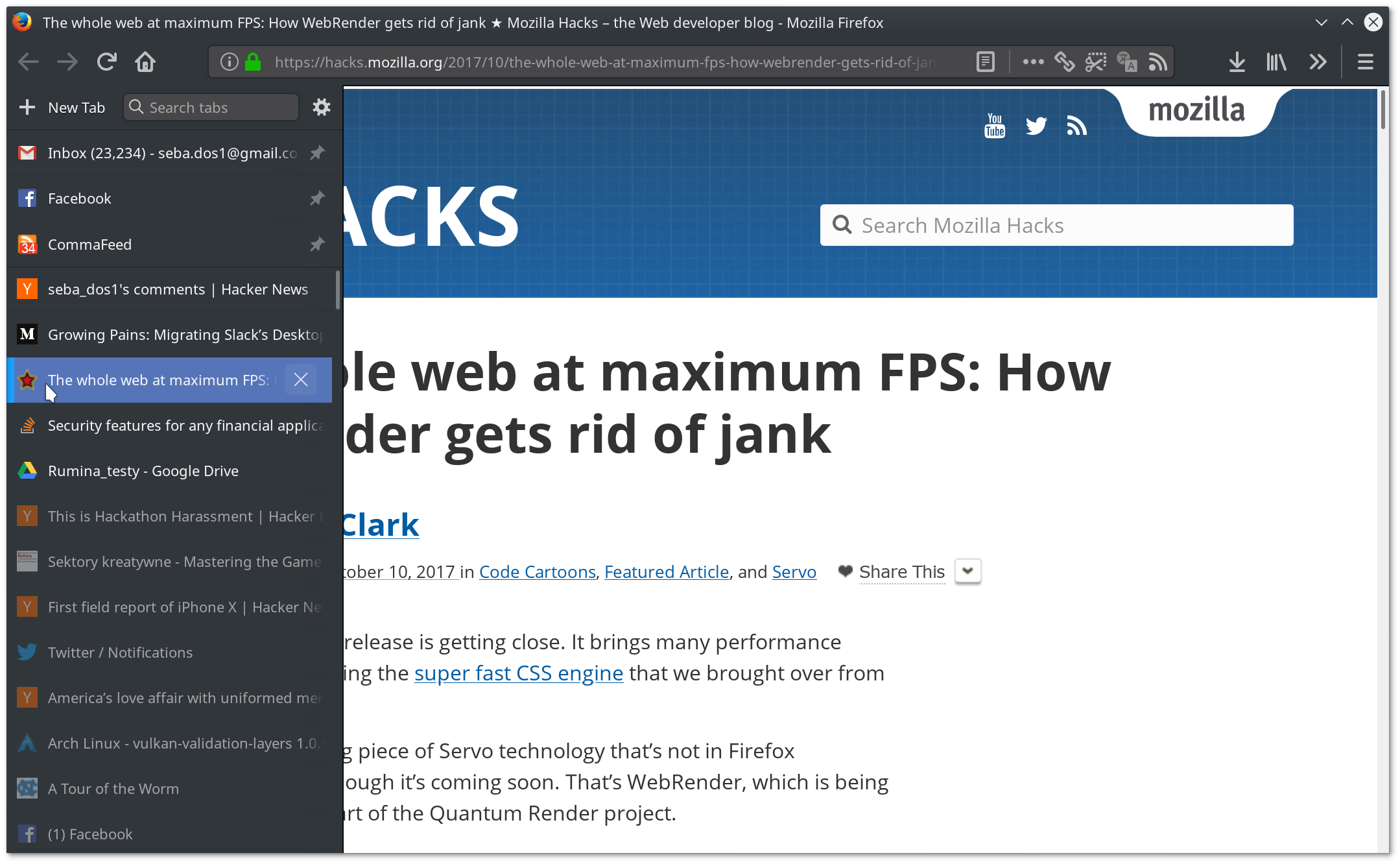
Once a while I'm getting to 1000-2000 open tabs and this is a point where the whole UI starts to feel a bit heavy, which is the only reason I clean them up then - navigating is a non-issue.
It's a symptom of my non-optimal behavior. Blame the wetware between my ears. On any given moment, I might have perhaps 5-50 new tabs that I actually work in, closing them as I go along (but along those numbers). The rest are mostly left-overs since previous days.
My weakness is eg "this is an interesting read, but I don't have time now", or "this is a good reference, better save that". Over time, those add up.
To actually make it work, I set FF to not load tabs until focused. Then, when I start up, there are in reality a couple of hundred place holder tabs where I can see the icon and page name so I can find them again.
The second enabler is the plugin to have the tabs vertically, in a list on the side, instead of horizontally on top.
I really should just close them all and never look back, but I gotta admit, it's hard to say goodbye to dear friends. In this case though, I only know them by name :P

API documentation. It's very, very useful to have the structure of the APIs represented in a tree of open tabs. It gets messy eventually, but the groups can be easily rearranged.
Later on TreeStyle Tab came out, and I've used that ever since. I've got 501 tabs right now (thanks tab count extension), I usually go on purges every so often when it gets around this high and close large groups of them, reading some before closing, bookmarking many of them before closing with a current month/year annotation and other tags, so I can get back down to a more reasonable ~100-200. Even if it didn't have its tree collapsing functionality (I've got 25 tabs collapsed in a tree right now related to setting up and using some new software I started doing last night, it takes up one tab of space when collapsed) I would still use it just for the fundamental insight that with widescreen resolutions being standard vertical screen real estate is much more important than horizontal real estate. Admittedly that's not as big an insight anymore with 4k screens (and I use a big 42inch one). Anyway with TreeStyle Tab I can have tabs that are on the left side of the browser, that grow down, with scrolling, but I can still read the titles of each tab unlike in Chrome where each tab after ~10-20 is just an icon (at best).
The URL bar is also just superior to Chrome's. It's not called the Awesome Bar for no reason. The table at the bottom of https://support.mozilla.org/en-US/kb/awesome-bar-search-fire... has a list of commands you can use to match things -- I actually often have that page in my sea of tabs since sometimes I forget a couple sigils but I found it immediately with ctrl+L + "awesome %".
This submission's title is kind of hilarious. Firefox never went away, I started using it pre 1.5 on a Windows 95 machine and though now I use Chrome/Chromium for some things I've never felt the need to leave Firefox. Well, except until recently with the Quantum updates, ironically. For my personal desktop, I'm still pre-Quantum, it works just as it always has, while on my other machines I've been giving the new Firefox a fair chance and am just hoping it gets better. The tree tabs addon port especially isn't as good, I really miss my right click context menu for noscript, etc.
Firefox does it at least as well, just having both open is a bit much.
Chrome 5.3 GB
Firefox 4.2 GB
I couldn't find a tally of where Windows applies its "memory compression" logic, to be honest I don't even know what exactly it does, but let's assume it's some background task and it did more to Chrome than to Firefox since Chrome had been running longer.
So yes, Chrome needs noticeably more memory, and I prefer Firefox overall, but both can handle tons of tabs in my experience. Chrome also appears to be more responsive under pressure, I assume this is because it splits work into lots more processes than Firefox does, which is both probably a memory drain and a security benefit.
------
EDIT in response to your reply:
Please do! I agree that logging would be interesting.
Do you know, does Firefox defer/discard tabs again if they do fully load but you don't use them for a long time? Or are the only deferred tabs, ones that you never looked at this session?
Maybe I should set up logging for this, might be interesting.
Do you know, does Firefox defer/discard tabs again if they do fully load but you don't use them for a long time? Or are the only deferred tabs, ones that you never looked at this session?
(Doesn't matter if I have 2 or 100 tabs if there is one bad apple.)