First buy a breadboard (or more than one). Buy the resistors and wires you need in the near future. You'll need a crimper pretty soon to cut the wires.
A good power supply is nice, but you can make due with a battery holder and battery at first, say, a 9 volt.
Look at some simple projects you can build, and get the capacitors, LEDs, inductors etc. necessary to build them.
When you want to start soldering things together, get a soldering station, solder and stripboards. Also get solder flux . Soldering is much less of a pain when you have flux, depending on what you are doing.
As the comment section here attests - a soldering gun is hot. Solder is hot. You have to be careful.
Digikey.com and Mouser.com have many, many electronic parts. Adafruit.com has a lot of cool projects and guides. In fact, I would recommend you watch some Adafruit videos, read some of their guides etc.
After you learn some of the basics, you can take a step up and get an Arduino and muck with that.
I find jameco.com very friendly for a beginner. Prices are about the same as elsewhere, shipping is fine, selection is fine for a beginner, and usually it's usually pretty easy to narrow the search results to just a few parts that have fairly clear differences. They have a pretty nice email newsletter too, essentially the only newsletter I allow through my spam filters, and the only one I've ever clicked on non-accidentally. The regularly feature hobby projects on their front page, from premade kits to more advanced stuff.
> A real soldering station > Solder
Get a good, name brand soldering station. Yes it will cost a few hundred dollars, but it will make a huge difference in your work. The cheap-o $15 soldering irons all produce horrible results and will shatter your confidence...
Get good, very thin solder. It will be expensive ($40) but will last forever and if paired with a legit soldering iron, will make a huge impact in your abilities.
Warms up in seconds, open source and customizable firmware, takes very little space (kind of important to me since I don't have a dedicated shed/garage for the hobby). What's not to love about it for a beginner?
Other features like a temperature graph or adjusting calibration and control parameters are handy additions when you have a nice display like in the TS100. Realistically though, people aren't really writing their own TS100 firmware with the exception of a few tinkerers. What it comes with is good enough.
For really fiddly SMD items I have a cheap hot air rework station, but I don't need it very often - mostly when I have to desolder something SMD or solder on an IC with a thermal pad on the bottom.
Also they have other great products.
The MINI Nano DSO203 is a great 4 Channel Digital Oscilloscope for around 100 USD... Also the Mini ES 121 is a piece of art screw driver :)
So yehh... I say it is a name brand ! And the Brand is "Mini"
It's nice if you only do audio or low voltage stuff but the first time you're going to point your probe at something a bit more beefy and you will let the magic smoke out (good case) or worse.
If you're just doing a bit of soldering as a hobby, though, get leaded solder. It works so much better than the modern unleaded stuff. Just don't breathe the smoke.
That is personally not the tradeoff I'd make.
Lead is a special kind of poison in that it makes you stupid before it kills you: This is especially true of children, but I don't want any of it on my adult self, either.
Note, you can also buy lead-free 'low temperature' solder, which has a lot of the same properties of lead solder, though it's more expensive.
"don't breathe the smoke" is just generally good advice, and it definitely doesn't become less applicable if you use lead free solder.
Being a technician, I read the MSDS:
https://www.mgchemicals.com/downloads/msds/01%20English%20Ca...
vs:
https://www.mgchemicals.com/downloads/msds/01%20English%20Ca...
I mean, I ain't saying you should lick either one... and yeah, I don't know how much if any lead is released into the air during normal operation, but lead is pretty seriously toxic to humans, and avoiding touching the lead as I'm using it sounds kinda difficult. The flux? yeah, that isn't any good for you either, but I don't think it's in the same category as lead when it comes to toxicity.
> Soft soldering temperatures (<450 °C) are generally too low to generate significant amounts of metal vapors, however, metal oxide fumes/dust or flux decomposition fumes can occur.
> RECOMMENDATION:
> For frequent or prolonged soldering processes, use of a local exhaust system to avoid exposure to thermal decomposition products. For example, use fume cabinet, a hood on a flexible arm, or tip-mounted fume extraction system on the soldering iron.
So if you're only occasionally soldering up a circuit board, you stay well ventilated, and you keep the solder temperature below 450°C (my soldering iron is usually set around 280°C - 300°C) then the risk seems pretty negligible. If you take up circuit board fabrication as a career then obviously you'd take it much more seriously. I should still give unleaded solder another shot, though - maybe it's improved since last time I tried it.
I think the danger is in touching the lead directly; it's a soft metal and comes off on your hands to a certain extent, and my understanding is that some of the dross can end up as lead dust.
According to the NIOSH, just washing with soap is often not effective for removing lead from your hands,
https://www.cdc.gov/niosh/topics/lead/safe.html
>I should still give unleaded solder another shot, though - maybe it's improved since last time I tried it.
I'm starting to look into different formulations; I'd start with the SAC305 formulation. It's like 3.5% silver and slightly more expensive, but still cheap. and widely available.
Not that I'm any good at soldering myself.
What's a good name brand for soldering irons?
A note - soldering stations usually come with a cheap conical tip as a starter tip. Pay an extra $20 or so to buy two chisel tips: a tiny one for fine work, and a big one for larger work. The flat surface allows you to apply more heat to the joint. Take care of your tips (ie: keep them tinned, don't leave the iron on too hot, and don't scrub too hard with the brass sponge) and the tips should last a few years without trouble.
Also tips, get a hooked tip, about 80% of the time it'll do the job.
Yes, the Hakko's are really nice and quality, but the Chinese clones are honestly 'good enough' for many people. They're workhorse machines that see tons of use in their native market.
Regarding the JBC, after the initial investment, various the tips (chinese clones ~$5 or even originals ~$25) add so much incremental value to the soldering iron base for such a little extra cost.
If you're soldering for a living there are probably better suited soldering stations, but if you're just starting out: get this one.
Also: don't skimp on tin. Good quality soldering tin makes a huge difference!
Get a small airfilter/fan if you're going to solder a lot.
It doesn't have to be super thin but thinner is 100% better than thicker.
I would make the opposite argument that if you can get great results from a cheap-o soldering iron, your confidence and ability will soar thereafter.
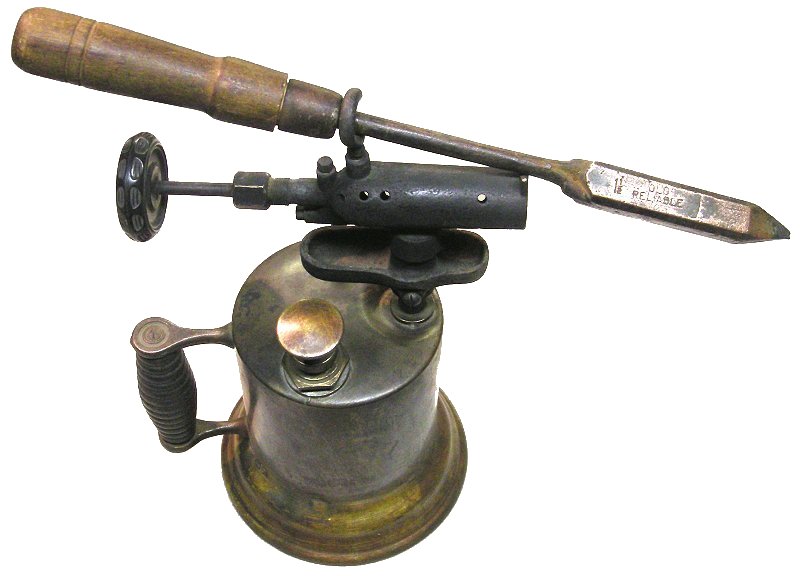
Recall that, back in the really early days, soldering irons were large affairs, consisting of a large block of copper heated via a gasoline or kerosene torch, with a large wood handle and a steel shaft:
https://www.stevenjohnson.com/soldering/pics/old-reliable.jp...
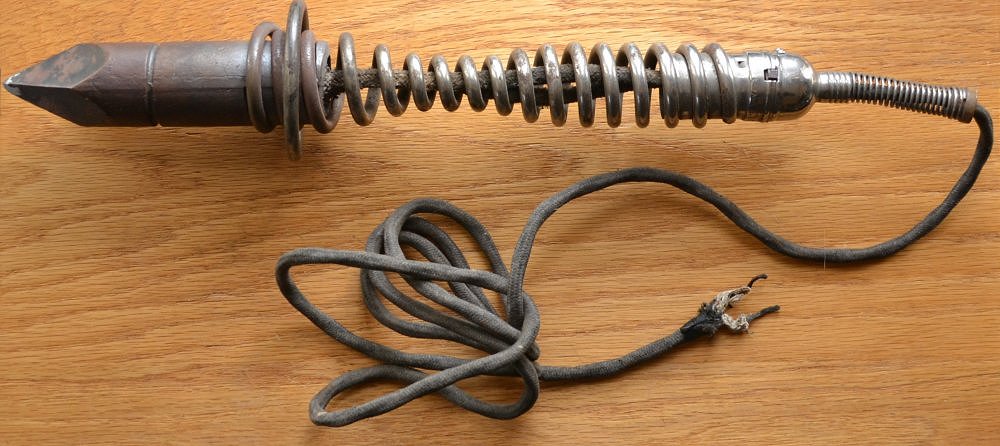
Electrical ones weren't much better:
https://www.stevenjohnson.com/soldering/pics/ge-1911.jpg
Now granted, connections were mostly "free-air" and not PCB based or similar. Also, some of those irons were meant for soldering sheet metal, not really electronics or electrical work - but that's what people had at the time...
When I learned to solder thru-hole electronics, I learned with what could be called a "cheap-o" soldering iron; something like this (maybe not as nice looking):
https://www.circuitspecialists.com/content/image/104526/600/...
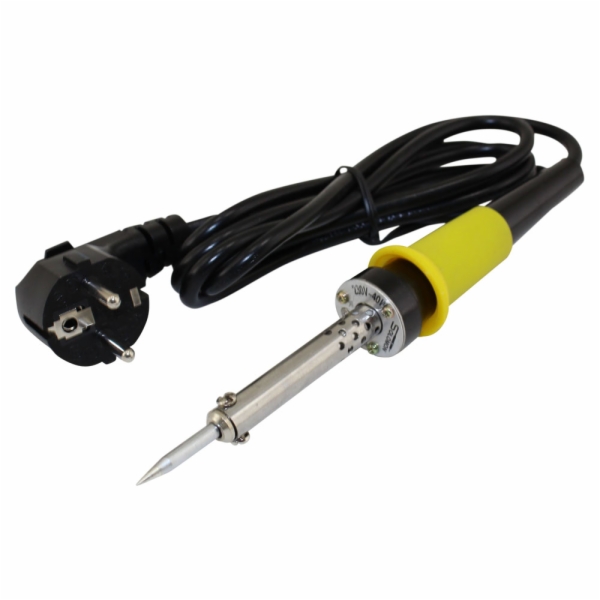
I still have it, and still use it occasionally. It takes "forever" to heat up (about 10-15 minutes), and the tip looks like hell. But for thru-hole construction, it works great. Once you know how to use it, you can solder like a champ.
Would I use it for SMT rework? No. Basically it's virtually worthless for anything with less than 0.1" pitch, unless you're removing parts and just need to dump a lot of heat in a small area.
The key to successful soldering is knowing how to control and place the heat where you need it, and flowing the solder into the joint properly. Most make the mistake of not tinning their iron or the part leads, then trying to flow the solder using the tip of the iron, where all it does is stick the iron tip. Instead, you have to heat the component's lead(s), and flow the solder using the heat on the lead(s). Tinning both the iron and the leads helps with this as well. Flux can also help, but if you use a decent flux-core solder (preferably 63/37 ratio tin-lead), flux should rarely be needed. A paste flux is useful though for cleaning the tip of the iron, especially when shutting down for the day.
It's kinda like arc welding. Sure, MIG can be easy to learn. But if you really want to understand, start with rod (stick) first. Yeah, you'll stick the rod continuously, cussing a storm up at first. But after a while, you'll develop the knack of keeping that weld pool just right and moving the rod while feeding it in, without sticking. Once you've done that, MIG is nothing...
I tend to disagree, when you're learning is not the time to be fighting your tools.
On the other hand, if you get the right cheap oscilloscope, such as a Rigol 1054z, which goes for $350 [1] and add the $180 "serial bus analysis" option, the 'scope will know how to trigger on and decode I2C, SPI, RS232 protocols.
If you don't mind using cracks, you can enable the serial bus analysis option for free, and also double the memory and the bandwidth.
Rigol's response to the crack is interesting. The cracks work because they used a key length for a cryptographic key in their firmware that is short enough to fairly easily brute force. It's hard to see how this could be accidental. Further suggesting that it is not accidental is the fact that they could have easily fixed this once people figured it out, but they have not.
That has led to speculation that they purposefully did this, so that hobbyists could easily crack the thing and get all the features.
Professional users could also crack it, but they would be reluctant to do so, because of potential liability issues. If you are a pro, and you design something the ends up used in a system that causes harm, and it comes out you were using hacked test equipment, the plaintiff's lawyers will be all over that.
If that is the case, it was an excellent strategy. Over on /r/electronics or /r/AskElectronics, you ask for a 'scope recommendation as a hobbyist or student, and almost all the responses will say get the DS1054z and crack it.
[1] https://www.tequipment.net/Rigol/DS1054Z/Digital-Oscilloscop...
I'm not sure what people mean when they say they want to learn electronics, whether they are talking about getting a micro based kit and hooking things up to it and programming it or whether they want to understand circuits and components and how they work. If it's the latter, then go with a scope.
Annnd they doubled their prices, oscilloscope it is.
also, Horowitz and Hill, to echo what i suppose is mentioned elsewhere.
Crucial Items.
- A real soldering station.
- Solder
- ALL THE RESISTORS
- ALL THE WIRES (Solid core is really handy for mocking with breadboards
- A good multimeter
- A good power supply
- Breadboards
- Shrink tube
I think that covers the main things. Also nice to have are
- Heat gun
- fume hood (this is overkill for a hobbyist probably)
- Oscilloscope (I hear they are getting nearly affordable)
- Crimps (molex)
- A real crimping tool (Not pliers. One of the ratcheting ones.)
- All the other stuff I forgot about.