News for hackers. Stuff that matters.
Re:Exercising for Healthier Eyes by nolok on Thursday March 27, 2014 @01:15PM (#7481809)
I'm genuinely interested in what steps do other people on HN who spend their work day on a computer take to "protect" their vision ?

I took on the habit of looking a distant wall every half hour or so for a couple minute or go drink a coffee, but while it helps with the "always looking close" vision I still have a very tired feel in my eyes at the end of a long day.

I do have good vision and have it checked every year, but I worry I'm doing some long term damage anyway, and the white of my eyes does look more bloodshot than they do in average people my ages (and gets a lot worse after big long hours release/bugfix days).

Do you guys have any tips to help the eyes rest ?

Re:Exercising for Healthier Eyes by chadgeidel on Thursday March 27, 2014 @02:15PM (#7482178)
I feel that modern LCD monitors are too bright. Typically I have mine set at 50% brightness. Adjusting environmental/ambient light is important too if you can. I try to adjust my desk/chair orientation that overhead lights are behind my head instead of in front of me (no line-of-sight light sources other than my monitors). I also use f.Lux (http://justgetflux.com/).

I'm not sure what combination of this list of things does the most good, but I rarely get eyestrain and I look at screens for 12+ hours per day.

Not sure if this matters, but I had LASIK surgery 7 years ago and ever since my eyes have been pretty sensitive to light (night vision FTW), so this is something I've been working on for a while now.

Edit: I am 40 years old, and have been looking at screens for long hours at least 10-15 years now.

Re:Exercising for Healthier Eyes by joncrocks on Thursday March 27, 2014 @02:26PM (#7482295)
Indeed. But I'd describe it as modern LCDs have a default brightness that it likely too bright for most uses.

Manufacturers likely set this so that the colours 'pop' when being demoed (the same reason they sell/create/display glossy monitors, because they demo well).

Taking the brightness down almost never impacts usability, but I've found can significantly affect eye strain (that 'OMG, my eyeballs are hurting' feeling).

Re:Exercising for Healthier Eyes by jstelly on Thursday March 27, 2014 @04:58PM (#7483434)
I totally agree with this. I usually turn my monitor brightness down to the lowest setting (my work monitor has been set this way for years). I've done the A/B testing on myself and find that I will develop something like a mild headache (probably eye strain) after a day of working at the default brightness. On my old LCD monitor the brightness would reset if power got disconnected so I did the experiment several times accidentally. My current monitor (Dell U3014) remembers the setting across power resets. I have my brightness control set to zero. It looks dim at first but after a few minutes it looks completely normal and you forget about it.
Re:Exercising for Healthier Eyes by copergi on Thursday March 27, 2014 @07:55PM (#7484329)
>(the same reason they sell/create/display glossy monitors, because they demo well).

They create very few of them. The few they do create are because some of us want monitors that are not intentionally blurry. I am capable of controlling the lighting in my environment. I do not want my monitor to deliberately make everything fuzzy just to avoid a glare problem I don't have.

Re:Exercising for Healthier Eyes by ColonelPanic001 on Thursday March 27, 2014 @02:24PM (#7482268)
Similar here - my cube is as dark as I can get it (which really just means the lights directly overhead are off), and my monitors are at the minimum brightness setting. My screens glow, guys. I don't need to light them up externally.
Re:Exercising for Healthier Eyes by enscr on Friday March 28, 2014 @01:44AM (#7485558)
Any reference on working with lights on vs off? I've seen 1 or 2 people do that in office. I've been told that lack of ambient light might cause more strain. Is there any study supporting what you've said?
Re:Exercising for Healthier Eyes by ColonelPanic001 on Friday April 04, 2014 @09:56AM (#7531401)
Only my own anecdotal study here. It's not total darkness, because I'm in a well-windowed cube farm (along a far wall that has no windows, though), so there's still a bit of ambient light.
Re:Exercising for Healthier Eyes by jisaacstone on Thursday March 27, 2014 @05:30PM (#7483622)
I have a 30in monitor and I put all fonts at 16+ pt so they are easily readable from a distance, then I relax instead of leaning in toward the screen. I am often mentally tired at the end of day but no eye strain.

When I work remote using my laptop I always end with a headache and often tired eyes as well.

Many many hackers at my office use 3 column tmux or screen terminal sessions all day long on 11 in laptop screens, but monitors are cheap so why strain your eyes?

As others have mentioned check on ambient lighting and brightness settings. You may also want to try setting your white balance, contrast and saturation levels. Factory defaults are for making them look good in on display in a store, not for daily use.

Re:Exercising for Healthier Eyes by jaxytee on Thursday March 27, 2014 @03:55PM (#7482986)
>I still have a very tired feel in my eyes at the end of a long day.

I asked my optometrist about this. He said that our extraocular muscles get tired like any other muscle on the body, and it's normal to feel that way after staring at a screen for extended periods.

FWIW I have good vision and don't wear glasses.

Re:Exercising for Healthier Eyes by patcheudor on Thursday March 27, 2014 @07:19PM (#7484181)
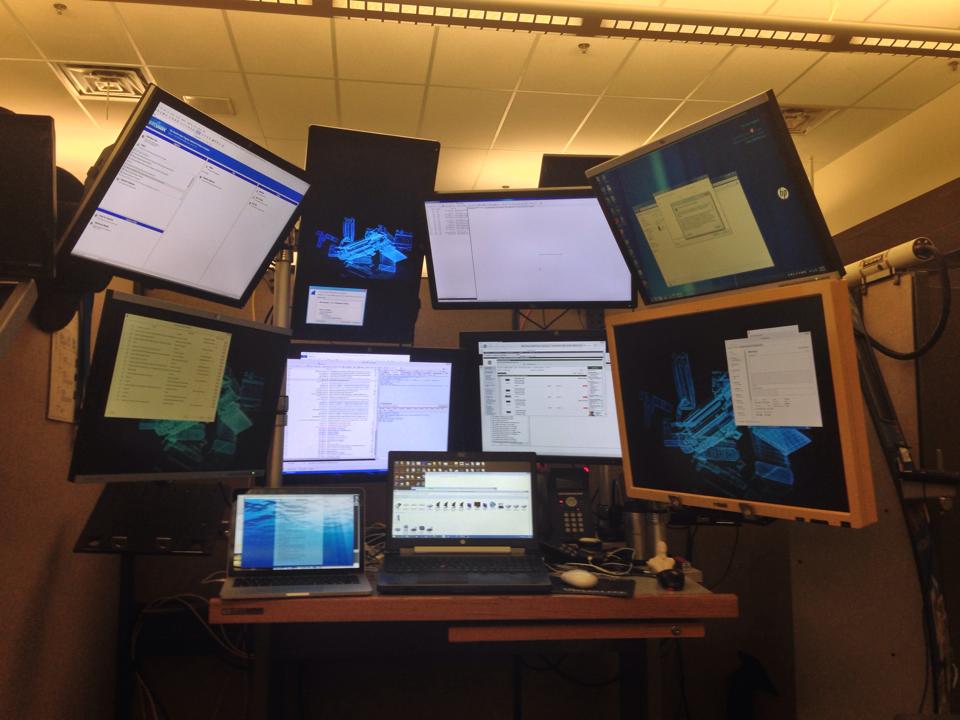
Diversity of focus. To start I have nine monitors attached to my laptop via the internal video card & four DisplayLink docs. They are placed around me in such a way that requires that I do a small amount of refocusing throughout the day as I move from monitor to monitor. I also sit next to a window and will make sure to stand up ever 30 minutes to an hour and focus far into the distance. I do this because my eye doctor was growing concerned that my eyesight continued to get worse when it should be stabilizing. Since I've gone to what some may consider to be an extreme in terms of constant eye refocus my eye's have stabilized and haven't changed for a decade. Your results may vary.

Here's my setup if you are curious:

https://defaultstore.com/mydesk.jpg

Re:Exercising for Healthier Eyes by j_s on Thursday March 27, 2014 @02:58PM (#7482557)
I'd love to learn how to manually perform the equivalent of whatever true REM sleep does for my eyes. No matter how I try to focus or rest my eyes myself they don't truly feel rested any other way.

There are software tools like Flux and Redshift for the PC, Screen Filter for Android (which I just use to turn off the LED lights) -- all intended to reduce the light (typically the 'harsher' blues) to absorb. Some people use orange safety glasses to accomplish the same goal: http://www.amazon.com/dp/B000USRG90

Re:Exercising for Healthier Eyes by quantumpotato_ on Thursday March 27, 2014 @03:32PM (#7482809)
I got an "eye pillow" - it's just a little bag with beans in it. I place it over my eyes when I sleep. The pressure and complete light blocking helps me reach REM sleep MUCH better and I feel much more refreshed.

Also, check this out: https://www.lowbluelights.com/index.asp?

"blue lights block melatonin creation". They sell lights designed to keep the room lit but not interrupt with your melatonin production thus allowing you to turn off the computer & reach sleep.

Re:Exercising for Healthier Eyes by mcfist on Thursday March 27, 2014 @04:47PM (#7483345)
There is an interesting read about lutein and macular degeneration [1] .. might be quackery, but I've started to include kale in my ration. If it does nothing, well it's not unhealthy. But if it helps though it wouldn't be wise to ignore it.

[1]http://en.wikipedia.org/wiki/Lutein#Macular_degeneration

Re:Exercising for Healthier Eyes by chourobin on Friday March 28, 2014 @10:49AM (#7487583)
I highly recommend using an app like http://breaktimeapp.com. You set an interval and length of breaks and Breaktime will lock your screen so you are forced to rest your eyes. Use it to look outside the window every once in a while.

As a tip, definitely enforce the break. You are always tempted to get out of it if you don't.

Re:Exercising for Healthier Eyes by colanderman on Friday March 28, 2014 @10:27AM (#7487433)
Reading glasses, intermittently. They're something like +0.5 or +1.0 diopter (I have perfect vision; adjust accordingly); enough to push my monitor toward (but not at) the edge of my focal range. I code for a few hours with them off, then for a few hours with them on. I usually switch when I feel strain setting in.
Re:Exercising for Healthier Eyes by hcarvalhoalves on Thursday March 27, 2014 @02:59PM (#7482560)
Adjusting the brightness of your screen helps reduce fatigue. The ideal is to have the screen at the same brightness as the room, as if it were a naturally lit piece of paper. For instance, right now it's 15:00 for me and I'm using the MacBook at 25% brightness.
Re:Exercising for Healthier Eyes by a8da6b0c91d on Thursday March 27, 2014 @03:16PM (#7482698)
To my understanding the main thing that causes myopia in children and contributes to age related vision deterioration is insufficient bright light. You simply have to clock up an hour or two outside in daylight every day. Even very brightly lit rooms are a fraction as bright as the outdoors on a cloudy day.