Hm, it is really not that bad anymore. Only if you target bleeding edge features, you will usually have issues. But a mouse click handler? I never managed to not have that working. Also I like vanilla JS. Web Apps can be really simple, if you avoid the bloat.
Current browser market share: Chrome 64%, Safari 20%, Edge 5.3%, Samsung Internet 3.5%, Firefox: 2.2%
https://www.similarweb.com/browsers/
It is hard justifying extra effort for those 2.2% marketshare, unless you count in idealism. And most companies are there for profit.
Chrome, Safari, Firefox.
It really shouldn’t be hard to test.
To me, this attitude always sounds like a local business owner choosing to randomly kick 1 out of every 45 customers out of his store. Is it really that much time/cost/effort to test one more browser?
As someone who has over the years all in all spend months of work on catering to FF, I say yes.
It is not the testing. But the fixing of bugs that costs time. Time most buisnesses apparently rather invest elsewhere.
Most "full-stack" developers I know that write web apps have literally never written a line of C++ in their life, let alone written a rich text editor using an object oriented desktop GUI API.
They don't know it's not supposed to hurt.
You're just looking at the past with extremely rose tinted glasses.
It's way,way easier to implement a UI like in the 90s with hmtl5. You're just trying to make a modern UI with all it's bells in whistles and now complain how complicated it is.
The tech ain't any more complicated. The software you're imagining has a waaaay more complicated UI then what you did in the 90s
Dude, some of us still write 90s style code, even Delphi style stuff (FreePascal and Lazarus), and can still compare it everyday to modern web dev.
It was better without any "rose tinted glasses" needed.
Same for 00s C#/.NET or even "classic" Visual Basic - dead easy to make even an elaborate UI going.
>It's way,way easier to implement a UI like in the 90s with hmtl5.
No, it really is not. What you're describing is some simple form, as if 90s UIs were constrained to that.
>The tech ain't any more complicated. The software you're imagining has a waaaay more complicated UI then what you did in the 90s
Not even close to being right. Most web apps including Electron apps are dead simple and primitive functionality wise compared to the 90s (including not having all the functionality one got for free via integration with the OS), but their codebases and dev platforms are still over-engineered and haphazardly-engineered monstrocities. And then there's the resource consumption.
The "modern web stack" has an incredibly high ceiling wrt how complicated it can be.
It's floor isn't particularly complicated however, and definitely not higher then the equivalent software with the native APIs from the 90s.
You had buttons, inputs, text boxes. Pre-2k UI APIs were extremely limited. Did we even have hover in windows 95/98 or MacOS 9.0? The first time I've seen that was more towards 2010 then 2000 - windows XP/Vista and MacOSX, but it's been a long time since then
> No, it really is not. What you're describing is some simple form, as if 90s UIs were constrained to that.
Please provide an example then. I sure as hell can't think of one and googling didn't provide me with anything but that.
> Pre-2k UI APIs were extremely limited. But that was largely enough for most GUIs. Nowadays people are putting a full browser (Electron) to create an interface with a few buttons and a progress bar. I'm thinking of an actual application, a relatively famous SD card writing program which weighs something like 200 MB. Make it with native GUI controls and it takes 50 kB (maybe even less) and will not eat the RAM and CPU of the users.
Moreover, people are doing fancy GUIs, with the result that no two application look the same, totally confusing some users (Windows itself is a mess, since Windows 8).
The resource inefficency is a completely different argument. That's true, but has no bearing on how complicated the APIs supposedly are. Same with the coherence between applications. That's an issue entirely unrelated to the original claim which was just false.
Completely off topic, but... If you're on windows , use Rufus instead if balena etcher. And if you're on Linux/MacOS... dd works great, just make an alias with tab completion for devices/image
That's like your opinion, man.
First, it's not the invidual APIs themselves, it's several layers of APIs, and combinations thereof.
In traditional desktop UIs you just placed widgets together in a form/panel, hooked events, and wrote your application - normally all in the same language and with a single bundle of APIs from your lib (e.g. the Delphi API, the QT API, MS's API).
In web dev (I do both), it's an endless layer upon layer of cruft. Even just the browser UI base layer alone has HTML, CSS, JS, the DOM, SVG, Web Components and shadow DOMs, and several other items besides. Then there are the differences and incompatibilities between engines, between desktop and mobile, and so on.
Then there's the pre-processing of all those, JS (or typescript), bundlers stuff like Webpack, minimization and map files, then there are Frameworks like Next/React/Angular/Vue, and different varieties.
We haven't even touched the backend of those, written in the same (Node) or different languages, and with its own layers added.
If you can provide one, I'll yield to your point. Otherwise you're just high on nostalgia
I'm not sure what exactly you think "UI/applications from before 2000" looked like and were.
You do know that, e.g. Word, Excel, Photoshop, Logic, WinAmp, Paint, Framemaker, 3ds Max, Final Draft, Lotus Domino/Agenda, Visio, QuickBooks, Cinema 4D, Encarta, Dreamweaver, ACDSee, Real Player, Outlook, AIM, ICQ, FL Studio, Maya, WinRar, WinZip, InDesign, Quark Xpress, Cubase, and countless others, commercial and freeware, including full featured KDE and Gnome DEs were made before 2000, right?
the UI back then were fucking trivial, youre deluding yourself if you think anything else.
Lets go through your first examples one-by-one, as the theme continues i will stop at some point.
* Word: literally just 1 menu/text, 2 rows of icons. And a range picker. you can do that within ~15 minutes even as a beginner.
https://winworldpc.com/res/img/screenshots/97-98-11f3805bab5...
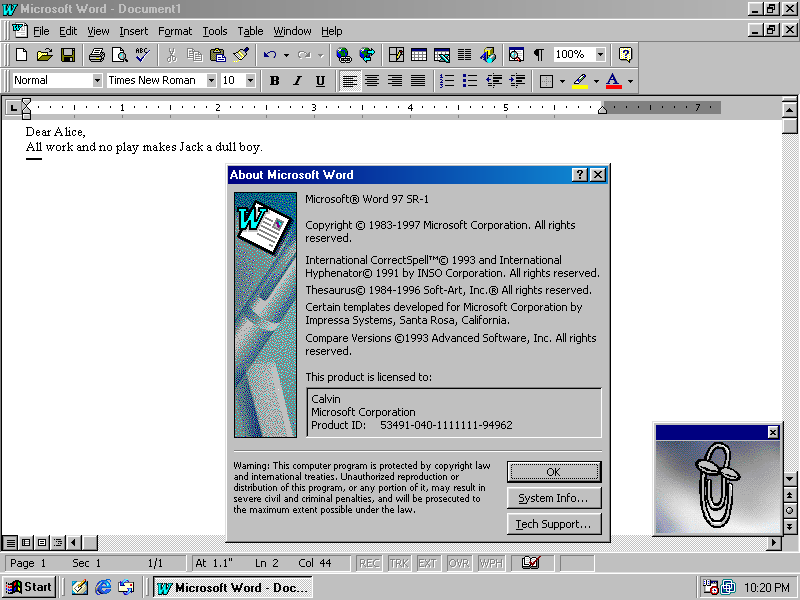
* Excel: same as word, with the addition of a grid in the body. the challenge is in chaining together the cells. trivial as hell -- as long as you ignore the application/domain logic, which would've been just as complicated back then. https://winworldpc.com/res/img/screenshots/57db2161e19c9e95d...
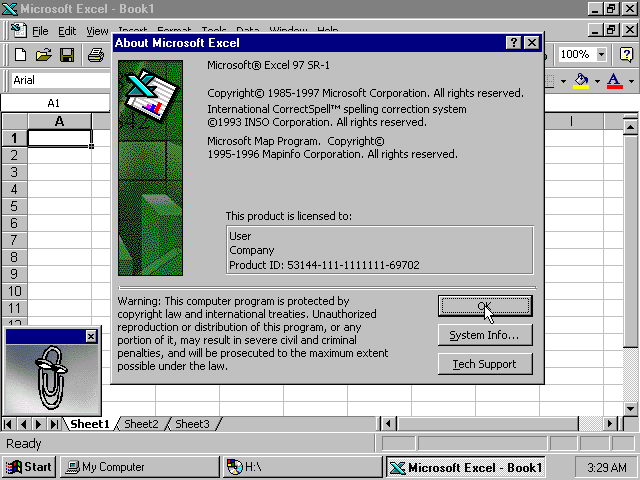
* slightly challenging for someone that hasn't encountered flex. extremely easy -- albeit time consuming just because of the quantity of buttons. still doable within <1h. https://www.webdesignmuseum.org/uploaded/old-software/graphi...
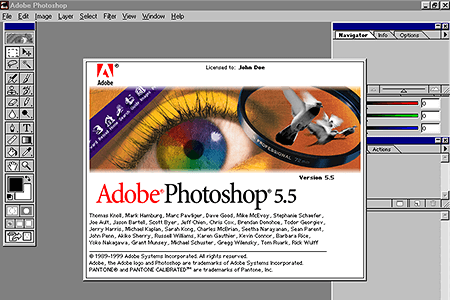
* logic: once again, the challenge is in the domain. the UI itself is just buttons in rows. trivially done by simple flex rows. https://www.muzines.co.uk/images_mag/articles/mt/MT_93_04_no...

* winamp 2.5: once again, trivial to do. creating this UI -- without the domain logic of actually playing the music etc behind it -- can be done within <1h. https://preterhuman.net/software/wp-content/uploads/2018/08/...

It goes on and on. Every single example youre citing is just rows and rows of icons. Thats extremely easy to implement with pure html and trivial css.
give any of these UIs to an experienced frontend dev and they'll provide you with a click dummy within 15 minutes to 3hours, depending on the quantity of elements on it.
I'd be pointless, precisely because nobody cares about such trivial UIs anymore... But hey, whatever floats your boat, right?
And everything I wrote here is ignoring the fact that every one of your example was the opposite of easy back in the 90s. They were developed by whole teams over years to get to that point. And duplicating this with html5 is trivial, that itself should tell you how much easier it's gotten if you just don't chase the hippest tech that's fotm right now
oooh, i see. you edited it out of your initial comment back then and i didn't notice.
I guess you realized how dumb that statement was and couldn't man up to it.
> Developers like you and I are a dying breed. We remember writing applications for operating systems that had straightforward APIs, and OS developers that worked hard to ensure any app which used those APIs would not break.
> Most "full-stack" developers I know that write web apps have literally never written a line of C++ in their life, let alone written a rich text editor using an object oriented desktop GUI API.
> They don't know it's not supposed to hurt.
HN doesn't allow editing comments outside of a very short edit window.
• Tree view controls
• Table views, with draggable, resizable and sortable headers
• Image list views
• Menu bars (something HTML will probably never have!)
• Context menus
• Embeddable file explorer views
• A rich text editor control that wasn't plagued with weird formatting and cursor movement bugs
• Embeddable Word/Excel/PowerPoint if you needed more than that
• Date/time pickers (something HTML didn't get until 2014 and I never see any real app use it)
• A calendar widget
• Tab views
• Toolbars
• Wizards/task dialogs
There's some docs here: https://learn.microsoft.com/en-us/windows/win32/controls/ind...
To get these many of these on the web you need to import large third party frameworks, because HTML5 doesn't offer them out of the box. So apps are all very inconsistent.
As an example, there is no standard, no-one-gets-fired-for choosing complex table widget that can sort, filter, paginate, re-order, etc its rows/columns. Many of them fall just shy of a prod-ready implementation.
It was (it still is) SHIT (there are technically valid reasons), but being shit from moment 1 it was absolutely necessary to create a builder for that.
While simple UI in HTML5/js/css is wonderful to make, any user-contribution system (drag and drop builders, editors and what-have-you) is hell to manage and develop, breaks a lot more than you may think, has bold performance issues. The stack is shareware as a service, it's crazy, it's laughable thinking that probably the multi-billion system required for A-grade GPTs is more cost-efficient than living like we are accustomed to in big web development.
(Less snark: just browse cppreference.com. The standard library is updated to make use of new features, so just check out the changes between C++14, C++17, C++20, etc.)
I too was daunted like you and that's why I chose Dart/Flutter. Though if you're wanting web technologies I'd consider looking into: https://leanwebclub.com/
Nothing to do with them but they're all about franework-less web technologies.
Even today, big chunk of React is masking the subtle differences in event handling and other things. And whilst it forces you into a paradigm, I've never had a bug caused by the internals of React that I've had to dig into. But maybe I'm lucky or only do simple stuff?
As to it hurting, I guess I'd say, use the protective equipment! Sure, it can be bulky and awkward occasionally, but it works and it's often better than the alternatives.
Even as someone who prefers making desktop apps, making Web apps should not be comparatively harder.
I don't think this is any different with web development, GUI programming, machine learning, embedded, or anything else. I did a bit of work with Pandas recently and spent the whole time going "but this is so dumb - why would it work like this?" In reality, it was not dumb, I was just inexperienced with the task and tools I was working with, and was running into problems because of that inexperience.
There are some ways to mitigate this, and good learning resources that show you how to get onto the happy path (without bombarding you with too many best practices up front) are worth their weight in gold. But I think it's very easy to forget what it feels like to learn something new, so often when we approach a new area of programming, we notice how difficult it is to learn, and that feels surprising to us - even though it surely took us a long time to get comfortable with the stuff we already know.
Instead start with pure HTML, SVG, CSS and JavaScript. Use MDN for documentation. Pick one browser to develop on (any one will do).
Why? Most importantly you are learning how the low level browser code works, and you are building your own taste about using the core languages. Just like learning machine code helps with your C++ development.
You don't need build processes unless you are developing commercially. The frameworks provide opinionated APIs, but they are often too abstract and are providing complex enterprisey features.
There is not that much difference between browsers now. And jQuery is bollocks (it was mostly golden for adding code to HTML pages that were served from a back end).
If you want to get a webdev job then maybe do some thinking on what framework and tools you want on your resume, and learn that framework/tooling after you have mastered non-framework browser development. But my guess is that webdev is likely not a good fit if you like engineering your software.
My experience is now outdated, but I wrote my own framework which morphed over time as we supported other browsers and newer versions of browsers. I started my career on embedded software, so perhaps I am more cynical than most! My framework was far better engineered than most (for the reliability we needed). Other frameworks delivered on other goals that were not aligned with our needs.
It is a very frustrating road writing pages for browsers because everything feels arbitrary and you have very little control over the engineering and you are at the mercy of browser quirks: you are often forced to come up with shitty expedient solutions that work if you are dong commercial work, and I very rarely felt clean. There is no beauty to web development: it is dirty work that I would try and do the best I could to achieve the outcomes we needed. Compromising constantly...
Thanks for this pithy summary. Beauty is the perfect one-word difference between what programming can be and what the web stack is.
But nothing has as thorough documentation as I'm used to in native / systems programming. It's all rando tutorials and incomplete/outdated web pages.
Weeks later, I have something barely working, but it looks ugly as sin because there is no nice, well-documented GUI library like Qt, wxWidgets, and so on. And the ones that are decent would require me to rewrite my whole app around them. I find JQueryUI which is still at the level of banging rocks together to create fire. In fact, the whole process of putting a web app together feels like I'm using stone tools and blunt chisels instead of the C++ workshop full of power tools and well-lit workbenches.
I don't know how developers can live with this pain. Good for y'all--I couldn't do it day in and day out.
The toolkits, the apparently billions of dependencies, the vastly complicated build processes.
I tried again recently. HTML file and a separate JS file. Some SVG elements with a click handler.
I had mouse in and mouse out logic, and that worked great. But for some reason the click handler did not.
I tried it in Safari, Chrome, and Firefox. It worked in Firefox. It did not work in Safari, it did not work in Chrome.
Turns out in Safari, my Ad Blocker was hijacking my click handler. Chrome, still not sure what’s happening there.
But I projected what happened in Safari out to the wild. “Can’t get your app to work.” Except instead of a 50 line experiment, it’s a gazillion lines of God knows what 87 levels removed from whatever code I actually wrote.
Cross browser Hell. It’s supposed to be a sandbox only to find out the cat got there first.
And I give up. Again. It’s not my livelihood. It’s a hobby. I encountered these quickly enough to thwart me before I’ve actually invested any real time. Like starting out on a vacation and you have a flat tire and the drain plug pops out before you get out of town. Maybe there’s a cosmic message here.
And I feel stupid. Obviously folks manage, but I keep getting knocked down and kicked.
The idea of pain free distribution via a PWA is really alluring. I’d like it to work. But it seems every time I get back up, the lights go out again and the corners of the cabinets seek my head.
But then I think back to my rock climbing days, a friend used to climb in shorts. And I asked didn’t it hurt when he used his knees? He answered “it’s not supposed to hurt?”
Is it supposed to hurt?