News for hackers. Stuff that matters.
Re:CSS Hat translates Photoshop layer styles to CSS3 by sushi on Thursday May 17, 2012 @08:40AM (#3986671)
I wonder how many people still use Photoshop to create mocksups first and then move to HTML/CSS. Ever since CSS3 became popular I create my mockups directly in HTML/CSS3.
Re:CSS Hat translates Photoshop layer styles to CSS3 by lachyg on Thursday May 17, 2012 @08:45AM (#3986688)
I would say pretty much ever designer I know still use Photoshop to design first. I also know that the PSD to HTML businesses do HUGE turn over each year, so I think this is very much in demand.
Re:CSS Hat translates Photoshop layer styles to CSS3 by flyosity on Thursday May 17, 2012 @09:53AM (#3986953)
The only time I don't use Photoshop is when I'm doing a super simple design (very flat, no graphics) but other than that I'm pushing pixels in Photoshop first before I jump into HTML & CSS.
Re:CSS Hat translates Photoshop layer styles to CSS3 by _mayo on Thursday May 17, 2012 @08:49AM (#3986706)
It's still pretty prevalent. I'm currently consulting for a largish e-commerce site, and their creative department sends all their page designs over as PSDs.
Re:CSS Hat translates Photoshop layer styles to CSS3 by artursapek on Thursday May 17, 2012 @09:55AM (#3986963)
I prefer Illustrator, it's more "element-oriented" if you will. Easier to move things around. Even if it's lacking a good UI for styling.
Re:CSS Hat translates Photoshop layer styles to CSS3 by wwweston on Thursday May 17, 2012 @02:10PM (#3988277)
A-men.

If you're missing the UI for styling, you might try Fireworks.

The idea that Photoshop should be used as a layout tool is an unfortunate accident of history -- it was/is the household name for image manipulation as most designers and developers hit the web. But while it's good for raster/photo editing, sets of pixel layers doth not a good layout/design tool make.

Illustrator's a lot better for this. And Fireworks is made for web layout and screen graphics, has a great mix of vector and raster tools, and is evolving some really sophisticated export abilities including some of the CSS export facilities CSS Hat is doing.

Re:CSS Hat translates Photoshop layer styles to CSS3 by DavidAbrams on Thursday May 17, 2012 @05:54PM (#3989315)
Unfortunately, Illustrator is essentially abandonware at this point. It's so hobbled by design defects and other bugs that you're much better off with Corel Draw, even if you have to run it in a VM on a Mac.

This is just one example:

http://farm3.staticflickr.com/2362/1800773495_d1f776e335.jpg
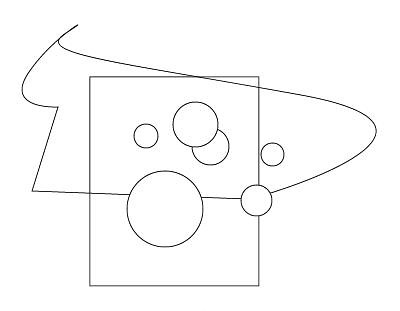
Many (most?) vector-drawing applications let you select only the items that are fully enclosed by a selection rectangle. So if you wanted to select only the circles in that image, you'd need only to draw a selection rectangle around them.

Illustrator gives you no way to do this. Every shape that comes into contact with the selection rectangle (or even the path of the lasso tool) is selected. You can fire up Windows and do the whole thing in Corel Draw in the time you'll waste tediously clicking on everything in Illustrator.

Re:CSS Hat translates Photoshop layer styles to CSS3 by jasomill on Thursday May 17, 2012 @09:16PM (#3989949)
In your example, why not select the non-circles with one rectangle select, then invert the selection by Shift-rectangle selecting everything?

As an aside, the lasso is a "direct selection" tool, operating on individual paths rather than shapes, not that this helps in your example. But it'd work well if I wanted to select, say, only the bottom side of your rectangle, for essentially the reason you dislike.

Re:CSS Hat translates Photoshop layer styles to CSS3 by DavidAbrams on Wednesday May 23, 2012 @10:18PM (#4016444)
That works only in a simple example like this, where you can make contact with all of the undesired objects without making contact with the desired ones. This is almost never the case in a real-world illustration.
Re:CSS Hat translates Photoshop layer styles to CSS3 by drtse4 on Thursday May 17, 2012 @08:59AM (#3986739)
Looks like they are about to release a tool for that too http://csspiffle.com/
Re:CSS Hat translates Photoshop layer styles to CSS3 by terhechte on Thursday May 17, 2012 @10:03AM (#3986998)
Here's their pitch: http://pitch.csspiffle.com/ Looks quite impressive. The idea is really not new, I've been waiting for more than 4 years now for a good HTML5 tool to go beyond Photoshop/Illustrator/Fireworks/Whatnot. I hope their app lives up to the pitch.
Re:CSS Hat translates Photoshop layer styles to CSS3 by studio625 on Thursday May 17, 2012 @10:44AM (#3987178)
Cool pitchdeck, but the navbar is really distracting. Should just be persistent, instead of constantly drawing my eye back up to it.
Re:CSS Hat translates Photoshop layer styles to CSS3 by joering2 on Thursday May 17, 2012 @10:51AM (#3987215)
They look like a cool team of developers!! congrats to them! Glad to see some amazing projects and awesome team back in my old continent!
Re:CSS Hat translates Photoshop layer styles to CSS3 by prawn on Thursday May 17, 2012 @10:16AM (#3987058)
Always Photoshop first. Last time (admittedly a while back) I read about someone creating their design directly in HTML/CSS, it was a rubbish design.
Re:CSS Hat translates Photoshop layer styles to CSS3 by jaems33 on Thursday May 17, 2012 @09:12AM (#3986778)
Most people who work in an agency still do it this way as the roles are divided by specialty.
Re:CSS Hat translates Photoshop layer styles to CSS3 by savories on Thursday May 17, 2012 @02:20PM (#3988324)
This is like starting a big coding project without first writing a plan.

It's best to prototype first be it on paper or photoshop.

Otherwise your design is shaped by programming requirements, rather than a fully thought out plan/experience.

Re:CSS Hat translates Photoshop layer styles to CSS3 by companyhen on Thursday May 17, 2012 @09:17AM (#3986800)
I always use Photoshop for my mockups for clients, but I'm still pretty new to web design.

I've only been at it about 5-6 months, with 1-2 years experience in graphic design. Any advice?

Re:CSS Hat translates Photoshop layer styles to CSS3 by josefresco on Thursday May 17, 2012 @11:09AM (#3987300)
Two things from someone with 12 years in professional web design: Switch to Adobe Fireworks now before you get too used to Photoshop. And ignore all of the engineering advice here about jumping straight to CSS/HTML.

Good web design begins much earlier than Photoshop/Fireworks, and doesn't even move to the graphics/proof stage until you've made dozens of decisions beforehand that will influence your design (think business goals, marketing messaging, platform, audience etc.) HTML/CSS is almost one of the last steps in a complete web project.

Re:CSS Hat translates Photoshop layer styles to CSS3 by joshmlewis on Thursday May 17, 2012 @11:53AM (#3987518)
Yeah, I would take this as a grain of salt like any other advice. Fireworks isn't necessarily better, either.

I would definitely create buttons or icons in Illustrator (but you still don't have to do that), and do a lot of everything else in Photoshop. You can try Fireworks and see if it's your cup of tea, but Photoshop definitely isn't going anywhere as far as standard practice for awhile, at least from what I've seen. I've worked with startups all over the country and top web development firms and still all I see is Photoshop/Illustrator.

Not to say Fireworks is bad or you shouldn't use it, but take it as a grain of salt and see what works best for you. It never hurts to learn new things.

Re:CSS Hat translates Photoshop layer styles to CSS3 by gilrain on Thursday May 17, 2012 @11:37AM (#3987433)
Can you expand on why you recommend Fireworks over Photoshop, please?
Re:CSS Hat translates Photoshop layer styles to CSS3 by robszumski on Thursday May 17, 2012 @03:41PM (#3988683)
1. an Illustrator-style object selection engine so you don't have to do that "right-click > pick layer from list" BS. 2. Multiple versions of one screen in a single file. Think collapsed/uncollapsed states of a form or all of the tabs of a form. 3. Small file sizes because it uses PNGs. 4. Ability to import PSDs and use style from PSD layers. Same with Illustrator files. 5. Customizable patterns UI so you can drag and drop custom buttons, etc. 6. Built in prototyping. Just click-through stuff using hotspots, but it's a good way to see if an interaction is going to be worth pursuing further or not.
Re:CSS Hat translates Photoshop layer styles to CSS3 by AhtiK on Thursday May 17, 2012 @05:34PM (#3989224)
> 1. an Illustrator-style object selection engine so you don't have to do that "right-click > pick layer from list" BS.

Ctrl/Cmd+click with Photoshop move tool automatically selects the layer that is under your mouse cursor raster. Not 100% Illustrator-style but less BS than selecting from lists.

Re:CSS Hat translates Photoshop layer styles to CSS3 by sushi on Thursday May 17, 2012 @09:55AM (#3986961)
I think getting better at CSS would be my only advice. I got better at it by doing tutorials on https://css-tricks.com/.

One other thing I do is try to make sure I complete my web design without having to use any image or Javascript. When you limit yourself in this way, you find ways to accomplish in CSS/CSS3 and get better at it eventually.

Re:CSS Hat translates Photoshop layer styles to CSS3 by SkyMarshal on Thursday May 17, 2012 @10:02AM (#3986995)
Re:CSS Hat translates Photoshop layer styles to CSS3 by jaz on Thursday May 17, 2012 @08:50AM (#3986708)
Photoshop is still pretty popular in web agencies.