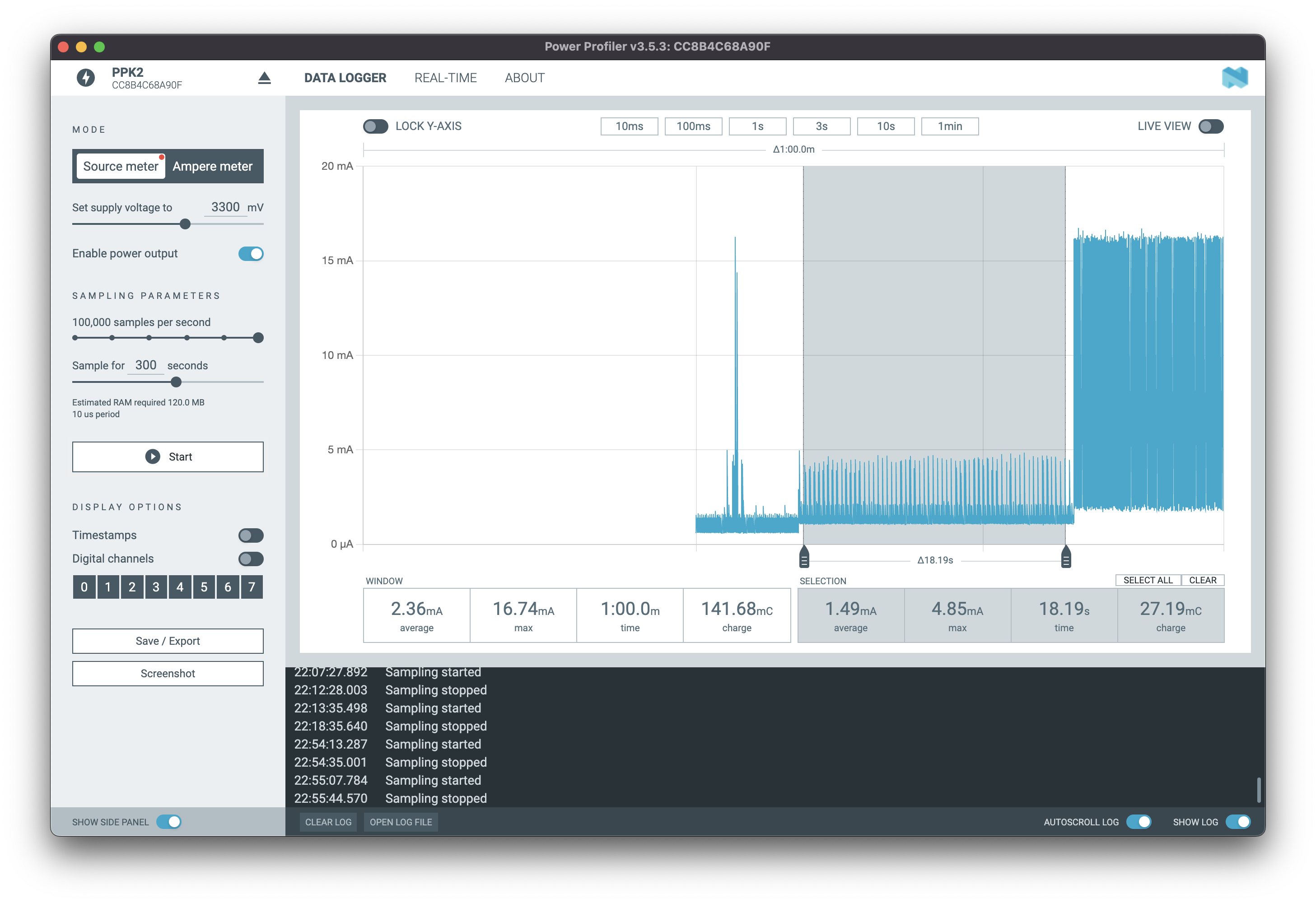
I'm sure other uCs could sleep at lower power, but active mode was what I wanted to optimize for.
Is that using the FPU, or are you doing all the fractal math in integer? I have this vague idea that using the FPU might cause it to use more power than integer code will (and might or might not be faster for fractal rendering).
48MHz is the most power efficient mode, you can run it at 96Mhz "burst mode" but apparently it uses disproportionately more power, I have not measured how much.
Does this display have the same nominal 2Mbps speed as the 2.7" one I've been using? I've seen people report that it works well at 6Mbps (and thus 60 Hz) but haven't tried it myself. I'm guessing that it would use more power.
Have you been able to measure how much of the power consumption is the display?
Approximately 25%-50% of the total power depending on refresh rate. Worst case seems to be alternating black and white pixels, maximizing the number of transitions?
So the display is about 25% of the 4.9 mW number? That's exciting! How often are you toggling the polarity of the LCD field? I've noticed that when I unplug the display it continues to display the same data for about 30 seconds on what is presumably the screen capacitance, but the datasheet minimum clock for that is IIRC 10 Hz, and as I understand it, never switching the polarity will eventually destroy the liquid crystals.
One of the things I really hate about normal computers is how high the interaction latency is, and one of the really appealing things about these displays to me is the possibility of getting much lower interaction latencies using partial screen updates, down in the submillisecond range (plus 10–20 ms for the crystals to fully change state, but it should be visible before that).
    This is the mail system at host adjuvant.canonical.org.

    I'm sorry to have to inform you that your message could not
    be delivered to one or more recipients. It's attached below.

    For further assistance, please send mail to postmaster.

    If you do so, please include this problem report. You can
    delete your own text from the attached returned message.

                   The mail system

    <(your email address)>: host mx01.mail.icloud.com[17.42.251.62] said: 554
        5.7.1 [HM08] Message rejected due to local policy. Please visit
        https://support.apple.com/en-us/HT204137 (in reply to end of DATA command)
I have seen a Swindle do partial screen updates much faster than 1000 ms. In fact, I originally wrote http://canonical.org/~kragen/sw/inexorable-misc/tetris.html to play in the browser on a Swindle, with update times of more like 100 ms. And I successfully used IRC on it, too.
The E-Ink display does have some good points: it's not glossy, it's available in bigger sizes, its whites are whiter, and it can do grayscale. But, for interactive computing, I think those aren't a good tradeoff for being orders of magnitude worse at power consumption and update times.
There is clearly a crossover point at which this combination would use lower power, because the e-ink display uses zero power when not updating, and the memory-in-pixel LCD uses power even to retain the display. So as the update rate goes low enough, at some point the e-ink display will use less power. My vaguely remembered estimate of this crossover point is that the e-ink display starts using less power than the memory-in-pixel LCD when the update rate is less than about one update per hour.
probably without showing evidence, neither of us will convince the other
E-paper has some real advantages over memory-in-pixel LCDs: as I said in the other thread, the whites are whiter, it's not glossy, it can do grayscale, some versions can even do color, it's available in larger panel sizes, it existed in 02007 when Amazon launched the Swindle, and it can continue to display Amazon advertising even when the device is entirely powered off.
None of these are true of memory-in-pixel LCDs (though the Playdate does display advertising on its memory-in-pixel screen when it's "off").
Moreover, the computing power budget for the Swindle and similar e-readers is also measured in hundreds of milliwatts, just like the screen. There's not much reason to worry about whether your screen uses 100 microwatts or 100 milliwatts if your CPU is using 200 milliwatts. Reducing your power consumption by 50% or 5% is never a critical factor in the success or failure of your product, because you could just add another 50% in battery weight if it were.
Ambiq didn't even exist until 02010, and didn't sample the Apollo3 until 02018, so to get even a single order of magnitude improvement in CPU power usage, Amazon (or competing vendors) would have had to cut the compute budget for e-readers by an order of magnitude, probably resulting in major increases in space usage, reductions in rendering quality, sluggish interactions, or all three, and certainly increasing development cost. Ambiq's CPUs are fast enough, but you can't just drop them into a new model of Swindle or Kobo and keep the same software; they have tiny onboard RAM, little support for offboard RAM (which would make power consumption balloon anyway), and no MMUs, so they can't run either Linux or any of the other e-reader software that's been developed for existing devices—it needs way too much memory.
There's a lot of different eink and memory-lcd screens that could explain the difference between your calculation and mine. But all else considered, 15-minutes vs 60-minutes isn't much of a difference at all.
For most applications of updates-per-second (or at worst, a few seconds per update), low-power monochrome seems best served by Sharp's memory-lcd.
A thing I didn't mention is that there are actually eink applications that have lower update rates than this. Store price tags, for example.
--------
https://www.pervasivedisplays.com/wp-content/uploads/2021/12...
Pervasive Displays has an oscilloscope measurement of 3.75mA on their 5.9-second updates for their 1.54" eink screen. (Page 14). That's 22.125 mCoulombs of electrons.
--------
https://media.digikey.com/pdf/Data%20Sheets/Sharp%20PDFs/LS0...
Sharp 1.2" memory-LCD (a bit smaller) has 12uW to 50uW on static images. Assuming 3.3V, that's 15uA worst case (0.015mA).
-------
22.125 mCoulombs / 0.015mA == 1475 seconds per update break-even point, or ~24 minutes.
So yet another number, but yeah, memory-LCD is just really good. Remember that the 1.2" screen from Sharp is a bit smaller though, so its not a perfect apples-to-apples comparison.
Either way, its a much longer period between updates than I was expecting.
With the right interface and design, it feels fine. In particular, Jubeat has a different note assigned to each screen so the divisions feel very natural.
First hit from YouTube: https://youtu.be/LSGOAkyFW7I
Or maybe just natural to people who put in a bit of practice, lol. This is an expert level song pattern, it's not so bad at earlier levels. But it still shows off how the 4x4 screen effectively communicates a variety of button press timings to the player, combo counters, life, scrolling and other such details for this game.
Have you run any tests to see if active mode is indeed the mode you're in most of the time? Or is it possible that other uCs that could have better sleep current can beat your uC of choice?
Screen -- I like the Sharp in pixel memory LCD screens, though 4 inches is a bit small. A bigger screen would be what I'd be searching for, but I also know that monitors use a surprising amount of power, and 4 inches is the biggest memory-LCD screen in my area as well.
E-ink, for all of it's faults, does climb to 7+ inches and beyond. But changing eink screens is surprisingly power hungry.
Bluetooth -- lol, there goes the power budget!! This uses what? Probably 10x more power than everything else combined? I/O is a necessity and it's a good feature, but I really do wish* it used less power.