News for hackers. Stuff that matters.
Re:How do you know when macOS detects and remediates malware? by CharlesW on Wednesday January 04, 2023 @02:26PM (#34250154)
> "As a result, the great majority of users are oblivious of the detection and remediation of malware on their Macs, which occurs in complete secrecy."

Great! This is how consumer products should work. If I were to see "hey a thing happened but I resolved it" alerts from the 500+ currently-running processes on my computer, I'd throw it out the window.

Re:How do you know when macOS detects and remediates malware? by akersten on Wednesday January 04, 2023 @02:33PM (#34250243)
Eehh... This is more like "you drove through a red light but luckily no one T-boned you;" a cop will rightfully pull you over to let you know "nothing happened." I'd say the driver definitely should be alerted that that PDF they opened was infected. At minimum to alert them to the fact that they should keep their guard up, and that further investigation of potential compromise could be necessary depending on your threat model.

Virus almost running on your PC is not a routine product feature that should be swept under the rug - at best it's bad security hygiene, at worst it's symptomatic of a targeted/ongoing compromise.

Re:How do you know when macOS detects and remediates malware? by gear54rus on Wednesday January 04, 2023 @02:37PM (#34250289)
It is typical apple dumbness - form over function.

The same dumbness exists on windows where it would silently remove files like keygens with its 'antivirus' making it a mandatory drill to disable it completely on any new installation. Even worse you would sometimes forget that it does that and then be dumbfounded for about 30 minutes as to why the file is in the archive but not on the filesystem after its extraction.

Re:How do you know when macOS detects and remediates malware? by dylan604 on Wednesday January 04, 2023 @02:49PM (#34250455)
>At minimum to alert them to the fact that they should keep their guard up

or to not share it with others!

Re:How do you know when macOS detects and remediates malware? by TeMPOraL on Thursday January 05, 2023 @05:00AM (#34257873)
Or warn the person (friend, coworker, family member) who sent it that they have a malware problem!
Re:How do you know when macOS detects and remediates malware? by happyopossum on Wednesday January 04, 2023 @03:33PM (#34251087)
> I'd say the driver definitely should be alerted that that PDF they opened was infected

When you actively open an infected or malicious file you do get alerted - those are the alerts shown in TFA.

Re:How do you know when macOS detects and remediates malware? by akersten on Wednesday January 04, 2023 @04:27PM (#34251960)
Hasty example on my part but point stands when scenario is replaced by "background virus" (i.e. detected by Remediator as an active threat, instead of being preemptively blocked when opening a file).

Could be the PDF example still too, if XProtect misses it on initial file scan, but then Remediator picks it up later. Not sure if they use different detection engines (database matching on the file vs active process heuristics)?

Re:How do you know when macOS detects and remediates malware? by still_grokking on Wednesday January 04, 2023 @09:32PM (#34255164)
> Virus almost running on your PC is not a routine product feature

Maybe on macOS it is, and the only reason it isn't broadly knows is because Apple is sweeping this under the rug?

Re:How do you know when macOS detects and remediates malware? by computerfriend on Thursday January 05, 2023 @01:17AM (#34256707)
> a targeted/ongoing compromise.

Not to worry! Because XProtect and similar have such a narrow scope, it is unlikely to protect against targeted attacks anyway.

Re:How do you know when macOS detects and remediates malware? by cryptonector on Thursday January 05, 2023 @01:33AM (#34256775)
> This is more like "you drove through a red light but luckily no one T-boned you;"

Huh? The malware getting removed is not evidence that no harm occurred. Perhaps the malware stole something of importance. If that something was just power and network (e.g., for a DDoS farm), then it's of little importance, but if that something was keystrokes, then it could be a major importance. The user not knowing is a real problem.

Re:How do you know when macOS detects and remediates malware? by britneybitch on Wednesday January 04, 2023 @02:36PM (#34250279)
Meanwhile every few weeks Windows Defender interrupts me with an alert that I have no malware. That drove me up the wall before I switched to Linux. I understand why Norton Antivirus etc do this, since they have a product to sell. But why Windows Defender?

https://www.thewindowsclub.com/wp-content/uploads/2018/09/Wi...
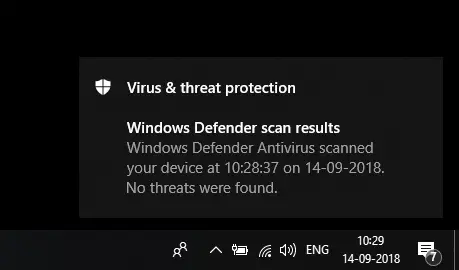
Re:How do you know when macOS detects and remediates malware? by CharlesW on Wednesday January 04, 2023 @02:41PM (#34250336)
Yes! This is exactly what I mean. It's a distraction at best, and creates confusion, anxiety, and even anguish at worst.
Re:How do you know when macOS detects and remediates malware? by InCityDreams on Wednesday January 04, 2023 @03:30PM (#34251035)
>confusion, anxiety, and even anguish

Ever tried installing a printer?

Re:How do you know when macOS detects and remediates malware? by whatisthiseven on Wednesday January 04, 2023 @02:38PM (#34250302)
I can't remember ever seeing those notifications? I must have turned them off years ago.
Re:How do you know when macOS detects and remediates malware? by burkaman on Wednesday January 04, 2023 @03:02PM (#34250610)
I think Windows Defender wants you to know it's there so that you don't feel the need to install Norton, because Norton will make your computing experience worse and you might blame Windows for that.
Re:How do you know when macOS detects and remediates malware? by vikingerik on Wednesday January 04, 2023 @03:52PM (#34251365)
This is pretty much it. The reason Defender / Security Essentials was invented was to reduce Microsoft's own support workload, because a substantial proportion of that is caused by other overly aggressive anti-malware programs blocking everything and blaring loudly about it.
Re:How do you know when macOS detects and remediates malware? by teeray on Wednesday January 04, 2023 @02:42PM (#34250346)
I think this also plays to the perception that “Macs don’t get viruses” that Apple would like to maintain.
Re:How do you know when macOS detects and remediates malware? by still_grokking on Wednesday January 04, 2023 @09:43PM (#34255225)
You mean Apple would brainwash their users?

No, Apple wouldn't do that. Never! Big Apple promise.

Re:How do you know when macOS detects and remediates malware? by arsome on Wednesday January 04, 2023 @02:49PM (#34250446)
Having one piece of detected malware means you probably have more that aren't detected and not having someone take a look at that machine or reinstall the OS means you're probably running a system with active malware.
Re:How do you know when macOS detects and remediates malware? by TonyTrapp on Wednesday January 04, 2023 @03:45PM (#34251258)
Enjoy the data loss introduced by randomly mis-identified files not being reported then. Yes, I've had it happen before that data files (not executables) that I fully intentionally stored on my computer were recognized as malware. If I hadn't been alerted about that fact, I would probably have wondered days or weeks later where the file went, with no way of restoring it. I'd never want an operating system to automatically, without notifying me, remove files, no matter how malicious it thinks they are.
Re:How do you know when macOS detects and remediates malware? by still_grokking on Wednesday January 04, 2023 @09:38PM (#34255194)
If you're using one just accept the fact that an Apple device never belongs to you.

Apple can do what it wants on their devices. You can't.

But you're generously allowed by Apple to pay money for that. Isn't that great?

Re:How do you know when macOS detects and remediates malware? by mysteryalias on Thursday January 05, 2023 @04:14PM (#34266691)
Stop being such a dramatic hyperbolic person please, tone it down a bit. The PC elitism dripping from you is really off putting, you responded multiple times under this topic just completely disparaging Apple, did an former Apple exec ram into your house with their car or something? Weird seeing this much seething hate for a computer company. Relax.
Re:How do you know when macOS detects and remediates malware? by still_grokking on Friday January 06, 2023 @05:51AM (#34273279)
I'm sorry for you if getting in touch with reality annoys you.

But the issue is on your side.

Re:How do you know when macOS detects and remediates malware? by highwaylights on Wednesday January 04, 2023 @04:23PM (#34251886)
This is a very wonky comparison.

Just because the malware has been removed (or not), does not mean the problem was resolved.

If a keylogger already got your passwords and you'll never find that out then the fact it's no longer logging keystrokes is not much comfort to you as a victim.

Re:How do you know when macOS detects and remediates malware? by throwaway675309 on Wednesday January 04, 2023 @05:21PM (#34252743)
If you're seeing 500+ alerts then you have a different problem on your hands. Personally something as relatively infrequent as malware detection should absolutely not be swept under the rug.

There's no way for a user to be able to correct her behavior or even be aware of problems without some kind of notification.