News for hackers. Stuff that matters.
Re:Ask HN: How to do cross platform GUI? by UnnoTed on Sunday August 23, 2020 @10:36AM (#24252239)
The stable options for native cross-platform GUI are:

1. Sciter

- Languages: C++/Python/Go/Rust/Pascal (optional: HTML/CSS/tiscript)

- Development time: fast

- Resource usage: light (space and performance)

- Visual customization: easy, doesn't use native widgets.

2. Qt

- Languages: C++/Python (optional: CSS/JS/QML)

- Development time: slow

- Resource usage: quite heavy (space), but well performant

- Visual customization: QtWidgets: hard, QML: easy, doesn't use native widgets.

3. WxWidgets

- Languages: C++/Python

- Development time: slow

- Resource usage: light (space and performance)

- Visual customization: hard, uses native widgets.

4. Lazarus

- Languages: Pascal

- Development time: slow

- Resource usage: light (space and performance)

- Visual customization: hard, uses native widgets.

[1]: https://sciter.com/ - https://quark.sciter.com/

[2]: https://www.qt.io/

[3]: https://www.wxwidgets.org/

[4]: https://www.lazarus-ide.org/

Re:Ask HN: How to do cross platform GUI? by c-smile on Sunday August 23, 2020 @01:13PM (#24253403)
Just to get a feeling, see screenshots of Sciter Notes application on major desktop platforms: https://notes.sciter.com/

The application uses exactly same code on all platforms: https://github.com/c-smile/sciter-sdk/tree/master/notes

It even runs on Windows 2000: https://sciter.com/necromancing-sciter-on-windows-2000/

Re:Ask HN: How to do cross platform GUI? by flingo on Monday August 24, 2020 @05:59AM (#24259086)
Is there any way to get a GPL-compatible version of Sciter?

I couldn't tell, just from glancing at the website/github.

Re:Ask HN: How to do cross platform GUI? by dkersten on Sunday August 23, 2020 @01:36PM (#24253629)
I’m not sure how you’re coming up with the development time estimates but personally I’ve found Qt to be fast to develop in, both Widgets (using designer) and QML. Hell, I mostly do React web UIs nowadays for various reasons, but I find QML a lot easier and faster than web UI’s, especially for layout (vs bootstrap style layouts as well as flexbox and css grid).
Re:Ask HN: How to do cross platform GUI? by c-smile on Sunday August 23, 2020 @01:49PM (#24253740)
What is your estimation of creating something like this: https://notes.sciter.com/ ?

UI, application logic and data storage.

QML is far not enough for this I think.

It took me 3.5 months ( https://notes.sciter.com/2017/09/11/motivation-and-a-bit-of-... ). But I shall admit that this does not include architecture time as I knew internal architecture of EverNote upfront.

Re:Ask HN: How to do cross platform GUI? by dkersten on Monday August 24, 2020 @06:09AM (#24259139)
It’s difficult to estimate and I don’t know enough about that applications requirements either, but to give some kind of indication, two years ago I wrote a tool to control an LED (neopixel) strip, or, rather, to create an animation that would be played back on the neopixels. The animation was a json file containing a timeline of events and parameters (think “at time t fade pixels 2 through 10 from rgb x to rgb y over 5 seconds). You could have four parallel timelines that got blended together.

I wrote a GUI editing tool using QML that had three main UI elements: a visualisation of the LEDs, a properties widget and a timeline. It also had start, stop, rewind buttons so you could play the animation back on the visualisation panel. The visualisation panel was also interactive to select individual leds. The timeline had time labels at the top which you could click to select a time and four “swimlanes” where you could draw the effects on, which controlled start time and duration (the rest of the parameters could then be set in the properties window, for the selected effect).

The led visualisation and timeline components were custom made (I don’t remember if they were made using custom QSceneNodes, QOainter or composed out of nested QML elements). The end result wasn’t particularly pretty, but I was going for functionality over look and the audience was limited to myself and one other person. The entire application (including the code to actually drive the leds, which ran on a raspberry pi, but shared code with the GUI tool to make the playback in the UI as realistic as possible) took 3 to 4 days. I’m sure given a few weeks I could have made it look really slick and given a few months could have made the UX something I would be happy to have other users use.

So I don’t know how long your application would take me, especially if it has to look identical to what you have, but I have been quite productive in QML, even when custom components were needed.

I’m not trying to say it would have been a better choice for you, though, just that I often find Qt and QML being under appreciated and underrated.

Although the Qt companies recent behaviour and aggressiveness in getting people to switch from open source to paid license had really put me off to the point where I’m not sure I’d use it for a new project, but those reasons are all not related to anything technical.

Re:Ask HN: How to do cross platform GUI? by zelly on Sunday August 23, 2020 @02:05PM (#24253869)
You can add Flutter to this list which is becoming a viable option for desktop UIs. The downside is Dart, but that's not so different from picking Pascal/Delphi just for its UI framework.
Re:Ask HN: How to do cross platform GUI? by sli on Sunday August 23, 2020 @02:12PM (#24253935)
I would say the downside is Google, because they may just kill Flutter and/or Dart even if they get popular. I just can't make myself hitch anything important to Google's tech anymore.

I do think Dart itself is a fine language, though.

Re:Ask HN: How to do cross platform GUI? by 946789987649 on Sunday August 23, 2020 @04:12PM (#24254919)
Flutter is open source though, no?
Re:Ask HN: How to do cross platform GUI? by zelly on Monday August 24, 2020 @02:48AM (#24258071)
So is Tensorflow but do you really think volunteers could maintain it?
Re:Ask HN: How to do cross platform GUI? by pkphilip on Sunday August 23, 2020 @10:56AM (#24252365)
I am not sure what you mean when you say that the development time on Lazarus is slow.

I would actually say that it is perhaps the fastest in the list.

Re:Ask HN: How to do cross platform GUI? by UnnoTed on Sunday August 23, 2020 @12:08PM (#24252842)
Lazarus allows you to design the UI quickly, but theres a lack of third party libraries when compared to the mainstream programming languages.

1.1k https://github.com/topics/pascal

27k https://github.com/topics/cpp

161k https://github.com/topics/python

Re:Ask HN: How to do cross platform GUI? by pkphilip on Sunday August 23, 2020 @01:05PM (#24253329)
Lazarus already comes with tonnes of components (over 200) and lots of libraries but yes, it is still possible that you want to access some functionality which is not provided natively by the built-in components. But then, you may not.
Re:Ask HN: How to do cross platform GUI? by mamcx on Sunday August 23, 2020 @11:52AM (#24252721)
True. Lazarus/Delphi are the "APEX predators" for UI building. Their only caveat is their lack of resources (Lazarus) and weird costly licensing (Delphi).
Re:Ask HN: How to do cross platform GUI? by pkphilip on Sunday August 23, 2020 @12:52PM (#24253225)
Yes, the Delphi licensing cost is horrible. However, if you are using Lazarus you don't need to use Delphi at all.

The lack of sufficient developers who are familiar with Lazarus/Freepascal is a problem though. But again, this is a chicken and egg type of issue.

Getting up to speed in Lazarus does not take very long though because the IDE itself guides a person through in the components and you can clearly see the properties and components they have etc.

Compared to the challenge of wrangling many of these cross-platform frameworks to develop a desktop, it is a piece of cake in Lazarus.

Sadly, what keeps Lazarus back is the fact that most people aren't even aware that it exists and a perceived notion that it is not a cool/capable framework.

Re:Ask HN: How to do cross platform GUI? by billfruit on Sunday August 23, 2020 @12:06PM (#24252814)
One another viable option may be java with JavaFX.
Re:Ask HN: How to do cross platform GUI? by andi999 on Sunday August 23, 2020 @01:07PM (#24253343)
Tk is probably also native since version 8 or so. But somehow the tutorials for Tk usually have ugly examples (not pleasing the eye).
Re:Ask HN: How to do cross platform GUI? by jabirali on Sunday August 23, 2020 @10:39PM (#24257121)
At least on Linux, Tk apps still tend to look like remnants from before Windows 95. (Which personally is the main reason I avoid Tk apps whenever possible, including Tkinter apps.)
Re:Ask HN: How to do cross platform GUI? by ofrzeta on Monday August 24, 2020 @12:41AM (#24257557)
There's tkinter.ttk that makes your widgets look slightly more modern.
Re:Ask HN: How to do cross platform GUI? by bscphil on Sunday August 23, 2020 @03:22PM (#24254536)
Do you have to update code to take advantage of native widgets? I use SCID [1] because it's the best FLOSS tool for its purpose, but the interface is still absolutely horrific looking. It doesn't even respect the DPI hints that GTK and QT programs do, so the fonts are too big on my computer.

[1] http://scid.sourceforge.net/

Re:Ask HN: How to do cross platform GUI? by Lammy on Sunday August 23, 2020 @11:34AM (#24252593)
Does SWT count as stable? Its website looks identical to when I used it (and liked it!) 10+ years ago, so I'd ray probably so :) https://www.eclipse.org/swt/widgets/
Re:Ask HN: How to do cross platform GUI? by raverbashing on Sunday August 23, 2020 @01:10PM (#24253375)
WxWidgets worked fine and it was very easy to integrate on small C++ projects when I tried. If you just need some basic windows it's the way to go.

Qt is good but it requires you to go fully into the Qt ecosystem (build tools, etc) not sure about QML though.

Re:Ask HN: How to do cross platform GUI? by bsenftner on Sunday August 23, 2020 @01:37PM (#24253640)
I second wxWidgets. It can produce small executables, like 50K, that sport a complete modern UI. Just look for the AUX addition, that the more modern and customizable version.
Re:Ask HN: How to do cross platform GUI? by zerr on Sunday August 23, 2020 @12:42PM (#24253143)
Qt (Widgets as well as QML) doesn't use native controls and it is fairly easy to customize (even Widgets, lookup "stylesheet").

For wxWidgets, there is wxUniversal, which draws custom controls, thus easier to customize - not sure how well it is maintained though.

I'd argue that dev time is quite fast for all - Qt, wxWidgets, Lazarus.

Re:Ask HN: How to do cross platform GUI? by andi999 on Monday August 24, 2020 @08:21AM (#24259889)
I dont know if Lazarus compiles as fast as Delphi, but I'd argue that dev time for Delphi is equal to compile time for Qt app.
Re:Ask HN: How to do cross platform GUI? by dublin on Monday August 24, 2020 @09:09PM (#24267255)
"Native" GUI toolkits that do not fully implement pen and touch UI are not really native, are they? Do NOT assume your users are on devices that are limited to 20th century UI hardware! (Win10 can fully leverage both pen and touch, iOS does touch well and pen fairly badly...)
Re:Ask HN: How to do cross platform GUI? by justin66 on Sunday August 23, 2020 @01:57PM (#24253806)
You've overstated the comparative advantages of Sciter so much that, upon clicking through, people might flash back to when they found out was a Segway was and shout, "it's a @#$&-+) scooter?!?"
Re:Ask HN: How to do cross platform GUI? by bscphil on Sunday August 23, 2020 @02:14PM (#24253946)
In particular, it's very weird that "doesn't use native widgets" is presented as an advantage, given that apparently the result is that your apps end up looking like this on every platform: https://notes.sciter.com/
Re:Ask HN: How to do cross platform GUI? by c-smile on Sunday August 23, 2020 @02:22PM (#24254014)
You can use native platform widgets with Sciter. If you will find one suitable.

It is just that there are absolutely no standard platform widgets (at least on Windows) for this UI. https://notes.sciter.com/wp-content/uploads/2017/09/notes-sc...

And even if there are some, integrating them with what your app is needed will lead to some mess like here:

https://notepad-plus-plus.org/assets/images/notepad4ever.gif
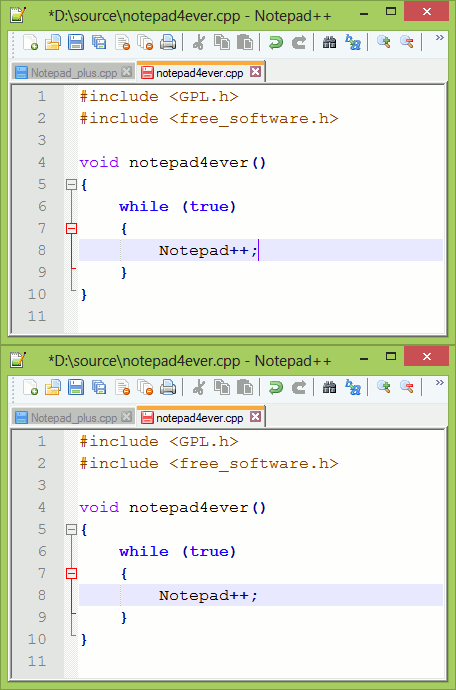
Custom components a la Windows 2000, some in Windows XP with default styled Windows 8 stuff - the zoo.

Re:Ask HN: How to do cross platform GUI? by adontz on Sunday August 23, 2020 @05:50PM (#24255562)
I'd rather disagree about Qt/QML. It is fast.

What people initially miss about UI libraries is composition features. Which are over the top for QML and not so to put is softly for Sciter.

Re:Ask HN: How to do cross platform GUI? by billfruit on Sunday August 23, 2020 @12:12PM (#24252874)
Perhaps Xamarin as well, not sure if it works on Linux.
Re:Ask HN: How to do cross platform GUI? by digi59404 on Sunday August 23, 2020 @02:12PM (#24253934)
It does but by default it uses GTK2. You won’t get the same experience on all platforms with Xamarin Desktop. Each platform has a different rendering engine.
Re:Ask HN: How to do cross platform GUI? by collyw on Monday August 24, 2020 @04:59AM (#24258718)
Pascal is still going?