The problem is, GUIs usually give you ridiculously low ceiling for productivity. So you're forever stuck with the level of productivity you get right off the bat. It used to be that GUI software had keyboard shortcuts for most operations (in particular, Windows made it really easy to do, and expected you to do it) - but then the web came and it all flew out of the window.
So part of the reason to use TUIs and Unix commands is because modern GUI philosophy makes my mind throw exceptions from boredom in the middle of doing something.
> How many program interfaces can you keep in your long term memory? Is it even worth it to waste your precious (human) memory space in such a thing?
Quite many. Human memory has natural garbage collection, so don't worry, you're not wasting anything. In this day and age, you're not really using your memory to its full natural capacity anyway.
And before someone says that learning a tool takes time, try this experiment: pick a tool with shortcuts you don't like, and spend one Pomodoro trying to operate in it. 25 minutes. There's a good chance you'll be past the mental block in that time, and the new navigation will already start to feel natural.
Oh, and that's a good night's sleep, not a programmer's every-other-night sleep, so better stage that 25 mins over four days, not two.
But think of the DOS-based programs of yore, like WordPerfect 5, and the Turbo C/Pascal IDEs... they had menus on screen, easy-to-access help screens, etc. to guide the novice. (What's the Web-app equivalent to the F1 key?) History shows that WordPerfect was fine to use as a non-technical person. (I wish our modern word processors were so simple to use as WP 5, actually -- modern app-design trends have bloated the word processor into a confusing mess, IMO, and I think the average office worker who has worked in both generations might agree.)
I really like the approach taken by the 'which-key' extension for Emacs, which is particularly well used in the Spacemacs distribution. Pressing the space bar pulls up a very nicely organized menu of actions, including access to help. It's extremely helpful both as a memory aid, and also for discovering new features.
Obviously a nice menu doesn't get the user fully past the initial Emacs learning curve, which supports your argument. But for the next level of user -- from novice to initiate -- it's a tremendous productivity boost.
- https://github.com/justbur/emacs-which-key - http://spacemacs.org/
It's even nicer than that (in particular, when you're not using Spacemacs): Emacs has a lot of multi-key commands (just like Vim). Whenever you pause in the middle of such command for a brief while (0.5 second by default), it'll pop up a sidebar listing you keys you can press to continue along with the command they execute. So e.g. there's a command you want to invoke, you remember it was under C-c something, but don't remember the exact combination. With which-key enabled, you just press C-c and wait until a list of available continuations shows itself. It's also useful for command discovery (what's there under C-c? what's under C-c C-v?).
Speaking of similar techniques, I like the way Magit works even better. Most commands involve several key presses, like "d d" for diffing against the thing you're pointing at, or "l l" to show current log. So whenever you press "d", a popup like this appears (bottom 2/3 of the screenshot):
https://magit.vc/screenshots/popup-diff.png
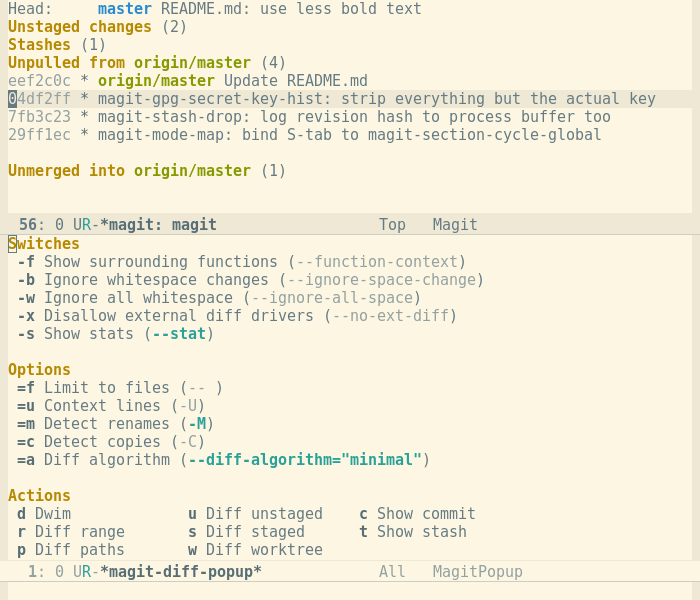
It immediately shows you all the different keys related to [d]iffing, including some sequences that set flags (like e.g. -f). It disappears as soon as you press the key. The principle here is that you'll quickly memorize most frequently used commands and type them so fast you won't even notice the popup, but whenever you don't remember something or want to explore, there's always something showing you the next steps.
I think that Spacemacs is a decent compromise between the two, covering a large swath of functions with a loosely organized menu structure. Although they occasionally clobber some key bindings in an annoying way (org-mode and magit come to mind), it's nice to be able to find "text" things under the text menu, even when you don't remember the key-binding at all. It's surprising how well the three modalities (curated magit, general which-key, and semi-curated Spacemacs) work together, and stay out of each other's way (for the most part!).
- https://en.wikipedia.org/wiki/Canon_Cat - https://en.wikipedia.org/wiki/Archy - https://en.wikipedia.org/wiki/Ubiquity_(Firefox) - https://www.youtube.com/watch?v=BVVXNlOFqXA
So it is with text-based interfaces like unix. I learned unix over thirty years ago, and thirty years of practice with a language gives me a great deal of comfort learning the occasional new word in unix. Conversely, every time I point and grunt, I don't feel like it's an even remotely "acceptable level of productivity".
I do however think these TUI things are abominations combining the worst of both worlds.
I think of a TUI not so much as a 2D text interface but more like text interfaces that work with a mouse, use similar constructs as GUI's like menus and form controls and standardize on conventions for displaying information in a uniform way across different applications.
Like I said, not the parent, so I may be wrong but there's my two cents...
But yeah, to this day after using Vim for years and years I still get a little surprised when I absent mindedly click on a Vim session in a terminal window and it moves the focus to whatever buffer I happened to click on.
I'm so used to ^W-^W that I forget this is even possible. Same with moving the cursor, selecting text, scrolling up and down, etc...
I wonder if there are many people that are as young or younger than the personal computer, who are stuck on the idea that a GUI is somehow inferior. Because I was about 7 when the first ones were available, so anything before that seemed like an obsolete relic.
But our grandparent poster said:
> > > GUI and mouse-based interfaces have the advantage of not requiring you to remember how to use a program. ... Is it even worth it to waste your precious (human) memory space in such a thing?
And my point is, if I spend my time learning a graphical workflow, I will undoubtedly have wasted it, for learning a textual workflow isn't much more work and the knowledge will pay dividends. I believe I am not unique in these regards, so yes, I don't think it's just worth it to me, but to lone_haxx0r (and you) as well.
Here's an example: I watched a graphic designer once doing a lot of work manipulating assets. He had spent the last hour translating all these artefacts for the web, so over the next 5 minutes or so, I learned some new unix words and wrote a little shell script to do that translation. The script ran quickly taking maybe another minute or so to do what would've been at least another hour of work the other way.
> stuck on the idea that a GUI is somehow inferior.
A GUI (and these TUI) will always require a coding of every workflow, and that workflow is undoubtedly written in text: Despite many efforts over many decades to tell the computer what to do purely graphically, we haven't begun to approach within an order of magnitude, the precision and productivity of textual interface. It's not turtles all-the-way-down!
So yes, it's definitely inferior in this way.
Anyway, I have to remember most of CSS, HTML, JS builtins, all kinds of syntax, posix API, std. C library, so bunch of shortcuts or commands in some weird ass MUA like mutt (I probably use 10-15 commands/shortcuts regularly), really doesn't add much.
The problem is that GUI/web programs are typically not easily extensible or composable. Though thanks to popularity SPAs, at least some web programs can be integrated with via internal REST APIs.
CLI tools don't usually have this problem.
Even if GUI tools have some scripting, it usually is ad-hoc and may not integrate that well with the rest of the system.
On the CLI side, you have a scripting system (shell) in which you're able to run and combinine all your tools.
Look at nano for instance: all the essential commands are there, always displayed at the bottom of the screen. Nothing to remember.
This morning, it took me a solid 20 minutes to find the page on Amazon.com where I could tell them that my book marked as delivered wasn't, and that I needed them to send me a new one. This is something I've done many times before, within a GUI, but the feature is hidden away because the company wants it to be - the graphical nature of the interface is irrelevant here.
Of course, we humans like short term returns and so most people don't make the investment to use a more efficient system.
Infinity. A practical one. You can keep as much as you like.
> Is it even worth it to waste your precious (human) memory space in such a thing?
We do not know what is waste of memory and what is not. Really no one knows exactly how human mind works and how diversity of your motor skills influence your mind in general. It even could be that it have no impact at all!
> most of the time it's not worth it to waste your time learning the superior UNIX/terminal version.
You never know. The more commands you have learnt, the easier learning become. The learning is a recursive thing, you can learn to learn. So if you didn't learn to use TUI, you couldn't measure the difficulties of learning one more utility.
You're also missing the distinction between keyboard shortcuts for a TUI and a CLI. Given a level of terminal compitency I'd argue that a CLI isn't any harder or is often easier to become compitent thanks to the UNIX philosophy.
Thanks to this sentence, it dawned on me that even if you're a l33t hax0r, GUI and mouse-based interfaces have the advantage of not requiring you to remember how to use a program. How many program interfaces can you keep in your long term memory? Is it even worth it to waste your precious (human) memory space in such a thing?
Sure, TUIs and UNIX commands can be really useful and efficient once you learn them, but GUIs are useful even if you've never used the program. They give you an acceptable level of productivity right off the bat, and most of the time it's not worth it to waste your time learning the superior UNIX/terminal version.