News for hackers. Stuff that matters.
Re:A Starting Guide to VIM from Textmate by sudonim on Friday November 19, 2010 @06:55PM (#1923299)
I used to get stuck in vim when logging in to linux servers. The key things to know for any newbie...

:q

i

ESC

:w

After I learned those, I've really come to love Vim. I imagine I'd need to learn about 50 more commands before I could be really well versed. What are some other important things to know?

Re:A Starting Guide to VIM from Textmate by gurraman on Friday November 19, 2010 @07:16PM (#1923351)
I started writing the basic commands in a comment, but it got kind of long. You'd best look at a reference.

http://tnerual.eriogerg.free.fr/vimqrc.html http://www.pixelbeat.org/vim.tips.html http://www.rayninfo.co.uk/vimtips.html

I'd start with looking at commands that allow you to quickly move around in buffers first (/, f, t, w, e, b etc). Then start combining those with actions (ct", dw etc). Then "timesavers" such as macros and built-in conveniences (q, gqq, marks etc). The rest will come to you.
Re:A Starting Guide to VIM from Textmate by wyclif on Saturday November 20, 2010 @12:35AM (#1923944)
Python and vim: Two great tastes that go together (slides): http://www.tummy.com/Community/Presentations/vimpython-20070...
Re:A Starting Guide to VIM from Textmate by sudonim on Monday November 22, 2010 @09:51AM (#1929939)
Thanks. Learning keyboard controls can be daunting. Your advice on where to start is much appreciated.
Re:A Starting Guide to VIM from Textmate by hiteshiitk on Friday November 19, 2010 @08:01PM (#1923461)
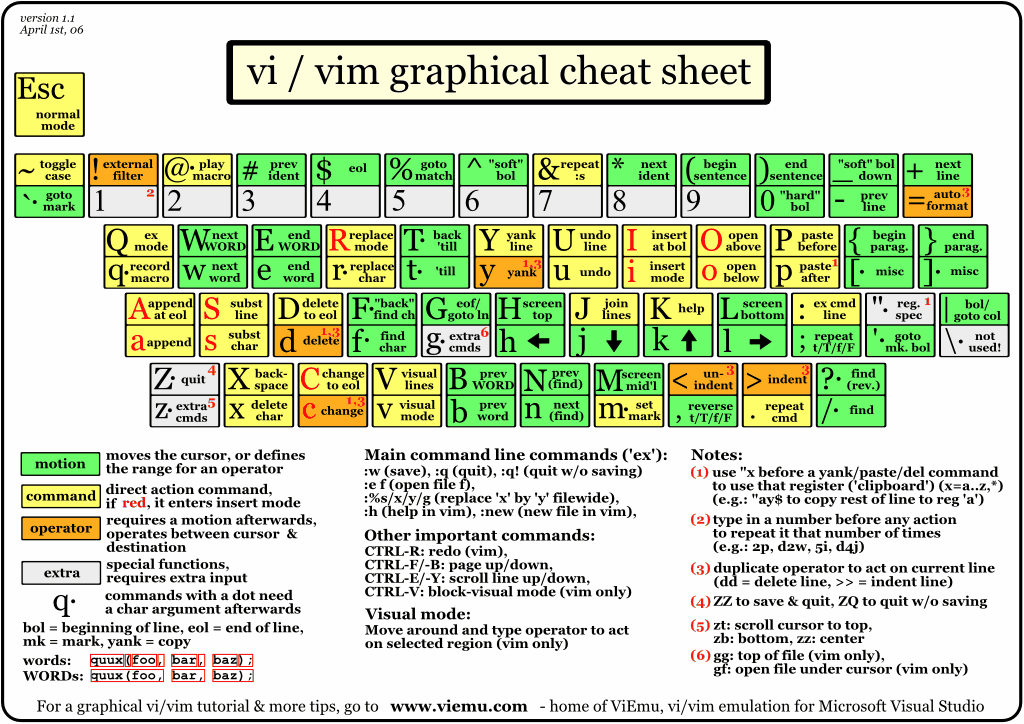
Just print this http://www.viemu.com/vi-vim-cheat-sheet.gif out and stick it to your side board.
Re:A Starting Guide to VIM from Textmate by bradleyland on Friday November 19, 2010 @07:10PM (#1923334)
Learning to exit, insert, and save the file is about as minimal a text editor skill set I can imagine. You should definitely start out by running through vimtutor a few times. The vim help is also really good. The author also provides a good list of links at the bottom of the article.
Re:A Starting Guide to VIM from Textmate by 5teev on Friday November 19, 2010 @09:20PM (#1923621)
One thing I do all the time is making macros on the fly for repetitive edits with :map. E.g., switch the current and next line

:map * ddp

Then type * in command mode to execute the steps.

And if you mangle your file beyond hope with out of control macros, there's always u to undo and :q! to quit without saving.

Re:A Starting Guide to VIM from Textmate by crazydiamond on Friday November 19, 2010 @11:17PM (#1923835)
Are you not aware that '*' (asterisk) searches for the next occurrence of the word under the cursor. That's one key i just can't live without. '#' (hash) does the reverse.

Why not do a 'qq' to record your macro as 'q' and @q to replay it.

Re:A Starting Guide to VIM from Textmate by 5teev on Saturday November 20, 2010 @05:18AM (#1924248)
It was an arbitrary choice for an example. Obviously one would choose a key not being used for anything else. (This choice can also vary from session to session, depending on the task at hand.)
Re:A Starting Guide to VIM from Textmate by Dobbs on Friday November 19, 2010 @07:13PM (#1923343)
hjkl for moving around.

I and A insert beginning/end of line.

0 and $ go to the beginning/end of line without entering insert mode.

:%!command -- Runs the entire document through the command. If you use visual mode and then press ':!command' and it will run the selection through the command specified. Super useful for sorting a list.

Also ctrl+[ is equivalent to esc. If you rebind caps to ctrl you can easily hit escape and other commands like ^d, ^u (page down and up).

Re:A Starting Guide to VIM from Textmate by dhimes on Friday November 19, 2010 @07:44PM (#1923423)
0 and $ go to the beginning/end of line without entering insert mode

You might find ^ more useful than 0 for indented code as it takes you to the beginning of the text on the line (like the regexp).

Re:A Starting Guide to VIM from Textmate by burgerbrain on Friday November 19, 2010 @08:41PM (#1923559)
If your aim is to indent/de-indent text, try the > and < commands (in normal mode).

I also find that selecting large blocks of text then using the = command to autoindent everything is exceedingly useful.

Re:A Starting Guide to VIM from Textmate by dhimes on Saturday November 20, 2010 @07:51AM (#1924412)
do you know how to highlight a block then double-indent? I can't make that work. With a block highlighted, I only know how to indent one ts at a time (then re-hightlight, etc.).
Re:A Starting Guide to VIM from Textmate by ollysb on Saturday November 20, 2010 @08:58AM (#1924494)
You can use the universal "repeat last action" command: just hit . You can hit . as many times as you like and it will keep indenting.
Re:A Starting Guide to VIM from Textmate by dhimes on Saturday November 20, 2010 @09:23AM (#1924535)
d'oh! I never even thought of that...it works great! Thank you.
Re:A Starting Guide to VIM from Textmate by dfischer on Friday November 19, 2010 @07:52PM (#1923445)
Great tip! I will be using this one.
Re:A Starting Guide to VIM from Textmate by pyre on Friday November 19, 2010 @10:14PM (#1923723)

  > Super useful for sorting a list.
Unless you have some special script/filter for specific sorting of lists, then why not just use ':sort' instead of ':!sort' (i.e. the Vim sort command, rather than piping it to /usr/bin/sort)?
Re:A Starting Guide to VIM from Textmate by silentbicycle on Friday November 19, 2010 @11:27PM (#1923849)
Why should vim have :sort built-in, when /usr/bin/sort already does it so well?

If you really want to get on a roll with vi, think of all the other cases where you wish it could do something, then make it work with :%!command_written_in_any_language_you_want .

You can also apply it to ranges. "%1,5!rev" reverses lines 1-5, etc.

Re:A Starting Guide to VIM from Textmate by pyre on Saturday November 20, 2010 @11:38AM (#1924741)
I never said that '%!command' was a bad thing. I was just pointing out that that particular use-case was already built into the editor. We could make pedantic arguments about Unix all day long (e.g. "Each command should do something specific and do it well, Vim doesn't need the :sort built-in" vs "Why should I incur the cost of starting up another process and having it eat up my precious memory space?") but it's relatively useless.

Being able to pipe through commands is a powerful tool, but using an example where the external command already has a built-in equivalent seems possibly confusing to the (novice Vim'er) reader (please don't rattle me off the laundry list of options that /usr/bin/sort has that :sort doesn't because you'd be missing the point).

That said... On the topic of ranges, never give :bd! a range unless you know what you're doing. I ran :bd! once while I had a number of lines selected in visual mode because I though that the selected lines wouldn't affect :bd. Bad idea. The '<,>' part of the range apparently is converted to line numbers (e.g. '3,6') and then :bd reads that range as the buffers to delete. So when you select lines 1-8 and then hit :bd! it goes something like this:

  :<,>bd! -> :1,8bd! -> delete buffers 1-8 without prompting for unsaved changes
Oops!
Re:A Starting Guide to VIM from Textmate by silentbicycle on Saturday November 20, 2010 @12:37PM (#1924854)
You're absolutely right (and sort's options are rather quirky), just trying to nudge people to thinking about piping through shell commands that way. There's a lot of power in the ex parts of vi (the : commands) that I seldom hear vi(m) users mention.
Re:A Starting Guide to VIM from Textmate by Dobbs on Saturday November 20, 2010 @01:29AM (#1924010)
I do a lot of bash scripting so I know `/usr/bin/sort` decently well. Using this technique I can use my bash scripting abilities to enhance my vim abilities.
Re:A Starting Guide to VIM from Textmate by eeperson on Saturday November 20, 2010 @01:54AM (#1924034)
Probably the most useful commands that aren't mentioned in most tutorials are:

ctrl-[ can be used in place of ESC

. repeats the last edit

Re:A Starting Guide to VIM from Textmate by rbonvall on Saturday November 20, 2010 @06:55PM (#1925734)
When you are experimenting, u (undo) and Ctrl+R (redo) are invaluable.