1) external magnet messed up heads movement closed control loop (internal drive's magnets + voice coil + positioning marks on the platters), and as a result head actual position became different from what controller thought it was.
2) control loop tried to correct itself, repeatedly failing, all while head kept moving across the platters, while controller was still thinking it's elsewhere.
3) controller was writing to disk, so it overwrote data in highly irregular tracks that followed erratic head dance. some of that overwrote positioning markers.
4) when recovering, even though 99.9% of data was still there, controller failed to position the head on erased markers, so reported "unreadable sectors"
> (harvested from an old hard disk drive)
Okay, this is making even less sense. "Hard drive magnets", in a drive, are millimeters from the spinning platters. I refuse to believe that the same magnet, moved 6 inches away from the computer caused catastrophic damage.
If it was a coincidence it was certainly well-timed. I don't have the Thinkpad anymore, but I do still have some 2.5" PATA drives. It might be interesting to test this and make a video.
Here's a picture of the magnet in question (it holds stuff to my refrigerator now), w/ a penny for scale: http://mx02.wellbury.com/misc/20171203-Magnet_of_doom.jpg
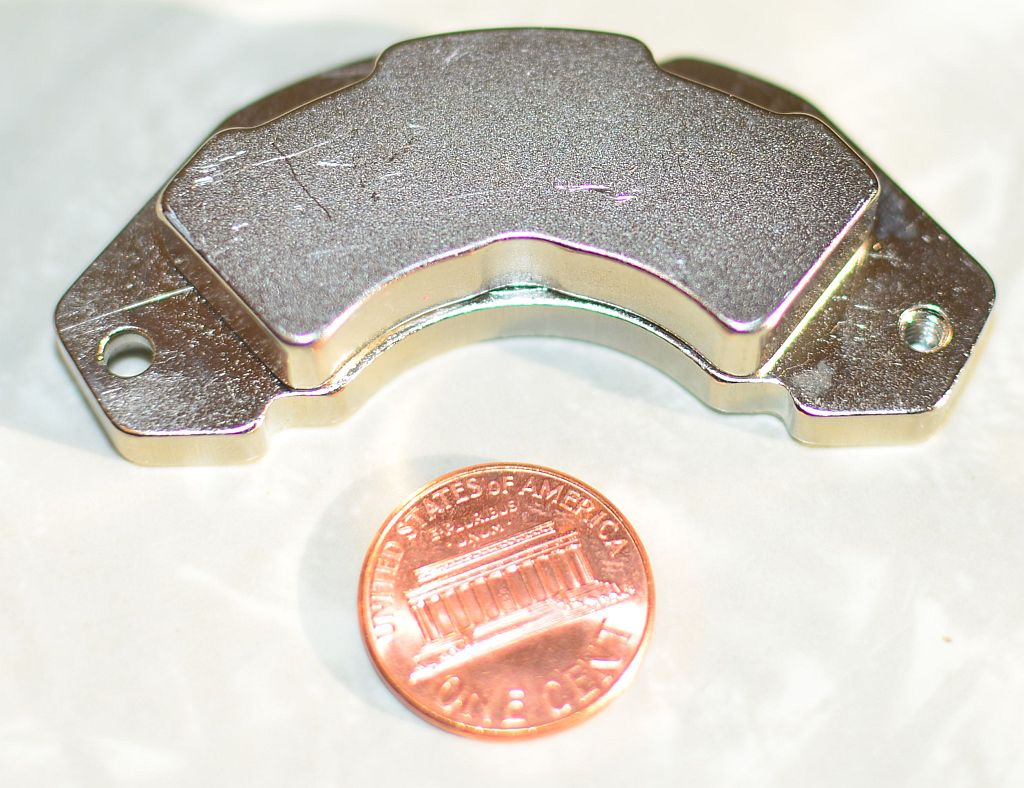
This magnet was pulled from a Micropolis 9GB SCA-II 3.5" low-profile drive dating from roughly 1998 (I had a crap-ton of these drives and, as they died, I pulled their magnets, so I have a bunch of these). These particular magnets will stick to each other thru my 3" thick butcher block table. They are physically larger (substantially thicker) than the ones I've pulled from newer drives.
Edit:
I assume that the data and servo tracks written to the drive are done so in the presence of the magnetic flux of the magnets supporting the voice coil. I always just assumed that adding a substantial new source of magnetic flux (the magnet in my hand) either induced a current or magnetized some component in the drive.
Not really, they look very close in size to current Enterprise Drives (https://imgur.com/2HjuuKM), Of course I have removed the Metal backing plate from mine
Now consumer drives do have smaller magnets (that is one way to save cost)
Here is a photo of the 4 styles of magnets I still personally have, the smaller magnets are either out of consumer drives and 2.5in drives manufactured in the last 7 years https://imgur.com/59XjVPm
And just for fun a small assortment of my collection because why not
I've found scavenged hard drive magnets to be very useful for odd jobs. One served several years holding up the fallen head-liner over the drivers seat in one of my crappier cars.
Magnets near your or even on the computer do nothing.
Yes. The magnet is stationary and the spinning drive plate is moving the data, the conductor, very rapidly relative to the magnet. (imho the real issue is the large metal box surrounding the drive plates. It's hard to feel a magnet from inside a metal house.)
In a server, the power supply is on the other end of the chasis. In a laptop, it's a lot closer to the internals.
> I don't buy that either.
Theory: https://en.wikipedia.org/wiki/Electromagnetic_induction
The forward model: https://www.youtube.com/watch?v=UL_ryxub-RA
The reverse model: https://www.youtube.com/watch?v=J9b0J29OzAU
The big ones: https://en.wikipedia.org/wiki/List_of_conventional_hydroelec... Note: the Three Gorges: 22 GW
For comparison, nuclear power: https://www.nei.org/Knowledge-Center/Nuclear-Statistics/US-N... Largest U.S. nuclear plant: Palo Verde (Arizona) produces around 4 GW.
For home applications: http://www.ebay.com/bhp/hydro-electric
A person, moving a magnet near a single wire - not even a coil - is going to induce utterly insignificant amounts of electricity.
You'd need lab equipment to even detect it. It will do absolutely nothing whatsoever to computer electronics.
Instead, why don't you take a multimeter and see if you can measure any voltage (never mind current) by moving a magnet, by hand, near a single non-coiled wire.
Anyways, I apologise for being snappy.
- HDDs often live right next to each other (separation of roughly 1cm, front to back).
- Power supplies and their induction coils are right next to the drives in some cases, including for instance consumer grade NAS boxes.
- HDDs tend to have a coil of wire, too.
If HDD magnets overwriting nearby HDD data was a thing, it would be happening all the time.
If HDD magnets in motion in certain orientations were inducing damaging currents in nearby HDDs or in nearby power supplies which then damaged connected components, that would be happening less often but still all the time. Not all chassis designs have power supplies at the opposite end as the disks, and some applications like consumer NAS boxes have them in close proximity to each other.
Either some extremely unfortunate and rare positioning and orientation and motion of the magnet occurred, which barely exceeded the design limits of the drive or power supply or other circuitry (or maybe the laptop hdd or circuitry was shoddy and shouldn't have had a problem but did), or this is a major problem that's gone unappreciated among computer and NAS builders for decades, or it was an extremely unlikely coincidence.
kees99 posted a possible explanation, where the magnet moves the voice coil, which ends up destroying the drive by writing data in the wrong places.
Modern drives, however, are designed to "follow" the tracks that are cookie-cutter imprinted onto the platters. We use this design now as it's far easier to design a head that reads tracks and makes slight adjustments to stay on track, vs a head that needs to move to an absolute exact position.
In other words, modern drives are designed to combat this exact problem.
Eventually I got a call back from somebody saying that they understood what I was asking for but couldn't send it to me. At that point I got fed-up and paid the minimum bench fee and asked for my disk back. I probably should have pushed the issue further, but my need was timely and I'd already started reconstructing the data from other sources.
You held a magnet 6 inches away from a plate spinning at 5400 rpm.
That is your take away? Not that "I ensure all my data is backed up using the 3-2-1 Method at a minimum" it is "never play with magnets"?????? Really?
People never cease to amaze me when it comes to data security.
It was a failure in following disciplined practices, in this instance, and it caused me monetary loss. It was a good lesson. I am happy with my attitude toward data security and data loss, and it's certainly not codified in the statement "never play with magnets".
BIOS would no longer detect the disk on that machine, or any other I tried it on (on both USB-to-PATA and honest-to-goodness motherboard PATA controllers). The drive spun up but made a repeated ticking sound (I assume seeking back and forth looking for servo tracks).
I sent the drive to Kroll Ontrack (because, stupidly, I had billing data that wasn't backed-up on the drive). The report I received back indicated that 80% of the drive's sectors were unreadable.
As an aside: The data I was looking for was ASCII text and Kroll Ontrack was completely unhelpful in just sending me a bitstream image of the drive so I could grovel thru looking for data I needed. Being plain ASCII, their "file carving" tools didn't locate any of the data. (They sent me a "preview" of the data they'd located, and while it got lots of Microsoft Office-format files, it didn't have any ASCII text files). I offered them a 3x multiple of the rate they asked for file-level recovery to simply send me the bitstream image of the disk that they'd already made. They wouldn't do it, and wouldn't even let me pay to talk to somebody who understood what I was saying. I ended up taking a major loss on the billing data I destroyed. I'll never recommend them to anybody.
I won't ever play with neodymium magnets around spinning rust media again.