I use both Linux Mint and MacOS on a daily basis and I can't say that one really is better than the other. I'm sure it would be the same with Windows if not for the fact that I need some unix-y stuff.
I do have a use case that I would really like to get on my primary laptop that neither Mac nor Linux currently offer: Detach screen and use stylus to annotate pdfs. If I was using windows on a surface this would be a major part of my workflow, and I would find it impossible to switch back. Doesn't prove that Windows is superior. (Maybe I will end up dualbooting Windows and Linux on a Surface or Yoga or some such thing eventually).
I have been meaning to Subsystem for Linux that since they announced it, but Cmder (Conemu) has been so working well for me that I have gotten too complacent to even try it. Cmder was the one thing for me when I switched to Mac that truly made the transition painless -- I thought I would hate not having OSX Terminal. I don't do super advanced unix shell stuff, and it was just perfect.
If your needs are already being met, it's sometimes hard to make time to play with something that does the same.
It works pretty well for command-line use. If you need X at all, you're probably SOL.
I've been doing mostly C++ & Python development. I've run into a couple of issues around networking and a couple of UI issues. The UI issues have been fixed after I reported an issue on GitHub.
All in all, it's been a fairing great experience, and the developers have been very responsive to issues reported on GitHub.
After being on Mac for about a decade, it only took a week of using Windows full time before going back on the Mac felt foreign to me.
If I spent a week or so full time on the Mac, the reverse would probably happen.
These days I only care that my main tools work on whatever operating system I use (it's a great era for end users now that so many tools are cross platform). There are things about every OS'es main UI that bug me, so I don't find myself being loyal to any one particular OS.
IMHO In their quest for simplicity, that have made a very good GUI for users, but hell for professional developers who DON'T only use the command line. One of my lifelong friends swears by his MBP, but he only uses the command line.
I think that depends on your view. IMO, Apple generally does make some of the best hardware in terms of quality and design, but there are exceptions.
The Mac Pro garbage can, for example. I don't know why they chose to make an art piece to replace the incredibly functional and expandable tower that existed before.
Another example is the early 2011 Macbook Pro 15" with discrete GPU, which had serious overheating problems that they just pretended didn't exist for more than three years.
I could go very far into detail here and list all of the extremely annoying limitations that I run into, but instead I'll respond to your vague complaints with my own. Apple quite obviously wants absolute control over their device and their software whereas Microsoft lets me to do whatever I want with my computers and my software.
I have to have a Mac to make iOS apps, but as soon as those are no longer a thing I'll toss all my Mac stuff straight into the garbage.
The hardware fit and finish is also second to none, and runs windows just fine if that's your thing.
The alternative on windows is a machine that spies on me, has horrible ui bugs and inconsistencies I run into constantly, and decides to auto update and reset all my privacy settings in the middle of the night while I am using the machine.
Not to mention it is often used with some awful trackpad. I haven't tried them all but I have never seen a non-mac trackpad I could go back to.
This exactly. I'm still baffled by claims that Windows 10 has a good desktop UI when I see its iconography [1], huge click (touch) targets [2], and wildly inconsistent use of whitespace [3]. That's not even mentioning the forced updates and always-on telemetry. I'm not sure how one can say macOS is more of a walled garden than Windows at this point, at least macOS's security features will get out of your way if you ask nicely.
[1] http://www.intowindows.com/wp-content/uploads/2015/07/Change...

[2] https://cdn2.pcadvisor.co.uk/cmsdata/features/3632303/how_to...

[3] https://cdn.arstechnica.net/wp-content/uploads/sites/3/2017/...
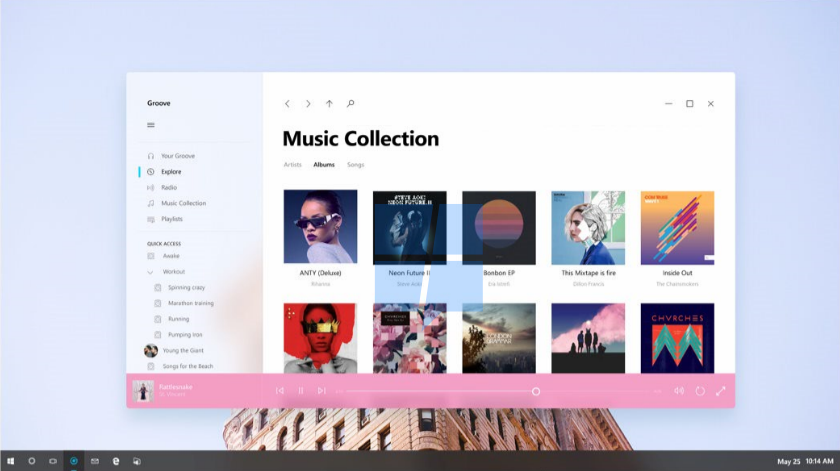
This almost reads as sarcasm. Some people really don't care about those things, and using them as examples of why you're baffled just highlights that disconnect between you and them. I don't use any bundled windows apps, and I'm rarely in the settings (and I just search for what setting I want), so iconography and whitespace design decisions in windows apps don't even factor into it for me.
Neither OS X nor Windows feel as comfortable as my customized FVWM config did, but windows gets a lot closer nowadays. I had to use OS X at work for a few years and it always grated.
> That's not even mentioning the forced updates
It's possible to disable them, you just have to put some effort into it (it requires regedit). I think this is the right decision. If you want to disable updates and you don't know how to change a registry setting, then for the good of us all, the answer is no.
The tracking is a valid concern though.
I don't want updates when I am in the middle of something full screen like a game, forcing a restart of the machine on me. This is madness.
I don't want ads for office 365, Cortana or edge on my desktop. I don't want to learn how to block them. I don't want to use an OS that feels like it is being milked for all it's worth in its dying breaths.
Edit: Also, have you set your active hours? Windows allows you to define the times you use your system so it won't attempt to update during those times. Additionally, you can set a specific custom restart time for when it will restart.
I tried to. I play games for a few hours either at night or early am -- say 6pm-1am or 5am-9am are my possible slots. Unfortunately, windows update will not accommodate this -- you are only allowed to set one window with an 8 (maybe 12) hour max, and it must be consecutive. I had to dig around to find this, and it still is not sufficient. I ultimately solved my problem by using the regex editor to convince windows I was on a metered internet connection. Unfortunately, this broke update all together. I turned it back and now its still broken -- apparently the magic auto-updater is the only way get updates -- there's no button I can click to just download the latest update and install it? (at this point I gave up)
I mean... that's just insane.
I was just in the windows update settings and there was a way at the top to check for updates right then. I didn't use it so I'm not sure if there's some other gotchas involved with that.
I have set active hours but for some reason my windows partition - and not my ubunutu partition, so it isn't a hardware issue - does not reliably remember my time zone. It is often reset without rhyme or reason to this random default (I think NYC). I don't always notice and change the time one when it boots up because I have steam launch in big picture mode.
Also, why does it even need to ask for active hours by default? I am using the machine at full-throttle. That is a really easy metric for "maybe wait until later". It's already logging everything I do and sending it to Microsoft, it would be nice to see some usuabiltiy features come out of all that data
Inconsistently working is a commmon theme of my experiences with windows. I am routinely baffled that I paid $100 for this experience and wish that there was better Linux game support for AAA titles. I know I throw my money that way whenever possible.
Some people run things all day long. My brother sometimes keeps the video game 7 days to die running all day at home while he's at work. Not updating when activity is detected is a good way to have it never update, and a good way to allow a virus to trigger a condition that may prevent automatic patches to holes it likes to use.
> I have set active hours but for some reason my windows partition - and not my ubunutu partition, so it isn't a hardware issue - does not reliably remember my time zone.
That's odd. Is it actually changing your time zone, or is it just off by a few hours? If it's just off by a few hours, my bet would be that it's a difference in how linux and windows set the system clock (one may prefer to keep the clock in UTC time, the other in the set time zone). If it's the actual time zone that's changing... I dunno, maybe some location service helper and a poorly mapped IP address? I haven't heard of that, but it does sound annoying.
Its definitely the time zone not persisting. I've navigated through seas of menus to change it to no avail.
http://tunecomp.net/disable-automatic-reboot-after-updates-i...
I agree its a good feature to ship enabled by default. Grandma who leaves her computer on for years at a time needs to have her security updates up to date.
I have a 2015 MPB and used it for 1 year before switching it to Windows because I got fed up of the apple dev environment.
It doesn't just run windows fine, it runs Windows with amazing speed compared to macOS. Everything feels (and is) snappier. I'm still left with a very expensive and under-powered machine.
PS. Installing Little Snitch, one becomes immediately aware that macOS does talk to base....a lot!
The point is, that "equivalent software" runs faster. I would wager that if Final Cut Pro was for Windows, and you run it on the very same MacBook12, it would run faster on Windows. Despite this, using Final Cut Pro an example is a bad one, because it was developed by Apple itself (and therefore assumed to be highly optimized to the OS) and it is not available for windows.
It is more useful to compare an equivalent 3rd party (neither made by apple or microsoft) application. I'm a developer, so I use a lot more software than just "apps" so maybe if you try to use a wider set of software, the difference in platforms will become apparent.
Admittingly, I don't have numbers. But I don't need numbers, because you can feel the difference as a user. Install it and see for yourself!
Windows seems to be a combination of 90's era throwbacks and 2edgy4you Metro design. If they've managed to improve this stuff recently I would be interested in switching, since there's a huge tax on hardware specs with Apple computers.
Windows 10 feels like it just wants to get out of my way, which is really nice, since for me the gold standard is a customized FVWM config I refined over a decade to be minimalist and extremely usable for work.
If you haven't used Windows 10, it's probably worth at least a look (as long as you don't mind or have ways to mitigate the privacy concerns).
I use MacOS, Windows, and Linux each and every day interchangeably. What I do is I start my productivity application(s) and spend time in that. I see OS when I'm copying files or when I'm in shell doing shit. Even when in shell, with baboon on Windows it's more or less the same experience across.
Only thing I want in all of OS' that is only in MacOS is preview. That thing is damn awesome. Everything else is invisible to me.
Not in my experience. My Windows 10 automation/unscrew-up script alone is like 5 kloc. And I bet 70% of that script could be replaced if I had real control of the system, like dropping a .config file in some folder instead of having to find hidden settings with nonsensical names deep down the regedit hole. Another example, you have to use some stupid hacks to make sure there are no Flash DLLs in your pc. No matter what you do they always come back in some security update.
You should see my ansible playbooks for our Windows Server systems, I don't mind PowerShell per-se but it takes a lot more effort to get anything done compared to my CentOS systems where I can template a config file and be done with it.
I really hope our vendors start supporting .Net Core soon, the SDK for our ECM software is the only reason we're still stuck on the full framework and having to manage a bunch of Windows VM's for our integration software...
I recommend you do your own script by choosing what you want from each type of script. I would release my script if I was sure it wouldn't break random people's computers, because IT WILL. I'm also running Windows 10 enterprise because I want as little telemetry and things shoved up my ass as possible.
Some Windows updates can change registry keys or disable certain policies. I monitor the commit log of other repos to know what I need to update, but they don't always cover everything. Feels like a lot of work but it's actually not.
Here's how I structured it:
- admin.ps1
--- admin-config.ps1 (policies, tweaks)
--- disable-services.ps1
--- remove-flash.ps1
--- ...
- user.ps1 calls
--- user-config.ps1
--- disable-gamedrv.ps1
--- disable-services.ps1
--- ...
Because if you're using a regular user account (like you should) you need to run 3 things:
- admin.ps1 as admin
- user.ps1 as admin
- user.ps1 as your regular user
I gave up on using runAs or any of the things recommended on stackoverflow, something always go wrong so it's easier to do it this way.
For a fresh install, I recommend that the first thing you do is update everything and let Windows install the 200 apps you don't want. Run the 3 things like I mentioned, reboot, run it again, reboot.
https://github.com/cluberti/VDI/blob/master/ConfigAsVDI.ps1 https://github.com/W4RH4WK/Debloat-Windows-10/ https://github.com/dfkt/win10-unfuck https://gist.github.com/sven212/5febf372aaa6e4cc1fda71ad9637...
My installation is months old and it runs like new even after heavy usage, hardware changes, tons of apps and games installed/uninstalled (this kills Windows 7). Just be careful what you remove, don't ever install ccleaner or any shit. All you need is sysinternals tools.
I'm too lazy to proof-read/make this shorter, hope it helps somebody.
Whatever is left after bricking it, I suppose?
You do know that there were actual lawsuits against Microsoft over the Windows 10 auto upgrade right?
https://www.amazon.com/Winning-Against-Windows-10-Microsoft-...
Even assuming that issue was overblown, I distinctly remember that Catbert-style perma-nag message appearing on each login asking me to upgrade. Microsoft doesn't even deem its users worthy of a simple "Don't bother me again" close window.
Let us conservatively say about 10% of the 300 million people who supposedly got the Windows 10 update didn't actually want it. That's about 30 million folks who would disagree with this notion that Microsoft "lets me do whatever I want with my computers and my software".
The best thing Microsoft and Dell have going for them in the laptop space... the 2016 MacBook Pro w/Touch Bar. It was a dud. The GPU issues were the final straw for me.
I thought that switching back to Windows would be a HUGE hassle. The Windows Subsystem for Linux took the pain out of it. That, and I no longer have to fight the we-don't-have-a-macOS-version of $APP issues.
If Apple doesn't care about their computers, why should their users? ¯\_(ツ)_/¯
I thought their sales report indicated it is their highest selling macbook to date?
My least favorite thing is I have to use the Registry to fix it
By the end of the month I had gone slightly loopy (seriously - MacBook withdrawl is real), gave up and bought a 2015 rMBP. Personally I find macOS, and its deep integration with Apple's hardware, too intuitive and 'invisible' to the way I work to give up on it.