Ugly, but it works
In this particular case, the best email "app" on the web still struggles to match the functionality of 15 year old native applications in the same category.
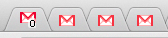
With Multiple Users, there's a bit more overhead with seeing you received a new email/chat and switching to the appropriate tab.
This is just like how I type "server" instead of "serve" all the time. (In fact, I just made this mistake while typing serve and had to concentrate not to do it that time too.)
It's a known issue. So far I haven't found a good solution or explanation.
https://code.google.com/p/chromium/issues/detail?id=167717
https://code.google.com/p/chromium/issues/detail?id=179822
http://productforums.google.com/forum/#!topic/gmail/FCcFN2N9...
The benefit for me is that this does not only work for for Google related products (gmail/analytics), but also for other products you use. In our case Outlook Web Access, but also for example Trello and GitHub.
I'm constantly finding myself logged into YouTube with my work account after logging into Google Drive to see a document shared to me by the coworker. Except after clicking on the link in the 'so-and-so shared a…' I just get a regular 401 'You're not allowed to access this content', because I'm logged in as a different account, but not provided an option to change accounts.
I have three google accounts: work, 'Google-related stuff' (gmail, calendar, other google services), and YouTube, and I'm constantly logged into the wrong one. Google seems to assume that everyone has a Google account, and only one, and they're always logged into only that. As soon as you break those assumptions, things start behaving in unfortunate, unpredictable, and inconvenient ways. Even with their new ability to change between profiles, it doesn't work all the time, and when it fails it's overly confusing and arbitrary.
Both Molly and Amy (in the OT) have gotten confused and assumed that the accounts had been merged indefinitely (who can blame them? This is as much PEBKAC as horrible UI) so they attempted to "unmerge" them, ending up deleting one of the accounts.
The way to "unmerge" them is to log out of Google. Then, next time somebody logs in, there will only be one account.
This UI is horrible, I had a similar uncomfortable moment trying to log one account but not the other, even though I knew that they had not gotten merged, it sure seemed like it. The intention was good, the execution lacking (my guess is that there were lots of technical reasons this couldn't be done cleaner).
As soon as Chrome introduced Multiple Users[2], I started using that and it's much better, with less mental overhead to check which account is loged in (I use a black theme for one account, a white theme for the other). For other people/accounts, I just use Incognito mode. For most end users, this is still too much overhead for them, but in that case the only solution I could see is autologout, which has its own problems.
1: https://support.google.com/accounts/answer/1721977?hl=en
2: https://support.google.com/chrome/answer/2364824?hl=en