For the most part, Lenovo's Thinkpads have a BIOS setting that allows you to switch the Fn and Ctrl keys. This has been around for a while now and is still an option on newer Thinkpads (although, I can't confirm that this option exists in the X1).
You can also use xmodmap, but that's not going to work outside X11 (if you tend to do much work without X)
I have both a Dell and a Thinkpad, and it's definitely much more convenient to have Ctl readily accessible with the left pinky than Fn, which you get on the Thinkpad.
The Ctrl key is so often used by developers, especially when one uses Emacs shortcuts (not only in Emacs itself, but also in Readline-enabled shells or other software), that you can easily get RSI. Remaping Caps-Lock as a Ctrl is a necessity and once you use it you'll never want to go back to the default left Ctrl.
Then I got Dell (E6400) and liked the keyboard even more. The feel was better. Only thing I missed was the light from Thinkpad. While the keyboard was backlit, I found the top light to be more convenient.
What I meant is that it's easier to access on a Lenovo keyboard than on a non-Lenovo keyboard, since it's closer. I have a hard time hitting Left Ctrl on the Dell keyboard than on my Lenovo keyboards.
Dell's Vostro V131 has my favorite keyboard I've ever used on a laptop, it's been perfect for me since whenever I got it. http://images.anandtech.com/galleries/1486/dell-vostro-v131-...
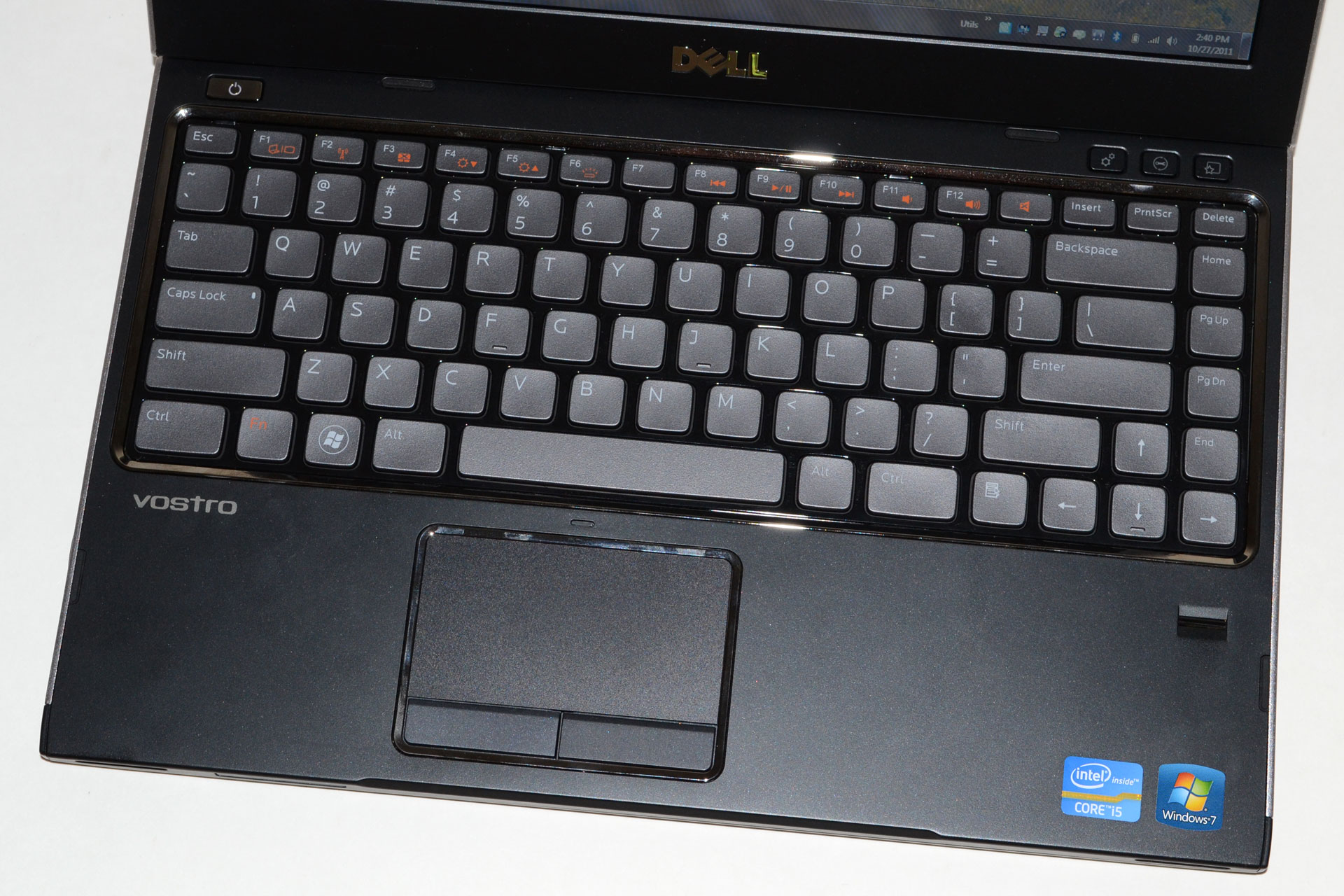
[1] http://cdn.gottabemobile.com/wp-content/uploads/2012/05/thin...

IMO, the classic thinkpad layout nailed it. Unfortunately, this has been replaced by the chicklet layout. I love the big delete button on the x220[2].
[1] http://cache.gawkerassets.com/assets/images/4/2011/01/500x_l...

[2] http://cdn-static.zdnet.com/i/story/30/40/092594/thinkpad_x2...

I preferred the feel slightly on the classic thinkpad keyboards, but these keys feel bigger in use which is nice too. Having the arrow keys separated slightly is a big win. So yeah, while I do slightly prefer the classic keyboard, I don't think there's much in it, and the underlighting is quite nice.
>The funky Fn/Ctrl placement is a Thinkpad thing
That might be literally true for some sense of the word "setting", but its certainly misleading: in the lower levels of OS X, the function key can almost certainly be remapped to control.
The only reason I had to add the qualifier "almost certainly" is that I never had to learn how to use OS X's analog to loadkeys or xmodmap because for my purposes it sufficed for Emacs to swap function with control.
But since Emacs has access to the "raw scancode" for the function key, OS X must have it, too.
In other words, the Mac is not like one of those PC laptops where the interpretation of "the function modifier bit" takes place at a level lower than the OS. Consequently I would be shocked if there were no way to swap function with control OS-wide if one is willing to research the question on the net.
Probably the piece I was missing. I grew up on PC keyboards but never hit Ctrl with my palm (I can't even figure out how I'd do it). And thus never understood the love some have for a control key in the bottom-left corner (with Fn between Alt and Control): even without the Caps remap, Ctrl next to Alt (as on thinkpads and macs) means easier pinkie travel (almost solely vertical versus an awkward stretch to the bottom and side) compared to a Ctrl stuffed in the far corner.
Yes, that's how I figured it'd work (as the palm would require having the fingers over the top of the keyboard), but I still find it odd.
Then again, my "desktop" keyboard has been an MS Natural Ergo 4000 for the last decade or so, so it's got a very small control key with precious little definition compared to the surrounding keys, can't help either.
The build quality wouldn't be quite ok for a $1000 laptop and is infuriating for a $1700 one. And the screen is just ok
About the linux experience: I don't mind the placement of the left ctrl key, but PrtScr sitting next to right alt is extremely annoying in Ubuntu.
Battery life in Linux is quite shorter than in Windows, wake up from suspension randomly takes longer than a full boot and there's quite a lot of battery drain while suspended.
And I just manually upgraded to the new 3.8 kernel to see if some new driver version there fixes the random full freezes i've been getting.
So I kinda wish I had waited for the Dell. I knew it was coming but got tempted by the black sexyness of this thing.
https://www.dell.com/us/business/p/xps-13-linux/pd?refid=xps...
Maybe I'm being way too picky, but the layout and feel of the keyboard is, aside from the screen, the other massively important thing that you don't get to change on a laptop.
I mean we are typists before we are programmers. Isn't it worth letting me see how the ins/del/home/end cluster is laid out?!
~~~
edit: It looks to be agreeable. Ctrl occupies the bottom-left and Del occupies the top right, which I've found very reasonable in the past (easy to find quickly when hopping onto a new device)
The Home/End/PageUp/PageDown are loacted on the arrow keys, which actually seems pretty reasonable:
http://www.cdn2.loopygadgets.com/wp-content/uploads/2013/02/...
Note that the Thinkpad X1 does not have Ctrl in the bottom left, instead its the Fn key. On the plus side, the X1 kept Home and End keys up top, with dedicated PageUp/PageDown near the arrow keys.
http://blog.laptopmag.com/wpress/wp-content/uploads/2012/08/...