Re:The End of Windows 10: a toolkit for community repair groups
by EvanAnderson on Friday July 18, 2025 @02:46AM
(#44601923)
A Windows 11 24H2 ISO will install on a machine w/o a TPM 2.0 module using the command line argument "/Product Server". (You can do this as either an "upgrade" to Windows 10 or on a clean machine by using the Shift-F10 shortcut to get a command prompt and run the setup from there.)
I'm on mobile and don't have a reference handy but search-engine this and you'll find instructions.
Re:The End of Windows 10: a toolkit for community repair groups
by genocidicbunny on Friday July 18, 2025 @03:09AM
(#44602038)
Thanks. Hopefully if there's a 25H1 or 25H2 they will also support this, since my plan is to hold onto W10 until the end of the year.
Re:The End of Windows 10: a toolkit for community repair groups
by EvanAnderson on Friday July 18, 2025 @03:49AM
(#44602281)
I'd snag a 24H2 ISO. If the bypass functionality is removed from future releases you can always install from the older ISO and update to the current version. I think it's highly unlikely they'll push an update breaking already-installed unsupported PCs. That would garner so much bad press.
Re:The End of Windows 10: a toolkit for community repair groups
by Paianni on Friday July 18, 2025 @05:38AM
(#44602803)
Wasn't this patched out about 18 months ago?
Re:The End of Windows 10: a toolkit for community repair groups
by EvanAnderson on Friday July 18, 2025 @08:42AM
(#44604066)
I have installed a half-dozen unsupported machines using a 24H2 ISOA snd this command line argument in the last couple months. It may be patched on newer builds but it's working fine on the ISO I'm using. If I remember I'll post a hash when I'm on a PC.
Re:The End of Windows 10: a toolkit for community repair groups
by yourusername on Friday July 18, 2025 @02:43AM
(#44601898)
Last i checked you can still use DISM to apply a image to the local drive, this bypasses the installer completely.
Re:The End of Windows 10: a toolkit for community repair groups
by jpc0 on Friday July 18, 2025 @05:41AM
(#44602825)
> On the other hand, if you install Windows 11 on a machine that doesn't support it, you get all security updates for the next year, and all the drivers you need are typically present in Windows Update.
This is very far from my lived experience.
Same generation of hardware, same workflow. Works flawlessly on linux distros. Something breaks after every single windows update when running win11, almost always related to driver compatibility with win11.
I’ve had to reinstall drivers after every update, had to find more recent but compatible drivers that aren’t explicitly listed as supported etc.
Re:The End of Windows 10: a toolkit for community repair groups
by SirMaster on Friday July 18, 2025 @11:36AM
(#44605903)
I just use Rufus to copy the ISO to the USB stick. And when selecting a W11 ISO, Rufus asks if I want to disable the TMP 2.0 requirement. This works just fine for the latest 24H2 ISO.
https://rufus.ie/pics/screenshot4_en.png
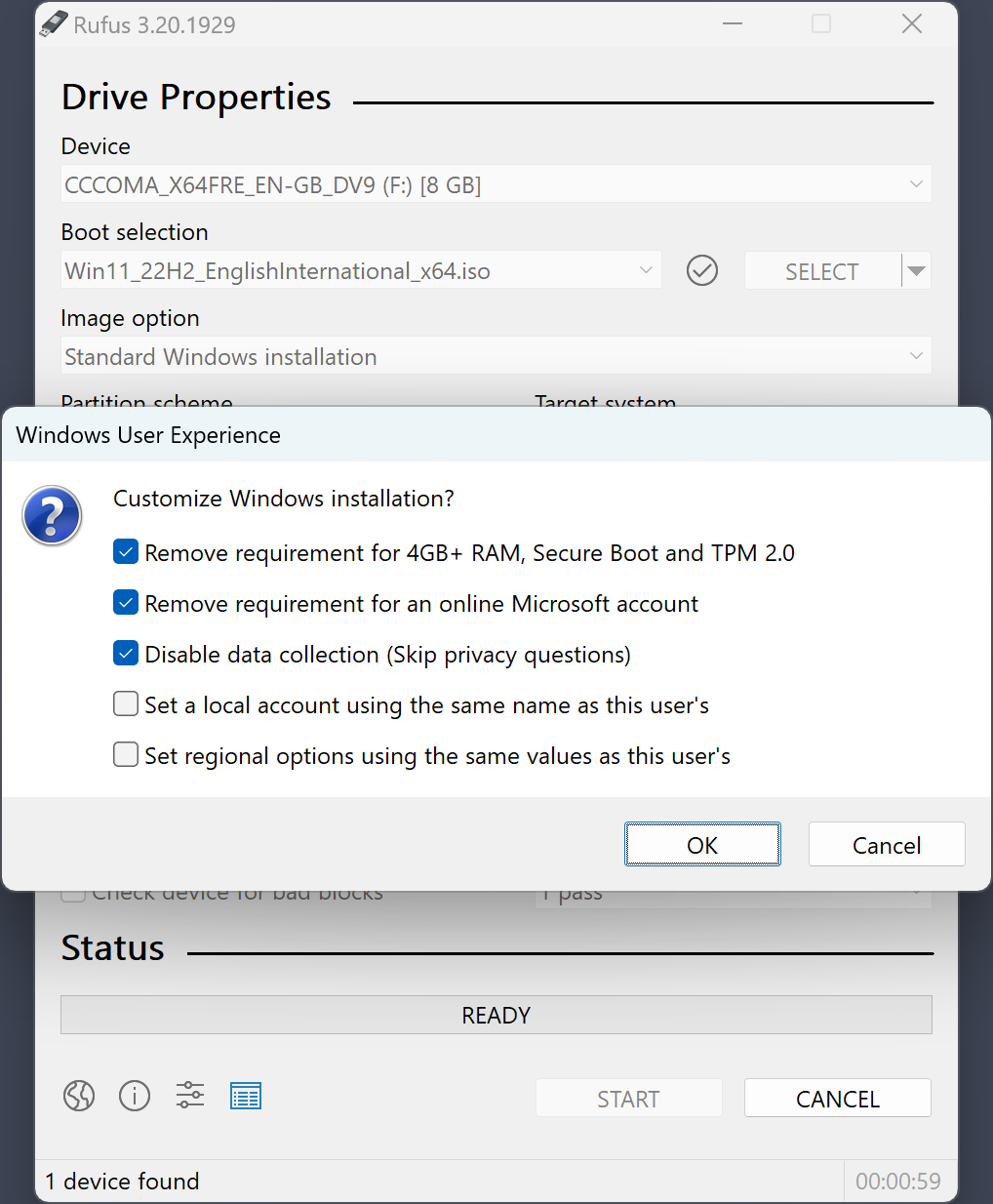
There are other software to help with this too.
Re:The End of Windows 10: a toolkit for community repair groups
by ivraatiems on Friday July 18, 2025 @07:49PM
(#44611123)
This is what I do. After you use Rufus for these settings, it will install on any machine with which 64-bit Windows 10 was compatible, pretty much. I've yet to have a machine not work.
Re:The End of Windows 10: a toolkit for community repair groups
by noisem4ker on Saturday July 19, 2025 @08:00AM
(#44614785)
Counter data point: an i7 860 based machine of mine with an Asus P7P55D motherboard from 2009 goes into boot loop after Windows 11 is installed. I tried multiple times, with the same result, before giving up.
Re:The End of Windows 10: a toolkit for community repair groups
by ivraatiems on Sunday July 20, 2025 @05:34PM
(#44629511)
Interesting -- did you install using UEFI or legacy BIOS/CSM?
Does the install complete and then fail, or does it never complete? What stage does it end at?
Re:The End of Windows 10: a toolkit for community repair groups
by noisem4ker on Monday July 21, 2025 @02:31AM
(#44632320)
There's only BIOS on such an old motherboard. Windows 11 locks up or reboots (can't remember precisely) after it has been installed from media and it's supposed to boot on its own. Perhaps even after showing those cheesy "we're setting up things for you" messages. I did not bother trying safe mode. This was a few months ago, so version 24H2 I think.
Re:The End of Windows 10: a toolkit for community repair groups
by anticensor on Saturday July 19, 2025 @05:38AM
(#44613961)
You can install an older image and upgrade it, but the main problem is user apps that assume the TPM is there (Adobe CC, Adobe DC, EAC, etc)
Also, what sorts of machines are you installing W11 on that are 'unsupported'? My daily driver initially came with W8.1 and for a while, I couldn't update to W10 because there were no W10 wifi drivers available; The manually-installed 8.1 ones were extremely flakey. And this isn't some no-name laptop too, it's a Thinkpad which you'd think would be well supported.