News for hackers. Stuff that matters.
Re:Keypirinha: A fast launcher for keyboard ninjas on Windows by rantallion on Wednesday January 17, 2024 @04:16AM (#39025317)
I use Alfred on my Mac and would kill for something with the same feature set and performance. Is Keypirinha the Windows equivalent I should be using? Nothing else I've tried in the past came close.
Re:Keypirinha: A fast launcher for keyboard ninjas on Windows by monroewalker on Wednesday January 17, 2024 @04:33AM (#39025488)
Alfred has a lot of features. What specifically do you use that you miss not having on Windows?

Personally the clipboard history and universal actions are far and away the things I'd be most pained to lose. Curious what the biggest features are for other people though

Re:Keypirinha: A fast launcher for keyboard ninjas on Windows by jen729w on Wednesday January 17, 2024 @05:25AM (#39025894)
Having an application switcher vs. launcher.

Launching Outlook once is great*, if it’s not already open.

Launching Outlook again, if it’s already open, is absurd. But that’s the behaviour of every single Windows ‘launcher’ that I ever used.

Compare to Alfred**: if it isn’t open, it launches it. If it is, it switches to it.

(*Inasmuch as launching Outlook can be considered ‘great’.)

(**Or any other Mac ‘launcher’, all of which are actually ‘switchers’.)

Re:Keypirinha: A fast launcher for keyboard ninjas on Windows by demetris on Wednesday January 17, 2024 @07:23AM (#39026743)
For frequently used apps, I do what eviks says.

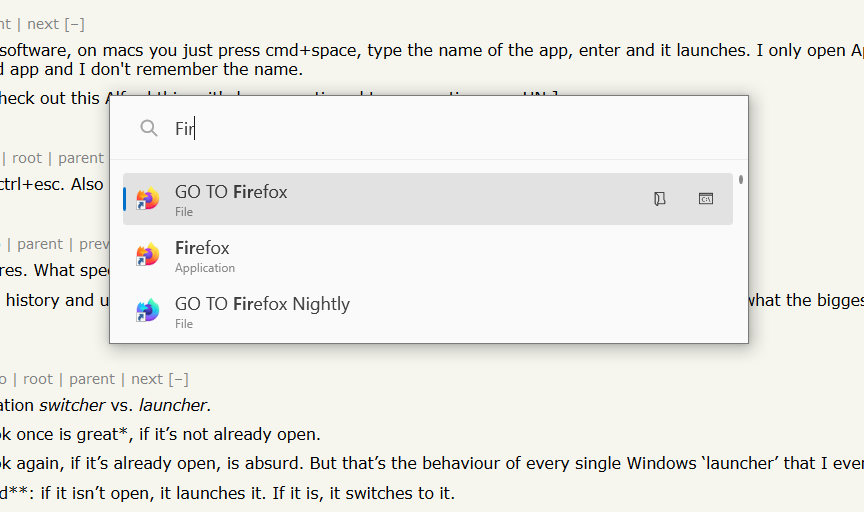
It’s a solution that annoys me as an idea, but it’s the only thing I have found that works for me. I have about 20 individual AutoHotkey scripts that are named GO TO <application name> and that go like this:

  SetTitleMatchMode 2

  if (not WinExist("Mozilla Firefox ahk_class MozillaWindowClass")) {
    Run A_ProgramFiles . "\Mozilla Firefox\firefox.exe"
  } else {
    WinActivate
  }

  Return
I also have individual LNK files that target the AutoHotkey scripts, so that you can run the scripts from any launcher. Here is how it looks in PowerToys Run:

https://op111.net/images/20240117-powertoys-run-autohotkey-s...
Re:Keypirinha: A fast launcher for keyboard ninjas on Windows by csdvrx on Wednesday January 17, 2024 @11:48AM (#39030177)
I did the same thing on Windows, and when I recently moved to linux, I upped my game with Hyprland workspaces:

- if the window doesn't exist, open it (*)

- if the window exists, change focus to it (*)

- (*): on it own workspace, which allows me to run windows in full screen mode, without a title bar wasting space!

The workspaces are configured by a set of rules (ex: I have mozilla|firefox|edge => go to workspace #2 for browsers)

Hyprland is both a tiling and a normal window manager, so you can make a window either. I'm running one terminal in quake mode, with what's called a special workspace

I added a few dedicated keys:

- F2: send me to workspace #2

- Win+F2: reassign the window to workspace #2, say if I want to have a text editor to take notes while reading a page

- Win+Shift+Arrows: resize the tile, because I want a lot of space for the browser and not so much for the editor

- Win+J: toggle the tile, because I want the text editor at the bottom (or top) of the screen, not on the left (or the right)

Re:Keypirinha: A fast launcher for keyboard ninjas on Windows by eviks on Wednesday January 17, 2024 @06:20AM (#39026293)
Such a common flaw indeed, though I think it might be more of an OS convention rather than the brilliance of Mac launchers, same as being able to have an app without any windows on a Mac

For frequently used apps at least you could have shortcuts via AutoHotkey that do exactly that

- switch to an existing app if it's running,

- open a new one if it's not, and

- minimize an existing app if it's already focused

Re:Keypirinha: A fast launcher for keyboard ninjas on Windows by jwells89 on Wednesday January 17, 2024 @08:51AM (#39027642)
Yeah this gets into how on macOS, applications != windows and instead, windows are hosted by applications, and while it’s technically possible to run multiple instances of an application, in practice this is almost never done outside of debugging-type situations. If you have, say, multiple Firefox windows open, on macOS they belong to the same parent Firefox process while this is not necessarily true on Windows and Linux.

This turns every launcher into a switcher if the app in question is already open. Even a two line AppleScript will behave this way.

Re:Keypirinha: A fast launcher for keyboard ninjas on Windows by rkangel on Wednesday January 17, 2024 @06:06AM (#39026168)
It's worth knowing that on Windows (and on Gnome) Win+1, Win+2 etc. map to the first, second etc. window on the task bar.

I pin the key applications in the same location (terminal on 1, VS Code on 2, Browser on 3) and so can quickly switch between them.

Doesn't help for the more than 5 or 6 key applications though.

Re:Keypirinha: A fast launcher for keyboard ninjas on Windows by mst on Wednesday January 17, 2024 @11:38AM (#39030041)
I also found it helpful when I discovered that one can Alt-Tab-release-Tab and keep Alt held and then navigate the tabbale-to windows with the arrow keys, including hitting Del to nuke one.

Oh, and Win-Down for minimise since Alt-Tab away from an RDP session doesn't do what I want.

(Win+<digit> is still the best, along with Ctrl+<digit> for browser tabs, but given you already covered that one I figured I'd share my next favourites)

Re:Keypirinha: A fast launcher for keyboard ninjas on Windows by abhinavk on Wednesday January 17, 2024 @05:50AM (#39026050)
Powertoys Run (https://github.com/microsoft/powertoys) can do this. There are not that many plugins as Alfred but Window Switcher is built-in.
Re:Keypirinha: A fast launcher for keyboard ninjas on Windows by eviks on Wednesday January 17, 2024 @06:29AM (#39026359)
Powertoys Run does it worse, it adds a new line from a plugin, so now you have two lines for the same app, and Alfread/Keypirinha at least have shortcuts to launch eg, line number 2 which powertoys doesn't have, so you have to scroll to pick whether you want a new instance or switch to an existing one
Re:Keypirinha: A fast launcher for keyboard ninjas on Windows by abhinavk on Wednesday January 17, 2024 @07:37AM (#39026878)
Yes. It’s still not perfect and the configuration is a bit unintuitive. I was able to get a closer experience to Alfred by setting Window Walker plugin priority to highest at 1000. I switch apps way more than I launch them so it kinda works.
Re:Keypirinha: A fast launcher for keyboard ninjas on Windows by neodymiumphish on Wednesday January 17, 2024 @08:52AM (#39027646)
Isn't there a prepend for the switcher? You can use something easy to reach as the prepend when you just want to switch apps, like `.` and the use powertoys run to trigger it. This would prevent the duplication.
Re:Keypirinha: A fast launcher for keyboard ninjas on Windows by eviks on Thursday January 18, 2024 @02:35AM (#39039029)
This would also prevent finding the app if it's not running, so you're just shifting the location of the bug around
Re:Keypirinha: A fast launcher for keyboard ninjas on Windows by rantallion on Wednesday January 17, 2024 @10:19AM (#39028868)
In-line calculations. Improved file/folder searches. Ability to write custom workflows, especially those that might call other scripts/APIs.

I can't remember the name now, but there was a JavaScript-based launcher that did _almost_ everything I wanted but was still very early in development and a little too buggy for me at the time. UX wasn't quite as polished as Alfred either - adding custom logic involved dropping your custom scripts into the right folder and restarting the process, IIRC.

Re:Keypirinha: A fast launcher for keyboard ninjas on Windows by proalph on Thursday January 18, 2024 @05:33AM (#39040167)
Keypirinha supports plugins. One of the plugins is Ditto which uses Ditto for Windows to access clipboard history.
Re:Keypirinha: A fast launcher for keyboard ninjas on Windows by nottorp on Wednesday January 17, 2024 @05:24AM (#39025888)
Even without 3rd party software, on macs you just press cmd+space, type the name of the app, enter and it launches. I only open Applications in finder when I'm looking for a rarely used app and I don't remember the name.

[Makes note to self to check out this Alfred thing, it's been mentioned too many times on HN.]

Re:Keypirinha: A fast launcher for keyboard ninjas on Windows by MikusR on Wednesday January 17, 2024 @05:28AM (#39025920)
On Windows it's ctrl+esc. Also known as the Windows key.
Re:Keypirinha: A fast launcher for keyboard ninjas on Windows by nottorp on Wednesday January 17, 2024 @07:11AM (#39026653)
That's relatively new isn't it? Windows 10 new. Last Windows I've used extensively was 7...
Re:Keypirinha: A fast launcher for keyboard ninjas on Windows by MikusR on Wednesday January 17, 2024 @07:16AM (#39026691)
Introduced in Windows Vista. So 16+ years ago. Before Windows 7.
Re:Keypirinha: A fast launcher for keyboard ninjas on Windows by nottorp on Wednesday January 17, 2024 @08:17AM (#39027213)
Who used Windows Vista?
Re:Keypirinha: A fast launcher for keyboard ninjas on Windows by mst on Wednesday January 17, 2024 @11:35AM (#39029998)
It came pre-installed on one of my Thinkpads, and took me about as long to tweak as any other baseline Windows install.

IME most of the people who had a bad time with it either tried to treat it like a Win2k install or kept installing/uninstalling things (Vista rotted annoyingly fast if you were that sort of indecisive about your app loadouts).

Install firefox, set up a usable bash+X11 system (IIRC I used colinux and then cygwin), install two or three games, and then Do Not Touch The Configuration From Then On and it was just as reliable for me as Windows 10 is.

(in the sense that my only recurring problem in both cases was Intel Wifi drivers being stupid, everything else was the traditional Windows "it's a bit like training a brain-damaged hyena but if you know what you're doing it -stays- trained" experience ;)

Re:Keypirinha: A fast launcher for keyboard ninjas on Windows by nottorp on Wednesday January 17, 2024 @11:50AM (#39030201)
> Install firefox, set up a usable bash+X11 system (IIRC I used colinux and then cygwin)

That's fun. Now you'd use WSL.

Re:Keypirinha: A fast launcher for keyboard ninjas on Windows by mst on Thursday January 18, 2024 @07:54AM (#39041103)
Yup, WSL2 on the machine I'm currently sat at, with systemd and xrdp installed so I can RDP across the divide to get my full X11 config* (I am very attached to my fvwm2 setup so WSLg isn't suitable for my personal preferences) - works very nicely.

I did use VMWare Workstation for a bit many years ago and more recently Hyper-V, but since the primary purpose of my X11 setup is ssh-ing to the dev rigs where I do my actual work, WSL2 absolutely wins out these days.

* under WSL1 I used a windows-side VcXsrv instance, but WSL2 being a Hyper-V slice means it has to do X11 over the (internal) network so if I need to restart network related stuff all my clients crashed; using RDP means I just have to reconnect the RDP client

Re:Keypirinha: A fast launcher for keyboard ninjas on Windows by MikusR on Wednesday January 17, 2024 @09:12AM (#39027895)
The feature has been there since then. It's completely irrelevant who used it. It was also in Windows 7. Windows 8. Widows 10 and Windows 11.