Re:Learning VIM while playing a game
by drostie on Monday April 23, 2012 @08:59AM
(#3878499)
On a side note, several times when playing through the game I noticed that my motions weren't working, and traced it back to this: that for me, the home row is jkl; and not hjkl. I don't know very much about vim -- is there a reason that you have to put your hand in the "wrong place" on the keyboard?
[ Parent
| on HN ]
Re:Learning VIM while playing a game
by tverlinden on Monday April 23, 2012 @09:24AM
(#3878619)
vi, which vim is based on, was programmed on the ADM-3A terminal, where the arrow keys are on the H, J, K, and L keys.
http://www.catonmat.net/images/why-vim-uses-hjkl/lsi-adm-3a....
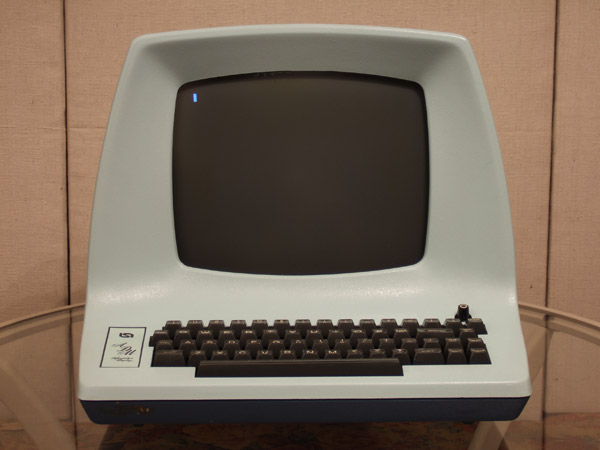
http://www.catonmat.net/images/why-vim-uses-hjkl/adm-3a-hjkl...
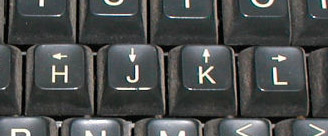
Ah. So it's a sort of Big Software Syndrome type thing -- "we could do it in a more intuitive way for new people, but it would break all of these existing programmers who learned it the less intuitive way, so let's leave it the original way" -- or am I missing something?
Re:Learning VIM while playing a game
by alphabethos on Monday April 23, 2012 @02:27PM
(#3880223)
That may have something to do with it, but in practice, I find myself moving up/down (j/k) files far more often than I need to backtrack by a single character, and when I do, as often as not my pinky flies up to backspace (note this works by default only in Vim). It ends up being the most natural to keep your hands on the home row anyway.
Keep your hands on JKL;
This is also an important point because it strikes me that as I play this game I am learning that as an antipattern. Perhaps I should just stick with not-vim.
Re:Learning VIM while playing a game
by doronlinder on Tuesday April 24, 2012 @06:47PM
(#3886723)
Your fingers should stay on JKL;. Going left involves lifting your index finger and moving it the the left, pressing H, and returning it back to J. When you're more proficient in VIM, you usually don't use h much, but ^ or 0 or T or F or b, lots to choose from :)