News for hackers. Stuff that matters.
Re:Apple's developers reflashed Mac ROMs in the '90s by Reason077 on Monday November 27, 2023 @06:54AM (#38431229)
> ”See that thing that suspiciously looks like a CD-ROM drive on the left? It’s not. It’s a blank cover … I pressed the button thinking the CD tray would come out. If you push the button hard enough, it gets stuck back in there.”

Pretty weird and un-Apple-like to have a physical eject button at all. The mid-90s were such a weird time to be alive.

Re:Apple's developers reflashed Mac ROMs in the '90s by sjsdaiuasgdia on Monday November 27, 2023 @08:38AM (#38432113)
I really enjoyed the handful of mid-90s Mac models where the power button was just to the bottom right of the 3.5" floppy slot, very near where you'd find the eject button relative to the floppy slot on pretty much every PC of the era.
Re:Apple's developers reflashed Mac ROMs in the '90s by morsch on Monday November 27, 2023 @03:13PM (#38437586)
It's hard to describe just how cool the soft eject mechanism was. At least to my young impressionable mind. I can still remember the sound it made. It made PCs appear archaic.
Re:Apple's developers reflashed Mac ROMs in the '90s by weinzierl on Monday November 27, 2023 @10:06AM (#38433069)
It was in the mid-nineties and I had to hand in my weekly lab report. As my printer at home had decided to go on strike once again (as they used to do in the mid-nineties) I decided to print it in the university's library. So I went, still a quarter to the deadline, with my little 3.5 inch floppy disk. All the PCs were taken so I resorted to the only Mac.

I was a little excited, because these jewels were expensive back then, and usually always taken by someone that seemed to have more important design tasks to do than I had. Now I had the opportunity, for once.

I inserted my floppy, opened the document, sent it to the printer. All went fine until I wanted to get back my disk to rush to the lab session. No button to eject, nowhere to be found, so I asked one of my fellows sitting at a PC. He told me to drag the disk into trash bin. Yeah, right, sure I believe that! So I asked another guy, and sure he said I should throw my disk into the bin.

Now, these lab reports were important, because you needed to pass all of them to be allowed to write the test at the end of the semester and there were only two substitute dates. So I had little choice. I dragged the little disk icon over the little bin icon and let go. I already saw all my work on the disk gone but to my great surprise the disk ejected immediately and completely unharmed.

My lab report was handed over in time, it passed. The two substitute dates at the end of the semester never materialized because the prof was sick, as every year before and after - as I lerned. So, good on me to trust my fellow students but g00daxxit terrible UI!

Re:Apple's developers reflashed Mac ROMs in the '90s by filchermcurr on Monday November 27, 2023 @10:20AM (#38433251)
To be fair to the UI, there's also an 'Eject' option in the menu bar when you've selected the disk. There's also a keyboard shortcut. Dragging it to the trash is just more fun!

Actually, if memory serves, dragging to the trash was a shortcut for ejecting AND... what did they call it... putting it away, I think. Normal eject would leave a ghost of the floppy disk so when you inserted another one, you could copy from one floppy to another. You had to 'put away' to remove the ghost.

Re:Apple's developers reflashed Mac ROMs in the '90s by wolfgang42 on Monday November 27, 2023 @11:57AM (#38434719)
The Mac had a distinction between “Eject” and “Put away” mostly as a relic of the days when it had a single 400k floppy drive, so “ghost” disks were used to keep track of however many disks you needed to juggle whatever task you were doing. For example, you’d boot the computer, eject the System and insert your application, start it, then eject the application and insert your document; the system would know about all 3 disks, and whenever it needed something off a different disk it would automatically eject and prompt you to “Please insert the disk: «Name»”.

In this world, the split makes perfect sense: you eject a disk when you want the drive slot to be free, but you don’t put it away until you’re done with it. Once hard disks became standard equipment, the floppy drive was relegated to data transfer and you almost always wanted “Put away”, but renaming the menu items to what new users expected would have confused existing users.

Re:Apple's developers reflashed Mac ROMs in the '90s by Reason077 on Monday November 27, 2023 @11:06AM (#38433960)
Modern (as in, the last 20 years or so) versions of macOS still have this feature, except when you start dragging an electable volume, the icon changes to an eject symbol to make it clear that you’re not actually trashing anything…
Re:Apple's developers reflashed Mac ROMs in the '90s by benjaminpv on Monday November 27, 2023 @10:19AM (#38433243)
Decades late, but they could have told you to use Special: Eject Disk if dragging to the trash was too much for you. Then you'd have to grapple with what to do now that the physical disk was in your hand but its icon remained. There was also...Command+Y, I think?
Re:Apple's developers reflashed Mac ROMs in the '90s by bonton89 on Monday November 27, 2023 @12:42PM (#38435408)
Better than my similar Mac story from the early aughts. I did not frequently use Mac computers but needed to quickly print a document I had burned to CD. For whatever reason, I was in the Mac computer lab which had nothing but what I believe were Power Mac G3s. Inserting when fine, and I knew from using those original black and white Macs in high school that dragging the disk to the trash would eject. When I did so I was rudely informed I lacked permissions to unmount a disk that I had myself just inserted and used.

Fortunately, the lack of an eject button was a farce on this machine. The CD drive was just your garden variety PC drive and if you aren't shy about abusing the facade door Apple placed over top of it you can still get to the eject button.

Re:Apple's developers reflashed Mac ROMs in the '90s by flir on Monday November 27, 2023 @10:38AM (#38433505)
2012 Macbook Pro had a physical CD eject button (it was top-right of the keyboard). Control was probably routed through the OS, so that may not be what you meant, but it was definitely physical.
Re:Apple's developers reflashed Mac ROMs in the '90s by dev_tty01 on Monday November 27, 2023 @10:49AM (#38433676)
I saw a sales droid demoing a Mac at Comp USA years ago. That model had the manual eject/inject button underneath the CD tray because in normal use you never needed to push the button. To eject you drag it to the trash on screen. To inject, you just push on the tray a bit and it detects that and pulls it in. The sales droid was talking about how stupid it was to have the button there because it was blocked by the tray, never realizing that he just needed to push on the tray a bit. Ugh.
Re:Apple's developers reflashed Mac ROMs in the '90s by Reason077 on Monday November 27, 2023 @11:00AM (#38433870)
Oh yeah, Macs had that eject button for years. Until pretty late in the Intel era, IIRC.

But you could “eject” (unmount) anything with it, disk images etc. It wasn’t hardwired to any particular drive.
Re:Apple's developers reflashed Mac ROMs in the '90s by ylee on Monday November 27, 2023 @11:07PM (#38442225)
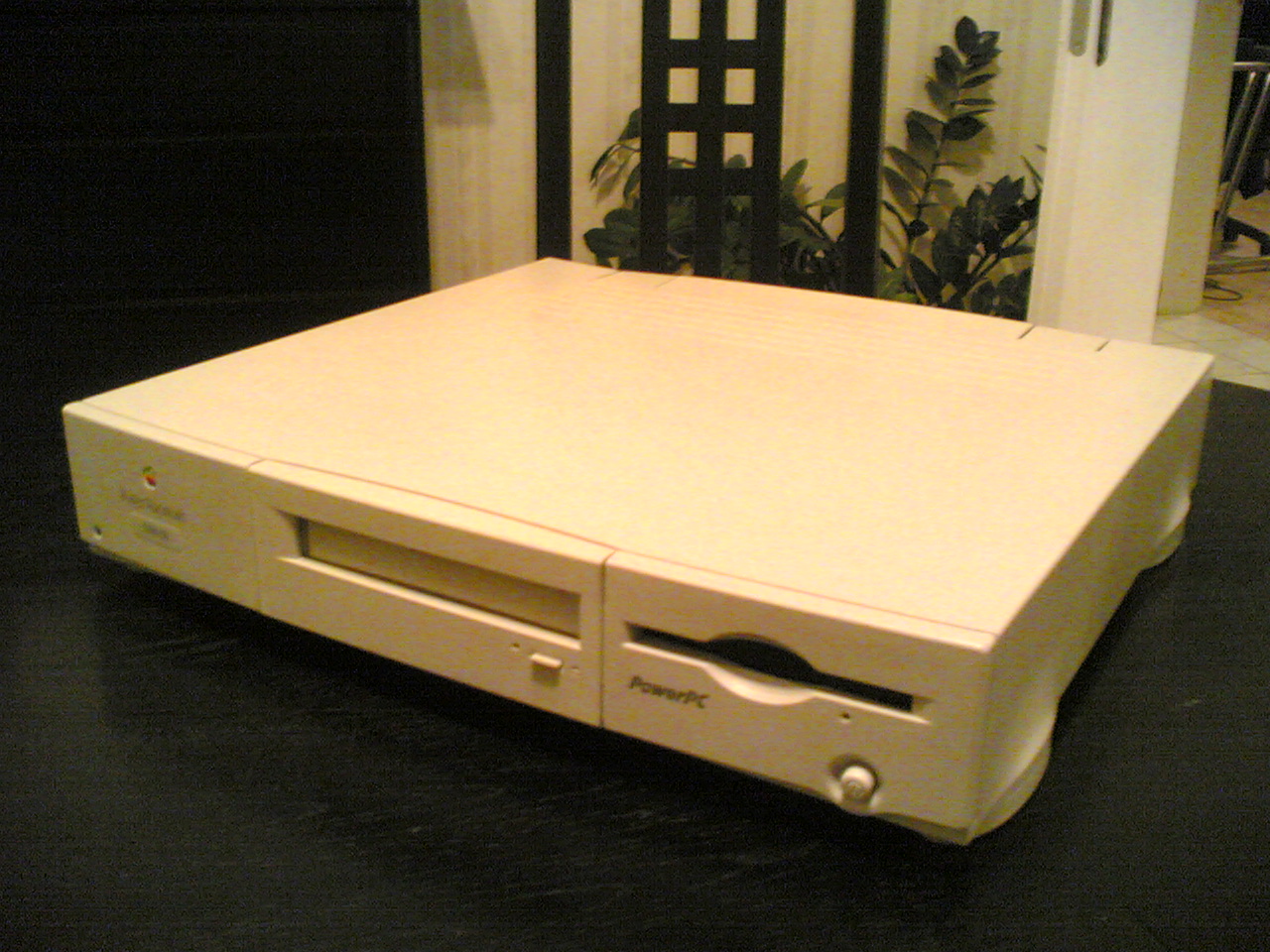
Consider the Power Macintosh 6100, in 1994 among the first three PowerPC-based Macs: <https://upload.wikimedia.org/wikipedia/commons/8/8f/Power_Ma...>

What happens when you push the eject button on the lower right, below the floppy drive? If you say "Ackshually, it's the power button. Macs don't have floppy eject buttons", feel free to go back in time and tell that to the many, many, many users at my college who pushed that button to eject the floppy and instead turned the computer off. This happened so often that we had to tape paper barriers over the buttons.