There's the fact that you're dealing with cell references rather than variable names, so all of your expressions look like ($K4 - $S$1) rather than (principal - payment).
There's the fact that the IDE you're working in is trash -- rather than a text file with carefully indented parenthetical statements, it's a single line text field. Sort of like trying to code in a URL bar.
There's the fact that pieces of a program are often littered all over the spreadsheet, and it's hard to look at the whole thing at once.
There's the fact that it's extremely stateful -- the whole thing exists and depends on a table of values -- and when and where and how and in what order they're updated. From a programming perspective, everything is a global variable, and anything can update anything, and setting the state of those global variables is the only way for functions to return data or talk to each other.
I would say all of these are problems that Real Programming Languages have under control, so I can't say I worry too much about such an IDE descending into spreadsheet madness. I do wonder how you would show meaningful realtime results, though, without running a program from the top.
In Excel, use the "Name Manager" dialog and the "Name Box" on the formula bar. They re somewhat hidden, but discovery of them forever changed my spreadsheets!
http://office.microsoft.com/en-us/excel-help/define-and-use-...
And functions can be VBA so the state of those global variables isn't the only way for functions to talk to each other. e.g.
    Dim x As Integer

    Function setx(n)
        x = n
        setx = 1
    End Function

    Function getx()
        getx = x
    End Function
Somebody should really build a web app version of that, there are millions of custom Excel+VBA spreadsheets spread throughout businesses across the world.
The only way they will migrate online is either through custom web apps (I used to do a lot of those) or with a generic solution which doesn't exist yet.
I don't know why Google hasn't done this yet.
Excel has named ranges - allows you to give a meaningful name to single cell or a range of cells - a pretty widely used feature.
"it's a single line text field"
Excel's formula editor can be as large as you want.
Numbers.app has the nice feature (among others) to use column/row headers to name cells/colums/rows in formulas in a readable manner.
Data and formulas were kept completely separate so you could change them at will.
You get compiler errors about as helpful as trying to debug C++ macros -- namely, something is wrong with this big glob of code, but it ain't gonna tell you what or where.
One ugly pattern that I'm often doing is to set a column with values by the function "A3=A2" and dragging that down. This gives a column of constant values which are tweakable by tweaking just the first element. That's what a scalar variable looks like in a spreadsheet. I'd like a separate calculation area where I could refer to these. Also when I select a column I might right-click and choose "Reduce → Mean", and the mean of that column could appear in the scalar area too. With some visual tinkering you might even have a sort of "iframe" containing the columns and the scalars at the bottom of the page, and have the mean appear underneath the column to remind me what it's the mean of -- but it should float; I shouldn't have to move it when I want to drag-down the calculation to enter in a few more rows.
With spreadsheet logic you have a couple of atomic operations like, "this is a fixed column specified by me," or "this is a column containing every half-int from 12.5 through 28.5" and so on. You have reductions of those list types, like Mean and Sum and Length. You have transformations of the data too, like NormalDist(x, mean, stdev). And some of them are cached-recursive, e.g. the running-sum function you might use to find a balance given a transaction history:
    balance[-1] = 0
    balance[i] = change[i] + balance[i - 1]
I think those elements are sort of the "core" of a spreadsheet and are handled woefully inadequately by Excel, which was not originally designed for the popular usage case it has become.
What do you mean by "coherent dataflow model"? (I'm working on these problems - hence all the questions.)
This gives a column of constant values which are tweakable by tweaking just the first element. That's what a scalar variable looks like in a spreadsheet.
Why not just put the value in a cell and reference that cell absolutely?
With some visual tinkering you might even have a sort of "iframe" [...] but it should float
It seems that the general solution here would be (a) make it much easier to decompose a problem across multiple sheets (in your example, scalars and reductions could go in a different sheet), and (b) allowing sheets to "float" if you want them to, rather than always being in a different tab that you're forced to switch to. Does that make sense?
balance[i] = change[i] + balance[i - 1]
It's interesting that you single out this kind of recurrent calculation, where a later value of a column depends on an earlier value. It doesn't get mentioned very often. But it's fundamental to what spreadsheets do computationally and is the reason why parallelizing them is a lot harder than at first appears.
What I mean is that spreadsheets are (right now) fundamentally based on the idea of a grid of cells which are individually meaningless and can contain anything, any individual datum, and datums may refer to each other by arbitrary operations. This grid view might be a good way to present datums to users but it requires a style convention when you want to write it to be readable; it encourages styles which obscure your ability to actually see what this sheet does.
It's not just that you can't see how the data flows, although that's part of it -- it's that the data is allowed to flow in ways that you could never easily visualize in the first place. Imagine that we simply draw the "depends on" relation by drawing a little curvy arrow from A to B if B depends on A. The Excel equivalent of "spaghetti code" could then literally look like spaghetti on the spreadsheet -- it would have neither head nor tail.
This could be solved with a nice model for how data, not individual datums, are allowed to flow through the application. Calculating a velocity might be as simple as writing "(x - last(x))/(t - last(t))", if x and t accepted vector subtractions and last(q)[i] == q[i - 1].
(2) I'm not entirely sure what you think the referring code is doing, if not putting the values in cells and referencing those cells. The reason why I can't be "absolute" about it is because in Calc (and Excel the last time I used it), to extend a computation over a vector, you highlight the computation and then click in a resizing corner to resize it into an area parallel to the input vectors -- or else you use some right-click "Fill" tool.
I used to think that these tools were broken but I think I can now appreciate that, because their model is so easily grasped, it's not really a break if it's hard to say, "no! I wanted this parameter fixed.
(3) That sounds suspicious. mean(v) should be associated with the column v in a clear way.
Once one achieves "coherent dataflow", there might be a case for adding some features into spreadsheets at the application level that allow for declaring and visualizing more structure. But I think it's a mistake to start with that - or at least risky, because spreadsheet users like spreadsheets and there is no guarantee they will like anything else. (There's a reason why it's always programmers who come up with ideas for "fixing" the spreadsheet UI. You gave yourself away with the Haskell reference :)) The approach I'm advocating is risky too, though, since it's not obvious that there is any coherent generalization to be had out of the spreadsheet data model.
The reason why I can't be "absolute" about it is because in Calc (and Excel the last time I used it), to extend a computation over a vector, you highlight the computation and then [...] resize it into an area parallel to the input vectors
Yes, but in your example the computation that you extended this way had an identical number in every cell. (That is, by extending it, you were copying a formula guaranteed to evaluate to the same number in every cell of the column.) If that's correct, why copy that number at all? Why not just keep it in one cell and have everyone reference it from there? Is it that you wanted it to be visually nearby in every row? I'm probably just missing something about your example.
That sounds suspicious. mean(v) should be associated with the column v in a clear way.
But the solution is to make it very easy for you to lay out your data and calculations in the way you find clear. It is certainly not to force every user to lay out their data and calculations that way.
Suppose I open up LibreOffice Calc, and my first row gets the values "c", "x", "y" in that order, as labels for three columns. The second row gets the values 2, -2, 0. The third row gets the odd formulas:
=A2, =B2 + 0.02, =B3 * B3 + A3 * B3 - 1
The key thing is, this "dragging autofill" has quickly managed to make all of the y computations dependent on the same c, whose authoritative value is stored at cell A2. (I can also change what x's I look at by tweaking the cell B2.)
So I highlight the x and y columns, click the Chart button, to do a scatterplot, lines only -- no point markers. Then I need to kill the autoadjustment of the y axis because it will confuse me, so I set it to go from y = -5 to +10.
Now I can just start modifying this parameter c in cell A2, and see how the graph changes. I might notice for example that the vertex of the parabola hits a maximum when c = 0. That's an interesting feature; it suggests that the vertex of the parabola describes its own parabola as you vary c. Et cetera.
The only reason for doing it this way is because that is the easiest way I know of to get the computation right for 200 data cells. You're right, I could hand-write 200 different computations to all point to A2. It would take a long time and I would hate my life. I could also write in the value "2" and whenever I want to change it, drag across 200 rows. But then I would never get to see how this thing changes. (If you've never seen it, see Bret Victor's "Inventing on Principle" talk for a discussion of the power of having a direct connection with your artistic creations.)
What it looks like to me is more like a program than a table, but with really good list/table entry and flow arrangement tools. That may just be because I'm a programmer.
Can you share anything more about what you're working on? These are interesting problems to me, too.
http://evincarofautumn.blogspot.com/2012/02/why-concatenativ...
which shows you how graphical diagrams can make sense out of concatenative programs.
If you really want an example, then I will give you this with some caution:
http://team358.org/files/programming/ControlSystem2009-/LabV...
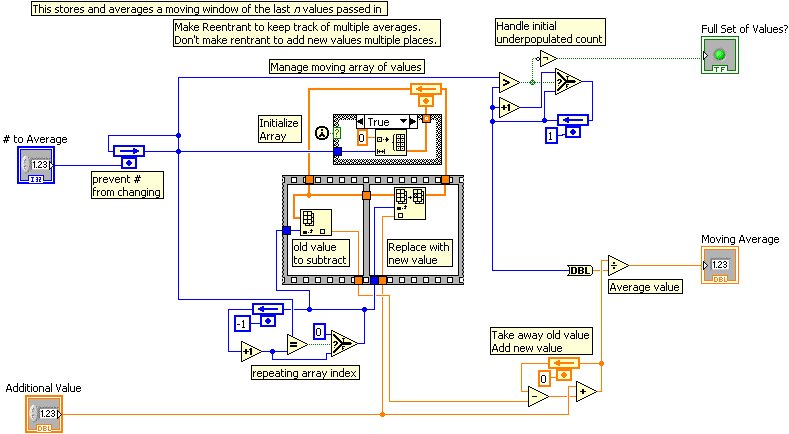
The caution is that LabVIEW views a data source as a sort of continuous input stream, so that it is manipulating individual values at any given time. I would rather view vectors as more fundamental in a spreadsheet language.
http://www.resolversystems.com/products/resolver-one/
It's not necessarily clear but the spreadsheet UI generates an IronPython program and you can hack the Python if you so desire. I've only used it lightly a couple years ago but I still think it's neat.
Can you expand on why? Also, if you can imagine a spreadsheet that actually did a good job of this, what would it look like?