I use a Mac all the time, and have never had to press a "certain shortcut" for a "hidden menu" for this to work. You literally just check (or uncheck, as your heart desires) "Mirror Displays" under the arrangement tab.
My bad it's a secret button, not a menu: https://cdn.osxdaily.com/wp-content/uploads/2014/03/show-det...
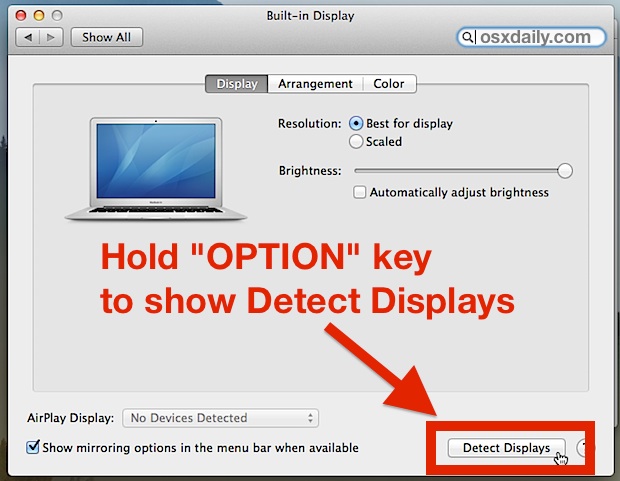
Worst UX ever IMHO.
Like the only way to eject the CD-ROM was by putting the icon in the trash can back then. How do you discover that?
Macs are rare machine where I live, so I have 0 experience with them.
A few weeks ago someone came at work with a Mac for a presentation and nothing was showing on the projector.
I had to search on the web to learn that in the screen config menu if you press a certain shortcut a hidden menu will appear and let you manage dual screen options. I'm still baffled...
I still never managed to make the thing work, I had to lend a Windows laptop to the guy (which just plugged and played like you would expect from the Mac!).