"Oh you can spend $x * 80 hours debugging or $x * 2 hours putting a patch to constantly restart"
It's hard to quantify the impact of having a house of cards system with components constantly restarting to side steps bugs until the whole thing lights on fire in a cascading failure later (oh the service scheduler was down for 30 mins and things are restarting so much a massive amount of capacity went offline during that time)
I say this as someone who uses and has used linux as a daily driver for years now but honestly I don’t feel good about the future of the platform in the medium term at all.
If anyone has some time to throw at understanding why this is probably the single most sober and rational set of arguments I’ve found of the topic yet https://m.youtube.com/watch?v=WtJ9T_IJOPE
The parts that I managed to endure were these:
"Some Linux figures are being cancelled, like Richard Stallman." Silence the pianos and with muffled drum... oh wait, actually, systemd will probably keep running and crons will keep firing.
"Linux companies undergoing changes." Where's Heraclitus when you need him?
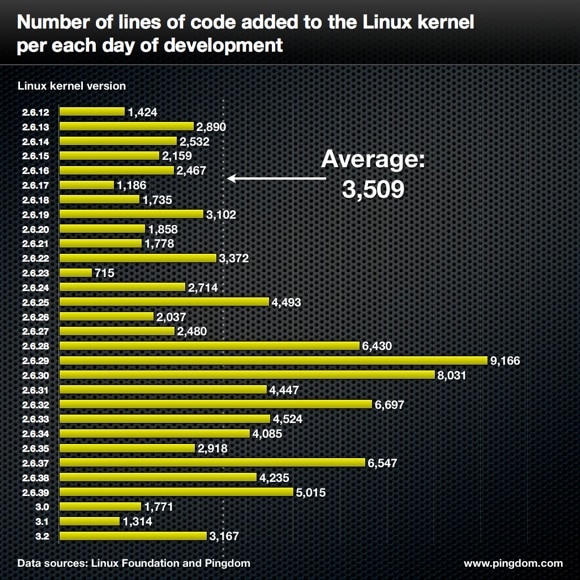
"Linux complexity increasing rapidly." He counts 2m lines of code added this year. But it's mostly drivers, and anyway this number has been trending downwards for a decade from what I can see (https://www.pingdom.com/wp-content/uploads/2012/04/linux-ker...).
"All Linux events are cancelled." Hmm, far be it from me to say, but I faintly recall that there was something besides Linux which might account for that.
"Google building Linux replacement." Google not building Linux replacement, Google building operating system.
"No operating system stays dominant forever." Linux is indeed not Ozymandias, sitting alone at the top of all creation, outside of space and time ... but I'm not sure how that means it sucks.
I wanted to like this, I honestly did, but the arguments are so dreadful that it feels like a deleted scene from one of Plato's dialogues. And Lord almighty he could have got to the point - such as it was - in much less than an hour.
He used to have really good "Linux sucks" videos, which were actually tongue-in-cheek celebrations of Linux's progress combined with legitimate griping about the platform's issues.
The last two, though, have been identical pearl-clutching and doomsaying. You articulated my thoughts about them exactly. "These bad things are happening! We might actually not be using this 1970s OS 20 years from now. Better OSes might exist by then. But they'll probably be worse though! BUT people will use them anyway. It's all over. D: But is it actually all over? Maybe not. c: Who knows? I'm really scared though. But at least gaming is perfect on Linux now and all the old problems it ever had are gone. Pardon me while I fire up DOSBox."
As Miguel de Icaza said in 2012:
> Backwards compatibility is not a sexy problem. It is not even remotely an interesting problem to solve. Nobody wants to do that work, everyone wants to innovate, and be responsible for the next big feature in Linux.
> So Linux was left with idealists that wanted to design the best possible system without having to worry about boring details like support and backwards compatibility.
> Meanwhile, you can still run the 2001 Photoshop that came when XP was launched on Windows 8. And you can still run your old OSX apps on Mountain Lion…”
Yeah Debian is still keeping mostly pro-user but they are not the leader in the cutting edge of development. Distributions innovating more do exist, but they are very small part of the Linux world. Most of it is Redhat, Ubuntu and hardware vendors.
Systemd, GNOME, GPU drivers are very windowsey; tightly coupled big software that one is discouraged to study and improve, almost as bad as their closed source counterparts on Windows.
The problem with old HW support is that the hardware is fine, the drivers are available and fine, but the kernel people decided to throw them out and replace by newer drivers which can run only newer HW products. Developers/vendors could be more user-friendly and keep support for the older hardware since the older compatible drivers exist, but they often don't.
Things I remember off the top of my head in recent years: floppy boot support being removed, pre-ATAPI Matsushita CD-ROM support being removed, stuff like that. Turns out... you aren't going to be running modern Linux on systems that ancient anyway, because the minimum system requirements for just the kernel alone are already higher than machines of that era. So the number of people impacted by those cleanups should be ~0. Are you seeing drivers actively being used by people on modern kernel versions being removed?
You mentioned GPUs, but Nouveau supposedly supports Nvidia GPUs all the way back to the Riva TNT2 from 1998, and the Radeon driver should go all the way back to the original Radeon R100 from 2000. What are these unsupported GPUs you speak of?
Same with RAID cards; I see the driver for the Promise PDC20277 is still in mainline, and that's a PATA card from 2001 or thereabouts.
You can't endlessly upgrade software on ancient hardware; at some point the software outgrows it. Linux has historically been extremely good at keeping compatibility for old hardware, 20 years down the line. No other OS does that. But at some point things do have to go. I don't remember any time Linux broke something within a timeline similar to other OSes' support period.
1) dropping support of some Adaptec RAID cards in RHEL/Centos 8 with Linux 4.18. Like <= 5xxx series. Yeah, Adaptec 5x series is old and weak performance, but perfectly fine and widespread SATA controller card for servers. Many storage-oriented servers don't need anything faster.
2) Radeon RX4xx RX5xx GPUs worked on kernel 4.19, but they don't work for many people on newer kernels such as 5.10 and higher. Lots of error messages in dmesg, lots of reporting on forums, no official guide as to how to fix that. Amdgpu driver is in state of being endlessly rewritten presumably due to shiny new GPU cards and cutting edge Linux can't work with older cards reliably anymore.
The kernel panic one started when I got pinged by a downstream team that we somehow delivered garbage data (valid-looking but entirely the wrong schema) to them, and that broke everything. Tracing things back up the chain, I found out that the source machine had had a kernel panic. Turns out that ended up with file metadata flushed to disk, but not file data. The unwritten sectors happened to contain data from a different process that was in the right file format, but had the wrong payloads, and since the file format was garbage-tolerant and self-synchronizing, the processing from that point on cleaned it up into data that looked completely valid... but was just from entirely the wrong place. All that happened automatically upon reboot from the panic. I was able to quite conclusively prove that this is what had happened by observing the data offsets logged to debug logs, and noting that the funkiness happened on filesystem block boundaries, and also aligned time-wise with the kernel panic, and a process that matched the schema of the data that ended up delivered had been running simultaneously on the same machine. This was all from just one instance of the fault, forensically debugged; we never reproduced it. The conclusion was basically "working as intended"... that is, this is apparently a thing that can happen given the filesystem mount mode in use (which was chosen for performance), so I think in the end they introduced some sanity checks on the data shape as a stop-gap. I think this was all soon deprecated and replaced with a system that didn't use local disk at all anyway, so there wasn't much point in introducing a big refactor to eliminate this rare failure mode at that point, but it's interesting that it did have security implications (it was just rare and not directly triggerable). It was very satisfying being able to trace down exactly what had happened (and the team lead sent this one off to me specifically due to my reputation for working this kind of stuff out... :) ).
The other one had to do with Google's NIHed gzip implementation, because of course they have one. We had found data mismatches between output computed over identical input in two different data centers (for redundancy/cross-checking), but it always went away if we tried again. This happened once a petabyte or so, give or take (I'll let you guess how often that was in terms of days, at Google scale). Digging through the error logs, I found that the mismatch was an offset mismatch, not a data mismatch. These files had gzip-compressed data blocks. Investigating the data was tricky because we weren't allowed to copy parts of it to workstations due to privacy reasons, but doing some contortions to work in the cloud I found out that the logical data was equivalent, but the compressed data was one or two bytes larger in one of the files, hence shifting the offset of the next block. Eventually I managed to grab one of the problem-causing uncompressed data blocks, build a test case for the gzip compressor with exactly the same flags used in production, and I had the idea of running it under valgrind... and that's when it screamed. Turns out the gzip compressor used a ring buffer of history to perform searches for compression, and for performance reasons the lookups weren't always wrapped, but rather there was a chunk of the ring buffer duplicated at the end. This was calculated to never exceed how much the pointer could fall off the end of the buffer. But, on top of that, the reads used unaligned 32-bit reads, again for performance reasons. And so you could end up with the pointer less than 4 bytes from the end of the buffer padding area, reading 1 to 3 bytes of random RAM after that. The way the compressor worked, if the data was bad it wouldn't break the compression, but it could compress a bit less. And so, the chances of both the read falling off the end of the buffer and happening to be one that would've improved compression were tiny, and that's how we ended up with the rarity. We never saw crashes due to the OOB read, but I think I heard some other team had been having actual segfaults (I guess the page after the buffer was unmapped for them) and this fix resolved them. I think we had the problem going on sporadically for a few months before I got sick of it (and I'd managed to rule out the obvious "it's a RAM bit flip / bad CPU / something" things you tend blame rare random failures on at that kind of scale) and spent a couple evenings figuring it out.
If you have a second to engage, I have found that I learn best in sandbox-types of environments, ie repls, notebooks, etc. What method do you find yourself going back to when you need to expand your understanding of a big production system like at Google? It might be my own ignorance, but I'm not sure how to move into big-systems engineering with low-stakes realism.
This isn't unique to big production systems in any way; while the numbers may have a few extra zeroes and the pieces of code may be more disparate and numerous, it's exactly the same process I go through today when debugging a kernel issue (these days I work on Linux support for reverse engineered Apple Silicon platforms). You start at the point where the problem happens, then add debugging statements and dig through the call stack, gaining an understanding of the system as you go, until you find the root cause. The good thing about Google, at least in the field I worked in (production SRE), is that usually there was enough logging already, in different forms and at different levels, that you could work things out without resorting to patching code to add more. But digging through the stack like this is certainly a skill, and it applies regardless of the scale of the system.
This skill is the crux of a fairly classic Google interview question: "You type www.google.com into your web browser and hit enter, what happens?" The goal there isn't to test your knowledge of any specific part of the puzzle, but rather to see if you have an understanding of how the puzzle fits together at some level, and hopefully enough of an interest in some part of it to go into significant detail. If you're a networking person, you might start talking about DNS requests, the TCP 3-way handshake, TLS handshakes, HTTP headers... If you're a web person, you might start describing how HTML is progressively loaded and resources are fetched in the background, how CSS lookups happen, how the DOM works... If you're a systems person, you might start talking about input events from the window manager, system calls to initiate network operations, caching to local filesystem... And if you're a smartass like me, you might start "At first, nothing happens; the microcontroller inside your keyboard is likely sleeping waiting for an interrupt that will have it advance to the next column in the scan matrix. Eventually, once the timer expires and the interrupt fires enough times to reach the column corresponding to the Enter key, it will bring that column to a logic high level, and the voltage will travel through the Enter key switch into the corresponding row line. The microcontroller will sample this line a short time later, and detect that a key has been pressed. It will then build a USB HID keyboard report packet containing the scan code, which will be placed in a buffer. The USB device hardware will then wait until it receives an INTERRUPT IN packet from the USB host, addressed to the HID interface endpoint responsible for delivering input reports..." (if I really wanted to frustrate the interviewer, I could start by describing a generic clock oscillator circuit and how the timer countdown logic might be implemented in terms of logic gates and transistors... but that might be going a bit too far, and we probably wouldn't get to the USB packet before the interview was over :-) )
All of those are valid answers, and the idea is that hopefully you can dive through some subset of the stack. So if you're interested in this kind of thing, that's a good place to start - pick something you're at least vaguely familiar with, and start digging through the stack to see how much of an understanding you can get of the different bits and pieces. Doing this with an open source OS is invaluable, since all the code is right there at your fingertips - there is nothing you can't figure out given enough time and patience. If you find interactive environments with a REPL more intuitive, you might use a debugger, set a breakpoint at the top level of the code, and single-step your way down the stack. If you're more of a reading code and printf() debugging person like me, you might do it that way instead. If you're interesting in digging downward towards the metal, perhaps try working with microcontrollers (e.g. Arduino, but make sure you dig through the libraries, don't stop at the interface - it's not that hard to learn how to program 8-bit microcontrollers in assembly!), and if you want to look at larger distributed systems, perhaps take a look at something like Ceph or some kind of Kubernetes deployment (both of which can be tested in a single machine with containers or VMs).
https://marcan.st/2017/12/debugging-an-evil-go-runtime-bug/
This one isn't bad either:
https://marcan.st/2015/10/rescuing-a-broken-ntfs-filesystem/
Source: xoogler, developed a reputation for black magic debugging, debugged both of those things. Correctness still matters, no matter how big you are or how much you think auto-restarts help.