However, your customers also don't want to hear that you were hacked and all their sensitive data is now in someone else's hands. We offer easy-to-use protection from that increasingly common scenario.
You (and your customers) also presumably don't want you to break privacy law regulations storing data. We offer a super simple service that helps you there.
I am sure there are use cases with the existing functionality.
Telling users their data will be irretrievable if they loose their password would certainly hurt conversions for many types of apps. And it would be a huge headache dealing with those who inevitably dismiss or fail to understand that.
My interest in this project was born out of wanting to do something similar for my own application. Didn't see any good options at the time and now there is one!
Generate an escrow keypair and ask the site owner to provide their own long passphrase for encrypting the private key. If a user needs to reset their password, they can contact the site developers who will need to key in the passphrase temporarily to generate a password reset link.
Yes, this leaves various avenues of attack involving caches and whatnot to get to the private key while it's briefly decrypted, but it's still way more difficult than hacking a MySQL database, which is what you're trying to beat. (And it retains the property that I don't need to run a MySQL database.)
If you're using the user password to decrypt the encryption key, why don't you simply derive the encryption key dinamically from the password each time the user logs in? I'm thinking of an algorithm that, given a string (the user's password), constructs a given key. Something like SHA-*, but more tailored to your use case.
In this way you wouldn't need to store the encryption key anywhere, as it's dinamically generated on demand.
As per the criticism on the user losing the password, I disagree with most comments. I think that if it's made very clear to the user why there is no recovery procedure, it can be a plus, but is has to be properly explained.
Anyways, to solve this, I'll throw my 2 cents. The recovery process could be done woth a local-based (no server) Q&A process. For example, when the user creates the password it is asked to provide three security questions, and the corresponding answers. Then the questions are stored locally and the answers are used to create an encryption key to encrypt the password, which is then stored locally. If the user forgets the password, it is asked the three questions and if the answers are correct the password is correctly displayed.
Now I know that many will tell me that storing the password in a database, even though encrypted, is a bad idea. But I'll respond that we are talking in this case of storing the encrypted password only locally. This means that to stole the password one would need phisical acces to the machine, and then it would need to crack the encryption. Which at this point makes this system much more secure than most SAAS that, while encrypting very well passwords server side, do allow (for obvious reasons) the user to stay logged in. So anyone with access to the machine can access all data without further work.
The memory option does exactly what you said, derives the encryption key dynamically from the password in memory.
It's actually a bit more complex in how it works under the hood (i.e. the above isn't exactly how it works), happy to get deeper into the details :)
Note this option is provided in the form of the rememberMe parameter here: https://userbase.com/docs/sdk/sign-in/
Your Q&A scheme is also definitely a plausible backup option! Thanks for the suggestion!
Only that particular password reset mechanism I described benefits from local storage. It's difficult to explain in one comment. We'll have clearer diagrams and explanations soon :)
And we do implement a PAKE.
For reference, I explained our approach a bit in this comment [0], and mentioned how we'll have more documents and diagrams available in the near future to explain it some more. Will explain it in more detail here (but be warned, it's still missing some steps and may seem a little convoluted to follow):
--Sign up--
1. user signs up and client generates a random seed in memory
2. client takes user's seed and inputs it through HKDF to derive a Diffie-Hellman key pair
3. client inputs user's password once through Scrypt, and then twice through HKDF to derive 2 values: password token & password-based encryption key
4. client encrypts user's seed from step 1 using password-based encryption key from step 3
5. client sends server the user's public DH key, password-encrypted seed, and password token for storage
--Sign in--
1. user inputs username and password
2. client inputs password once through Scrypt, and then twice through HKDF to derive 2 keys: password token & password-based encryption key
3. client sends server password token
4. server verifies password token matches stored token, and sends client a random message encrypted to the client's public DH key that was stored at sign up, along with the password-encrypted seed
5. client decrypts password-encrypted seed using password-based encryption key from step 2
6. client takes user's seed and inputs it through HKDF to derive DH key pair
7. client uses private DH key to decrypt random message from step 4 and sends plaintext message to server
8. client is now authenticated
Overall this approach is somewhat similar to Firefox's approach with Firefox Sync [1]
Let google and Apple be your IDP provider and use the identity they provide as that key?
You can't sign in with just the temporary password. You need the key as well.
Using google or Apple like that would destroy the end-to-end encryption scheme
Lose your device and use only password manager in device and you’d still be out of luck.
That said, do you think the threat risk of trusting Apple with the encryption key for end to end encrypting data with Sign in By Apple is much different than the approach you are implementing? In both cases, at least you wouldn’t have access to the user’s data and you have to trust Apple to some extent given they are in charge of securing local storage and device security.
All you need is your password to sign in.
I was only describing the hypothetical approach we're planning to implement for someone who forgets their password.
And yes, if I'm understanding right, I think those threat risks are very different. One is trusting your device which you yourself have control over, the other is trusting a cloud-based service provided by Apple, which you do not have control over. Not everyone uses Apple products either :)
Edit: But alas, it's a user's choice how they want to save their password. If Apple provides a static key over this service and users really want this option, it's definitely worth exploring further :)
The Keychain is end to end encrypted and they have done the hard work in propagating data securely across devices. Then there are no passwords and user is in control over which devices have access to their data. Access to device equals access to data, which I think most people would be comfortable with (e.g. you don’t sign into your email account on your phone each day).
> The only sentence that wasn't actually a question had the only question mark?
Sorry for insulting your writing style, but this is very confusing to me on many levels, and while I've seen it elsewhere, I've never been able to ask someone why. Why are you doing this? This, of course, being "using punctuation marks in the opposite way that they're intended to be used."
Nope.
And even still, you have the choice to do this or not and we make it clear in our documentation what your choice entails. You can keep everything in memory if you want
I said we'd store the user's key in local storage referring to the user's randomly generated key our client uses to encrypt data before sending to the server.
Passwords are never stored in plaintext anywhere. We don't even send passwords to the server in plaintext -- we hash passwords client-side.
But yes, even storing the key in plaintext in local storage has undesirable properties, which is why it's opt in. But an app that encrypts data with a key stored in local storage has a significantly higher level of privacy than an app that sends all data in plaintext to the server for storage.
Is that instead of or in addition to any hashing done on the server? It seems like doing all hashing on the client side essentially means that you would be storing plaintext passwords, since the value sent to you by the client would end up in a DB without modification. Curious as to why you went with client-side hashing as opposed to something like SRP.
Long answer: Based off my understanding, we do implement something analogous to SRP with some minor differences.
We'll have supporting documents explaining our approach complete with diagrams soon. But for right now, this is close to what the architecture looks like for clarity:
https://user-images.githubusercontent.com/26468430/69532862-...
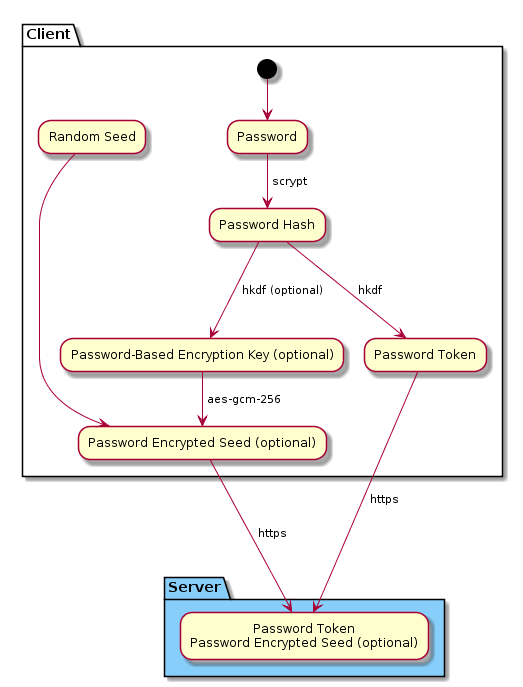
In order to be fully authenticated, the client must first prove they know the password token. The server then sends the client the password encrypted seed, then the client proves they can decrypt that seed (using Diffie-Hellman). So functionally the client is proving it knows both derivatives of the password to the server.
Note there are 2 major differences between that image and what's currently in the code:
1. We also do a single SHA-256 hash of the password token before storing it on the server (prevents someone with access to only the server's data from passing round 1 of our authentication flow)
2. The optionals are not optional anymore, what I described above is how it’s working today.
Disclaimer: there are a lot of missing pieces in the above description. So if it feels like there are gaps, that's why. It's difficult to explain the full scheme in a single comment like this.
Our approach is pretty similar to Firefox's described here: https://hacks.mozilla.org/2018/11/firefox-sync-privacy/
Yes, this is a thorny issue.
We chose to offer a service that keeps user data end-to-end encrypted by default. With that choice comes this tradeoff. And it’s a tradeoff similarly offered by practically every other end-to-end encrypted service I’m aware of.
That being said, we have plans to alleviate the weight of this tradeoff, and we’ve already written nearly all of the code. That code is pending a security review and further refinement.
The high level summary of it right now is: 1. you as the developer can opt to keep the user’s key stored in plaintext in local storage (via a single parameter passed to our signIn() method) 2. if a user forgets their password, they can get a temporary password emailed to them, then use it to sign back in 3. the user can then change their password normally