News for hackers. Stuff that matters.
Re:iRobot Terra Robot Lawn Mower – First Impressions by defanor on Thursday January 09, 2020 @01:21PM (#22003858)
That's my concern about their home vacuum cleaners as well: if a battery runs out, it would hit my computer. There are some programmable models though (were not available here at the time), and various certainly programmable DIY ones (may be a fun project, but would take some time); that seems like a much better solution -- both for efficiency and predictability (as opposed to random walk), and for this particular case with paths/boundaries (define them once in the robot's memory, maybe even just by moving it manually or otherwise showing it the path/boundaries, and don't rely on batteries in external devices).
Re:iRobot Terra Robot Lawn Mower – First Impressions by wolrah on Thursday January 09, 2020 @02:22PM (#22004525)
> if a battery runs out, it would hit my computer.

So? It's a vacuum, you could drive it right in to a computer non-stop until the battery runs out and it's not going to do any meaningful damage. The worst case scenario would be if you had a case where the power or reset button was right there at vacuum height, but other than that what's your concern?

Re:iRobot Terra Robot Lawn Mower – First Impressions by asdkhadsj on Thursday January 09, 2020 @03:28PM (#22005308)
You'd be surprised. I have a Botvac and that thing can easily damage plenty of things in my house.

On that note, I love my Botvac. My biggest complaint though is that it has to "learn" a room first, without any sort of helping functionality. This is a problem in my eyes because the Botvac comes with an awesome in-app barrier system where you can tell it to avoid areas, but to tell it to avoid areas it has to have done a normal scan of that area.

It's a chicken-egg scenario. I can't keep the botvac out of my fragile areas without first letting it in my fragile areas.

Once scanned though, the Botvac's "no go" lines are awesome, and very accurate in my experience.

Re:iRobot Terra Robot Lawn Mower – First Impressions by defanor on Thursday January 09, 2020 @04:41PM (#22006168)
Mechanical shocks are indeed the concern.

> you could drive it right in to a computer non-stop until the battery runs out and it's not going to do any meaningful damage

What is this based on (i.e., are HDDs and all the smaller components commonly designed to withstand such shocks)?

Now I've looked up a random WD Blue HDD data sheet [1], which mentions 30G shock (read/write, 2 ms). If a vacuum cleaner was to hit it directly while moving at about 1 m/s (less than 4 km/h, and it seems to walk at around that speed, though I haven't found exact values), and assuming that it would accelerate the HDD to its own speed in those 2 ms (maybe it's not realistic, though not obvious to me), that'd be about 50G (1 m/s / 0.002 s / 9.8). Even if it is so, a vacuum cleaner has a plastic bumper, a computer case is heavy, and a vacuum won't hit any of those components directly, but it seems dangerously close and I'd rather not hit the computer.

[1] https://documents.westerndigital.com/content/dam/doc-library...

Re:iRobot Terra Robot Lawn Mower – First Impressions by marblar on Thursday January 09, 2020 @05:00PM (#22006360)
> accelerate the HDD to its own speed in those 2 ms (maybe it's not realistic, though not obvious to me)

You need to conserve the momentum and kinetic energy, so assuming an elastic collision you're going to accelerate the PC to about half the speed of roomba[1] so you're looking at closer to 25G. With the plastic bumper, you're not getting anywhere near an elastic collision and your contact time is probably a lot longer than .002 due to the deflection. I would not worry too much about this.

http://www.convertalot.com/elastic_collision_calculator.html

Re:iRobot Terra Robot Lawn Mower – First Impressions by wolrah on Thursday January 09, 2020 @08:34PM (#22007717)
Three things you should keep in mind regarding those numbers:

1. They're worst case numbers, as in the hard drive being mounted perpendicular to the impact force. Some OEM crapbox PCs may have spinning rust mounted to the front of the case directly in a vertical orientation, but most PCs have them mounted horizontally and many use shock absorbing rubber bushings.

2. As noted, your numbers also assume an inelastic collision. Almost all PC cases have a plastic front, and all robo-vacs I'm aware of have the same.

3. The absolute peak potential impact force is significantly less than a single accidental kick or kid/pet running in to it.

If you're really concerned about impact, you should get your PC off the floor. That said, I'd happily frisbee a Roomba at my PC and not be concerned for anything other than the front panel of the case itself.

Re:iRobot Terra Robot Lawn Mower – First Impressions by Seenso on Thursday January 09, 2020 @01:28PM (#22003931)
I have one of the random Roombas. The virtual walls are nice for keeping the robot out of areas where it will get stuck, but I rely on making small modifications to the environment to protect things from damage.

In the case of a computer, you could try putting it on a short platform (no more than an inch high is sufficient) or positioning it so cables are in spaces narrower than the robot can access. The latter is what I do. The back of the case is a few inches from a wall, and the cables are routed upwards into cable guides mounted under the desk. I mostly did that for aesthetics rather than the Roomba, though.

Re:iRobot Terra Robot Lawn Mower – First Impressions by bdcravens on Thursday January 09, 2020 @02:37PM (#22004717)
I have a few areas where ours gets stuck - I haven't tried it yet, but I was thinking cheap pool noodles would work. Definitely cheaper than beacons at $50 a pop.
Re:iRobot Terra Robot Lawn Mower – First Impressions by scrooched_moose on Thursday January 09, 2020 @03:06PM (#22005066)
Usually easier to slightly raise/lower your furniture.

A surprising amount of furniture already comes with levelers (1) that no one ever adjusts. Raise them up 1/4" and it can then pass under. If not, tacking on some small furniture glides are usually enough (2).

1) https://c1.neweggimages.com/ProductImage/A27C_1_201906171218... 2) https://i.etsystatic.com/17715291/r/il/b873a3/1550855907/il_...
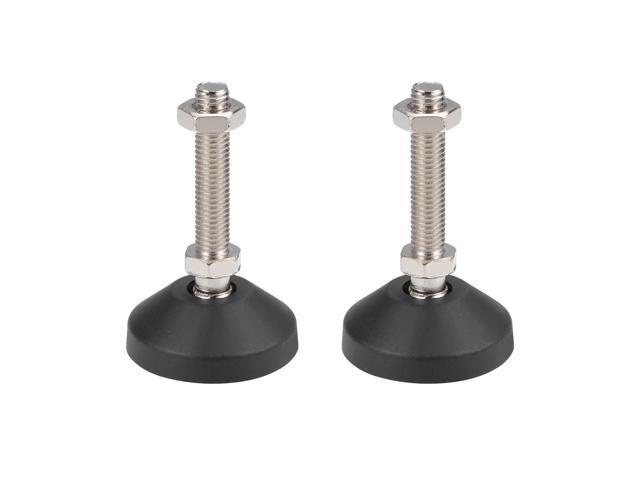
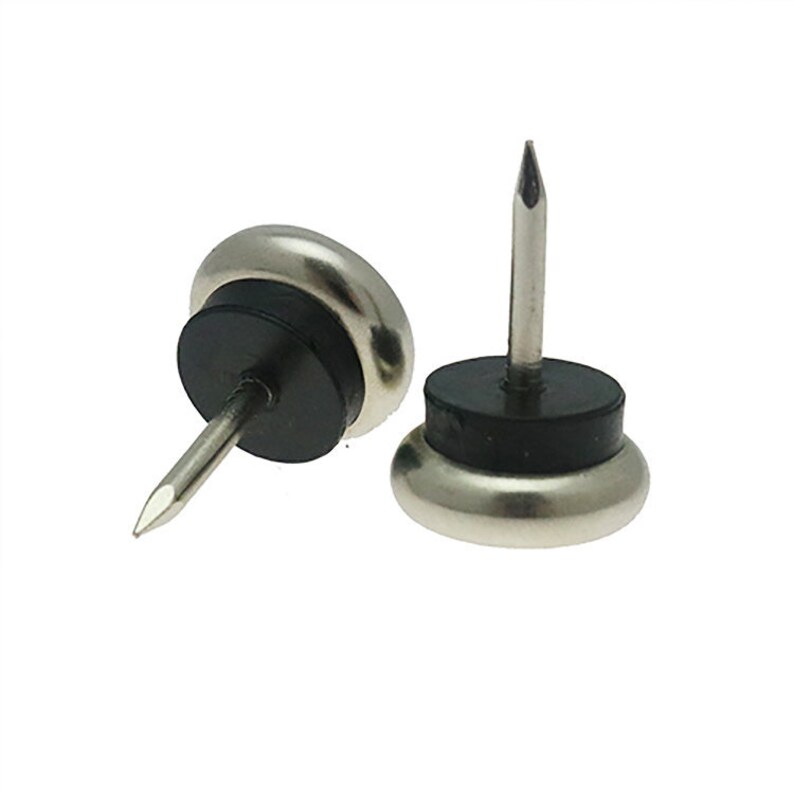
These have the advantage of allowing it to clean under the furniture as well. Every time ours got stuck I'd adjust the height a bit and haven't had a problem in over a year.

Re:iRobot Terra Robot Lawn Mower – First Impressions by bdcravens on Thursday January 09, 2020 @03:52PM (#22005576)
We can do that some places where it's an issue (bed, for example) but other places like cabinets that's not possible. The house I'm in now has foundation issues (it's a lease), so in spots it won't get under the cabinets, but a couple of feet down it gets wedged in as the height varies by a few millimeters.
Re:iRobot Terra Robot Lawn Mower – First Impressions by Seenso on Friday January 10, 2020 @01:27PM (#22013496)
> The house I'm in now has foundation issues (it's a lease), so in spots it won't get under the cabinets, but a couple of feet down it gets wedged in as the height varies by a few millimeters.

You might want to take a look at these. I've found them very useful for situations like that:

https://wobblewedges.com/

Re:iRobot Terra Robot Lawn Mower – First Impressions by cr0sh on Thursday January 09, 2020 @02:49PM (#22004867)
Our Roomba loves to get stuck under certain pieces of furniture and the low overhangs of our kitchen and bathroom cabinets. It just wedges itself in place and gets jammed, eventually erroring out.

If it doesn't do that, then the other annoying thing it sometimes does is drive off into a bedroom and go underneath our king-size bed, then "dies" (runs out of battery) somewhere in the middle of the bed area, which makes it very difficult to coax out. Neither my arms nor my wife's are long enough to reach it; I generally have to use a broom handle or such to shove it closer to one side to pull it out.

First-world problems, right?

Re:iRobot Terra Robot Lawn Mower – First Impressions by bdcravens on Thursday January 09, 2020 @03:53PM (#22005592)
We have a newer one that returns to base to recharge, and it seems to do well about knowing when to "return home"
Re:iRobot Terra Robot Lawn Mower – First Impressions by Izkata on Thursday January 09, 2020 @01:41PM (#22004079)
I have a Neato, which uses magnetic strips for boundaries. No batteries, and in 5-ish years so far, no problems.
Re:iRobot Terra Robot Lawn Mower – First Impressions by scrooched_moose on Thursday January 09, 2020 @03:11PM (#22005114)
Eufy (part of Anker) is the same. Our entryway is about 1/2" lower than the rest of the house. Small enough for it to fall in without triggering the edge sensor, too tall for it to get back out.
Re:iRobot Terra Robot Lawn Mower – First Impressions by beat on Thursday January 09, 2020 @02:13PM (#22004404)
That's a good idea! Passive boundaries are better than active boundaries, for sure.
Re:iRobot Terra Robot Lawn Mower – First Impressions by Goz3rr on Thursday January 09, 2020 @02:37PM (#22004712)
I have a Roborock (Xiaomi) S50 which just has a LiDAR on top and I can set boundaries based on an actual map of my house with the app. Greatly preferable over having to place random things around the house.
Re:iRobot Terra Robot Lawn Mower – First Impressions by MBCook on Thursday January 09, 2020 @03:20PM (#22005217)
The newer/higher end Roomba’s with cameras on them have the same feature using VSLAM instead of LiDAR.
Re:iRobot Terra Robot Lawn Mower – First Impressions by asdff on Thursday January 09, 2020 @06:31PM (#22007025)
I have the xiaomi one with lidar that actually maps the room and vacuums in laps. If it detects something in the way it slows down and lightly taps it, then it turns around. It never hits anything full speed. If you disconnect the dock the vacuum will keep working, but when it is finished it will go looking for the dock then tell you it's lost.