News for hackers. Stuff that matters.
Re:Why iOS 13 and Catalina Are So Buggy by jl6 on Wednesday October 23, 2019 @02:09AM (#21331586)
The only iOS 13 bugs I’ve been bitten by are:

1. Safari’s back button now seems to lose the position on the previous page - sometimes.

2. The share sheet has a row of Messages contacts that I didn’t ask for, don’t want, and can’t turn off - and it creates the risk of super-inappropriate sharing, because all my work contacts are eligible for being on this row, seemingly at random.

Re:Why iOS 13 and Catalina Are So Buggy by rogy on Wednesday October 23, 2019 @06:22AM (#21333117)
God this, my number one share contact is my ex, who i broke up with almost 5 years ago, and literally havent contacted in over 4. This person isn't even a contact in my contacts anymore, yet still top HOW.
Re:Why iOS 13 and Catalina Are So Buggy by systemtest on Wednesday October 23, 2019 @07:41AM (#21333539)
This is because Siri knows that you secretly still have a desire for your ex.
Re:Why iOS 13 and Catalina Are So Buggy by smacktoward on Wednesday October 23, 2019 @10:20AM (#21334879)
Don't be paranoid. It's because Siri desires your ex.
Re:Why iOS 13 and Catalina Are So Buggy by kkarakk on Wednesday October 23, 2019 @09:49AM (#21334599)
Technology is really reinforcing the correct behavior - if you think you don't want to talk to someone, DELETE them off your phone/social media.

I used to have the same problem until i took the plunge and just banished everyone i didn't like out of my digital life. If i don't want to interact with them, i just make their contacts poof/block them

Re:Why iOS 13 and Catalina Are So Buggy by jl6 on Wednesday October 23, 2019 @01:20PM (#21336750)
I’ve got a large number of contacts who I rarely (but not never) want to contact.
Re:Why iOS 13 and Catalina Are So Buggy by vocatus_gate on Wednesday October 23, 2019 @03:14PM (#21337832)
> This person isn't even a contact in my contacts anymore

...did you not actually read his post?

Re:Why iOS 13 and Catalina Are So Buggy by Engineering-MD on Wednesday October 23, 2019 @02:17AM (#21331628)
I completely agree with point 2, and I have already accidentally shared a hacker news story to a work colleague without intending to!

I can’t understand why there is no option to remove it.

Re:Why iOS 13 and Catalina Are So Buggy by netsharc on Wednesday October 23, 2019 @10:25AM (#21334929)
Slightly off-topic, but a while ago Google changed the YouTube app's sharing menu to show Google contacts first... ah yeah, just because they probably wanted to make YouTube the next social gathering space. Hit Like and Subscribe and Share! (I never do).

God damned growth hackers. Imagine driving out of the highway to the exit you regularly take to get home, but wait, it now leads straight into a shopping mall, because hey, look at this new shopping mall, please spend your money here! Want to go home? Make a 3 point turn and drive that way instead!

Re:Why iOS 13 and Catalina Are So Buggy by DavideNL on Wednesday October 23, 2019 @04:06PM (#21338406)
> I can’t understand why there is no option to remove it.

You can i think... but not sure;

Settings > Siri & Search > Messages > Learn from this app < uncheck

Re:Why iOS 13 and Catalina Are So Buggy by pzmarzly on Thursday October 24, 2019 @11:00AM (#21345306)
Didn't work for me. I unchecked all boxes for Contacts, Phone and Messages, rebooted my phone, it's still there.
Re:Why iOS 13 and Catalina Are So Buggy by DavideNL on Thursday October 24, 2019 @02:34PM (#21347732)
Strange. At some point after i changed multiple settings this feature stopped working for me. Instead of the "suggested contacts" i only saw a sort of blurred panel without any contacts.

So i started searching and re-enabling things and suddenly the suggested contacts were back. Not sure what caused it then, might have been a bug...

Re:Why iOS 13 and Catalina Are So Buggy by mstade on Wednesday October 23, 2019 @05:47AM (#21332917)
Haven't noticed #1 but I love the new share sheet feature. I often text with the same few people, sharing links, images and what not, and this thing has really sped up that flow. Also I think the risk of accidental sharing is mitigated somewhat by the fact that you're taken to the compose screen and actually have to press send – it doesn't happen right away and gives you an opportunity to back out. This I also find extremely useful since I often add comments to whatever I share.
Re:Why iOS 13 and Catalina Are So Buggy by kace91 on Wednesday October 23, 2019 @03:31AM (#21332070)
I have one where notifications aren't clickable (tappable?) on the lock screen, and I need to turn the screen on and off several times for them to work or just go to the app manually. Strangely enough they can be dismissed through swiping, the click event registers but just does nothing.
Re:Why iOS 13 and Catalina Are So Buggy by 333c on Wednesday October 23, 2019 @04:04AM (#21332298)
Interesting. I seem to have the opposite: some notifications I can't swipe right (finger moves left to right) to open, but I can tap on them to open them.
Re:Why iOS 13 and Catalina Are So Buggy by 0x00000000 on Wednesday October 23, 2019 @05:53AM (#21332948)
Number two is actually the thing that pushed me to switch from Android. Now it has followed me to iOS. These product managers are out of control. Why should it be mandatory? At least it’s not suggesting messenger contacts from other apps that I contacted literally once ever 3 years ago. (Yet)
Re:Why iOS 13 and Catalina Are So Buggy by tolqen on Wednesday October 23, 2019 @06:15AM (#21333077)
> At least it’s not suggesting messenger contacts from other apps that I contacted literally once ever 3 years ago.

Only because none of the messaging apps have implemented it yet. As someone who uses their phone for messaging 70% of the time, I actually missed it from Android and am happy to see it come to iOS.

Re:Why iOS 13 and Catalina Are So Buggy by jl6 on Wednesday October 23, 2019 @06:11AM (#21333056)
I use WhatsApp for 99% of my messaging. I’d be happy with the new share sheet row if it could be configured to show me my common WhatsApp contacts. But because it’s Messages only, it only shows people I very very rarely want to contact.
Re:Why iOS 13 and Catalina Are So Buggy by tolqen on Wednesday October 23, 2019 @06:15AM (#21333080)
It’s not Messages only, WhatsApp just hasn’t implemented it yet.
Re:Why iOS 13 and Catalina Are So Buggy by jl6 on Wednesday October 23, 2019 @08:43AM (#21333976)
When WhatsApp get round to implementing it, will I be able to turn it off for messages?
Re:Why iOS 13 and Catalina Are So Buggy by wrboyce on Wednesday October 23, 2019 @03:59AM (#21332262)
FWIW re #2 if you do accidentally click on an iMessage contact it brings up the message compose dialog and you have to use the regular send button. I too shared your fear, and have accidentally clicked the wrong contact.
Re:Why iOS 13 and Catalina Are So Buggy by city41 on Wednesday October 23, 2019 @10:33AM (#21335005)
I’ve encountered so many iOS bugs (both in 13 and previous versions) I’ve strongly considered making a website documenting them all. I honestly think Apple CarPlay is the buggiest thing I’ve ever used.
Re:Why iOS 13 and Catalina Are So Buggy by FireBeyond on Wednesday October 23, 2019 @02:48PM (#21337592)
CarPlay on my iPhone 11 Pro has no hysteresis around day/night mode. It will literally go back and forth as frequently as every two seconds - extremely distracting at the periphery of my vision.
Re:Why iOS 13 and Catalina Are So Buggy by dawnerd on Wednesday October 23, 2019 @12:07PM (#21335997)
Latest CarPlay I’ve had to unplug and replug my phone to get audio to output. And sometimes it just fails to even load CarPlay. Super weird.
Re:Why iOS 13 and Catalina Are So Buggy by 24gttghh on Wednesday October 23, 2019 @10:55AM (#21335237)
#2 is infuriating. If they don't fix this I'm going to have to stop using the phone. It's asinine such a list isn't customizable. I text my girlfriend the most, and she isn't even in that list half the time! At the very least it should be a list of whoever you texted last, in chronological order, but it's fucking random.
Re:Why iOS 13 and Catalina Are So Buggy by mrweasel on Wednesday October 23, 2019 @03:49AM (#21332203)
I can't help getting the feeling that they should make two versions of iOS, one for the average user/teenager, and one for professional use.

Really they mostly just need to remove a boat load of features to make it a work phone.

Re:Why iOS 13 and Catalina Are So Buggy by abawany on Wednesday October 23, 2019 @02:45PM (#21337555)
OTOH, I updated a test MBP to Catalina yesterday and after the update completed, I looked at the desktop and thought: 'well hello iOS 13 on MBP.' I really wish the consumer fluff wouldn't keep leaking on my work equipment.
Re:Why iOS 13 and Catalina Are So Buggy by makecheck on Wednesday October 23, 2019 @10:23AM (#21334906)
I believe the contacts list you’re referring to is generated by AirDrop based on nearby contacts. You can’t reorder it or edit the list but you can turn it off using Settings for AirDrop.
Re:Why iOS 13 and Catalina Are So Buggy by mikestew on Wednesday October 23, 2019 @10:43AM (#21335111)
I believe the contacts list you’re referring to is generated by AirDrop based on nearby contacts

The 12 year old girl across the street who helps me walk our dogs on a regular basis (hence why she's in that bar), whose father works for Google, and has an Android phone is most certainly not showing up due to AirDrop when I'm in my living room.

And I'm with parent comment: I DO NOT WANT 12 year old girls to be one accidental button push away from inappropriate content. Hell, I don't want to explain to my bluegrass pickin' buddies why I sent them an Ikea link, either.

Re:Why iOS 13 and Catalina Are So Buggy by makecheck on Wednesday October 23, 2019 @10:56AM (#21335256)
Only one of the settings is limited to contacts; AirDrop can also be set to find “everyone”, which probably uses WiFi Connect or some other trickery to locate nearby devices even on other platforms.
Re:Why iOS 13 and Catalina Are So Buggy by mikestew on Wednesday October 23, 2019 @11:11AM (#21335420)
I have it set to only contacts. I'm looking at the share sheet right now: there is no one in that list that is within WiFi range. My wife: at work in Redmond. Dog walk girl: at school, in Redmond. My mother: 3000 miles away in Florida. My bluegrass pickin' buddies..., oh, you get the point. Me: at work in Bellevue, WA.

But you prompted me to remember: "Aha! AirDrop uses a different icon than what I see right now!" Observe the following:

https://media.idownloadblog.com/wp-content/uploads/2019/06/i...
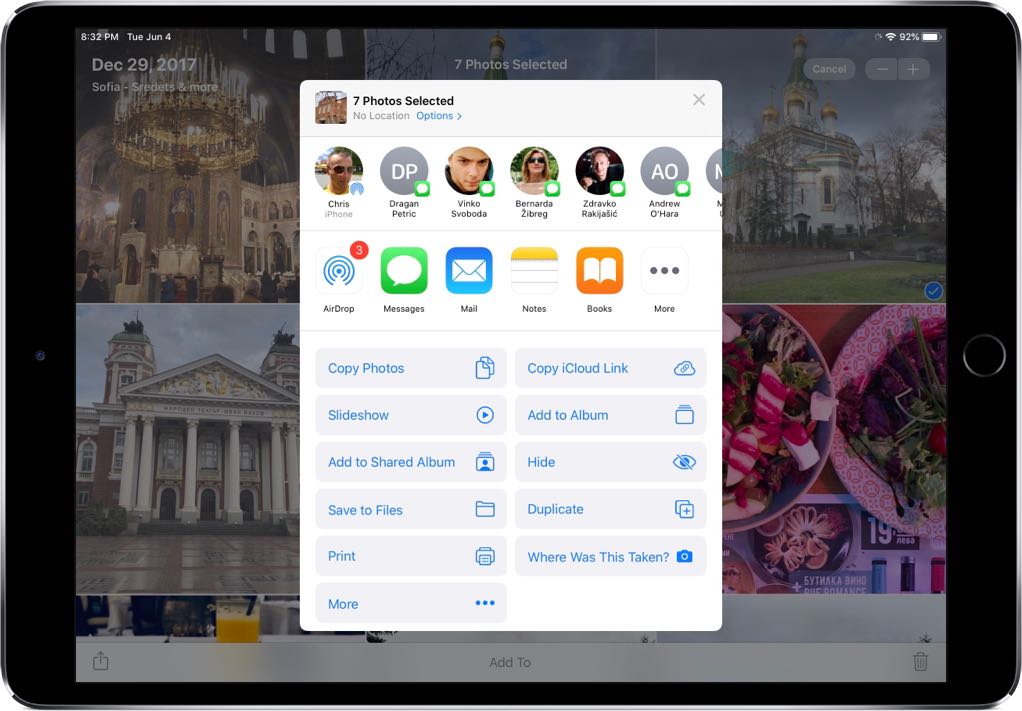
Note the contact on the left, and icon: it's the AirDrop icon. But the rest have a Messages icon. That, I'm assuming, comes from contacts I've recently messaged and has nothing to do with AirDrop. I could have my phone on airplane mode, and those still show up.

Re:Why iOS 13 and Catalina Are So Buggy by asplake on Wednesday October 23, 2019 @02:55AM (#21331852)
Bug 1 is driving me nuts but found it hard to confirm that it was affecting others or was even new. Strangely, I feel slightly better now!