They don't provide knobs because they're a bad idea for input. Holding mousedown while drawing an invisible arc with the cursor is an awkward way to change a value. Sliders are generally better but still not great on interfaces with cursors (they're better on touchscreens). Skeuomorphism can be a useful visual design cue but it needs to be secondary to the input capabilities of the device.
Up and down arrow buttons(or plus/minus, or whatever makes sense for the value) are very compact and operable with a variety of input methods. Buttons need a way display the value but there are many options including putting them in the center of a ring of numbers like a knob would use.
I remember learning soft synths when I was 11 - 12 years old and back then it maybe took me a few minutes to get it. Come on.
I like knobs because the distance from the center of that control (radius of your arc movement) can be a “fineness” or “coarseness” control. I think sliders don’t usually offer this.
Arrow buttons are pointless when you're trying to dial in a value - which is the whole point of using knobs in audio software. They don't give you adjustable granularity or an easy way to continuously adjust - and if you do give it those functions, you've made a knob without the visual feedback of knob position. Or like you say, put it in the center of a ring of numbers, but again, you've just made a knob!
The knob behavior you're describing is essentially an invisible slider. An invisible line is better than an invisible arc but it's still not good. Why not make it visible? A visible slider could appear on mousedown so there's something that corresponds to the gesture.
In your first example, you've just made a knob that doesn't look like a knob.
In your second example, you're confusing mouse position and gesture. Linear sliders map mouse position to state changes, rotaries map gesture. Another way of looking at it is that a rotary slider's state is decoupled from the input, and in doing so, is a much more responsive control. Not to mention, you have an infinite 2D area to traverse to change the knob value with respect to the widget itself, not a finite, defined path.
And the huge reason that linear sliders (at least off the shelf ones) are impossible to use for audio UIs is that 99% of your user's time is spent adjusting from the previous position, not resetting it to a new one. That means any behavior where a click resets the position (like clicking just past the current position) is broken. Not just because it's trash UX for the application, but because in audio systems jumping parameter values can cause artifacts, and mitigating them is not without cost in performance and fidelity.
That doesn't make them intuitive, they're merely familiar to people already familiar with such audio software.
> hotkey like ctrl to swap between coarse/fine tuning of the parameters
Image editors and video editors have keys like that too, they're not related to knobs.
> In your first example, you've just made a knob that doesn't look like a knob
That's great! I preserved the functionality while making the action more apparent.
> a rotary slider's state is decoupled from the input
That's what I'm criticizing.
> Not to mention, you have an infinite 2D area to traverse to change the knob value with respect to the widget itself, not a finite, defined path.
The visual feedback of both sliders and knobs are both restricted to finite, defined paths. Whether the control of the input is restricted to that path depends on how it was designed. With some sliders, you can only move the control when the cursor remains without the bounds of the slider the iTunes volume control for example. With other sliders, once you've clicked on the control, the cursor can be outside the slider, I think this is the "infinite 2D area" you're talking about. The macOS menu bar volume and Sound Preferences sliders are examples of this latter behavior, I also found this example (you need to click the play button for the code to run).
https://editor.p5js.org/Joemckay/sketches/rk2edzTIb
> That means any behavior where a click resets the position (like clicking just past the current position) is broken
Yes, for what knobs are used for, you wouldn't want a slider control to jump to whatever point on its line was clicked on. This is another behavior that is found on some sliders (both iTunes and macOS Sound volume controls) but not others (the P5 example above).
https://soundquest.jp/files/uploads/2018/10/massivex-replica...
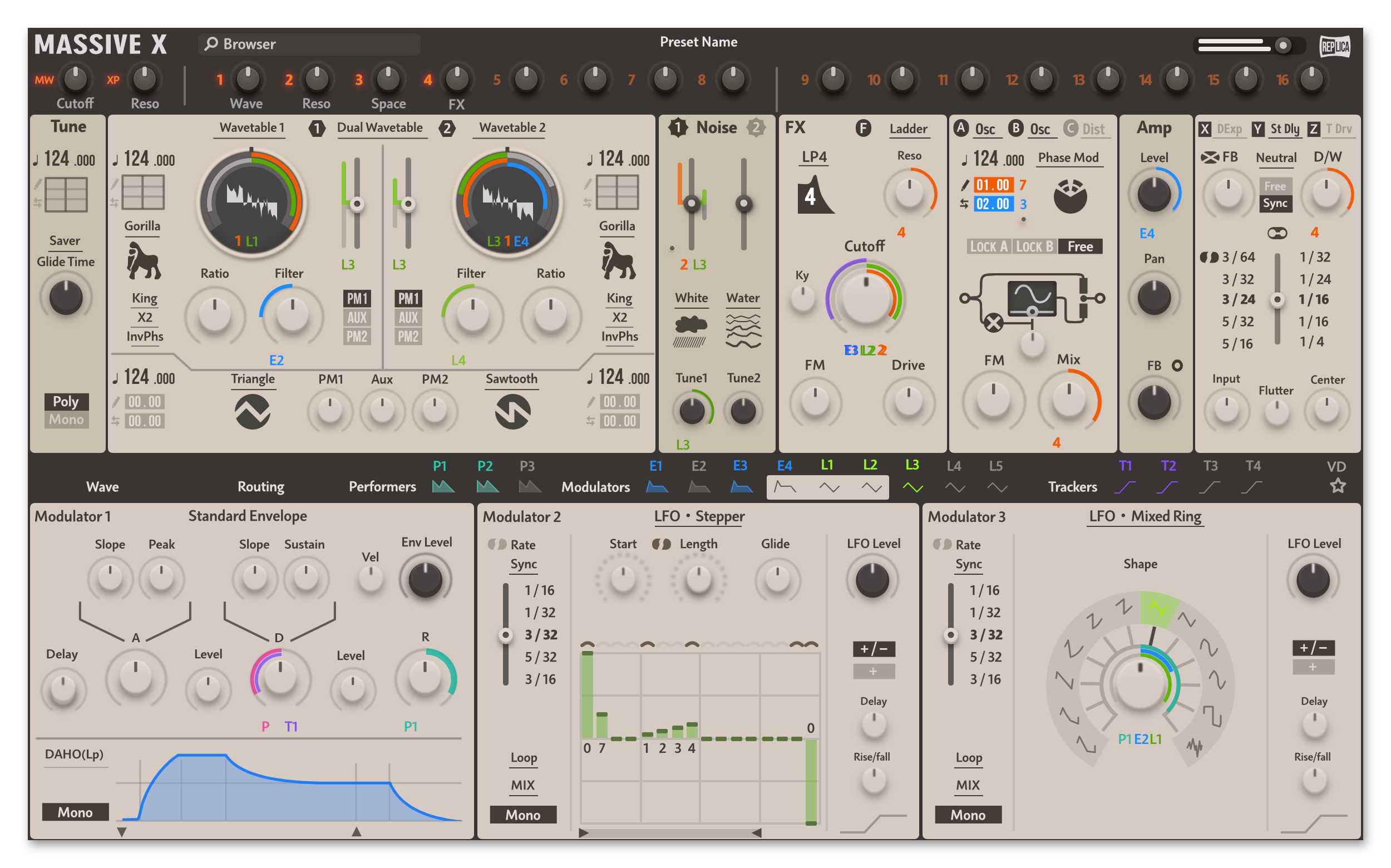
On a more meta level, a whole industry decided after 30 years of iterations that knobs that work like invisible sliders are the best controls, and you - who by the looks never had any extensive use of audio software - are claiming that they are all wrong, because of some philosophic argument. You might be true, you might be the rare visionary who sees a better way of doing things where other cannot, but the burden of proof is on you.
Perhaps the solution is to make the slider pop up if you press a button?
I think many music apps these days give you the option buried somewhere in settings.
That’s what I did. Made it slide by default (because I hate trying to twist a virtual knob). I briefly had a translucent rectangle popup when the control was in slider mode but it turned out not to be helpful as linear dragging seemed to make sense to everyone and I only had like eight options in total.
The one nice innovation I had was automatically detecting horizontal or vertical drags - useful for things like pan controls where a horizontal motion makes more sense.
I don't think so. It's a pretty standard exercise to try to create an ui framework so of course we're bound to see tons of them.
Then you hit the second requirement: complete bitmap theming, many times of a skeuomorphic kind. This is extremely difficult to do in something like Gtk/Qt.
https://doc.qt.io/qt-5/qtwidgets-widgets-styles-example.html
2. See the diamond-shaped radio buttons in the second example. :)
3. 3D embossed arrows on scroll bars.
A long time ago I wrote a tiny audio synth. And yep, I wrote my own minimal GUI which had stuff like sliders, and most importantly knobs which general GUIs typically don't provide.
Now I'm working on a non-audio webapp, and I have a problem where a knob would be the ideal solution. Searched far and wide for a Vue knob, and what I found was not usable. It worked if you "rotated" it circularly, but it didn't work if you pulled it up/down like a slider. You might say "use a slider then if you want to pull it up/down". True, but a slider takes a lot of UI space which sometimes is very precious. More importantly, the slider resolution is limited to it's height, while a knob could for example use the whole screen height for a full turn.