So perhaps it's not that GoogleMaps are good, AppleMaps are bad. It's more that while AppleMaps are good/decent, GoogleMaps these days are miraculous - almost to the point of being unfair comparison.
I don't own a car with Apple CarPlay, but a recent rental had it, and it worked perfectly with Google Maps.
There was pre-action mention of "Turn right in 500 feet". The driver was so frustrated with it, I finally turned on Google Maps and made the co-pilot turn off Apple Maps.
On the interstate, Google mentions "In 2 miles, take Exit 17 to Middleton", "In point 5 miles, take Exit 17", and "Take Exit 17".
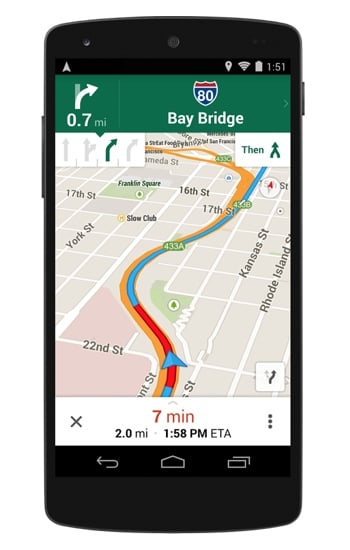
Additionally, I don't know if it had the lane indicator Google Maps puts up at the top [1]. You could feel the tension rise in the car as we tried getting to the various destinations throughout the week.
[1] https://www.techlicious.com/images/phones/google-maps-screen...
Apple Maps did route me up a to the top of a mountain on a single-lane two-way road in France, but I had "avoid tolls" enabled so it might have been my fault. Can't say it wasn't scenic though.
The search, however, is absurd! It does constantly return places on the other side of the planet! And God-forbid you misspell anything by a single character. I wish there was a plugin for Apple products that would just return the "Did You Mean" result from a Google search. I'd gladly trade a little bit of privacy for crowdsourced spellcheck at this point.
They do support third party navigation now
Occasionally I'll rent a car that only has Apple's Car Play and have to use my work iPhone to navigate (gawd forbid Apple would let us use Google Maps on Car Play;).
My experience has been universally poor:
- it provides no instructions for major actual intersections. It thinks you're staying on same main road even when there's a confusing Y in front of the driver. I have constant moments of panic when I see the intersection coming and no help from the maps.
- It provides confusing instructions on straight roads ("Turn right in 100 meters" when there's a stretch of straight road)
- It'll reference names for a road that are nowhere near what any of the signs indicate
- "Keep in right three lanes to stay on the road" - when the rightmost lane is actually a turning lane
- Something that is admittedly tricky, it struggles to provide useful instructions on more than four-way roads (e.g. if it's a 5-way or 6-way, "Turn right" has multiple interpretations). It doesn't use, at least not in my cases "bear right" or "slight right" or similar vs "turn right" or "acute right" or "sharp right" - and again, it gets the road names wrong.
- When Searching:
* it'll show me Bedford England 5000km away, but not Bedford NS 12km away
* It has some weird internal naming so searching for actual address will again not lead me anywhere near to what I want
Basically it's been a constant source of frustration beyond what I believe could reasonably be attributed to my inexperience with its UI :-/
EDIT/UPDATE: Thx for feedback; my work phone is on iOS 11, good to know that (*recently, after 4 years without it) CarPlay now supports other maps; note that I don't think it in any way makes Apple Maps experience itself any better 0:-)