News for hackers. Stuff that matters.
Re:PyQt5 Tutorial: Create a Python GUI in 2018 by Sileni on Tuesday September 25, 2018 @12:40PM (#18067918)
I like the tutorial, but I don't know why you would use PyQt these days. Tkinter is more permissive and has wrappers like appJar which make it disgustingly easy to put together a quick, ugly GUI. If you're building a desktop app that needs to really look good and be fast, why are you using Python?
Re:PyQt5 Tutorial: Create a Python GUI in 2018 by captainmuon on Tuesday September 25, 2018 @12:56PM (#18068090)
> If you're building a desktop app that needs to really look good and be fast, why are you using Python?

Why not? For an app to feel fast, you need to make it responsive and non-blocking. You can easily make apps with Python and Qt or Gtk that start instantly and never seem to hang. Discipline when it comes to not running things on the main thread, using proper async techniques etc. is more important than the number crunching ability of your programming language.

And when you need raw speed, you can easily drop in some C++ code with SWIG for example. For example, I made a GUI for controlling an experimental sensor system. The GUI could look boring, but should be rock solid and always responsive, it should be easy to add new features, and it had to read data from PCIe at hundreds of MB/s or even faster. So I wrote the GUI in PyQt, the PCIe part in C++. Python allowed me to mock the hardware code out easily so I could test the GUI separately, and made it really easy to read configuration files etc. which is unneccessary painful in C++.

Re:PyQt5 Tutorial: Create a Python GUI in 2018 by sevensor on Tuesday September 25, 2018 @03:02PM (#18069385)
> more important than the number crunching ability of your programming language

I work on a data visualization program written with PyQt. As an example, in a scatterplot with several hundred thousand rows, the bottleneck is not number crunching. Numpy could go up another order of magnitude. Probably two. The bottleneck is figuring out efficient ways to display all of the points, correctly, and make them pickable.

Re:PyQt5 Tutorial: Create a Python GUI in 2018 by gusmd on Tuesday September 25, 2018 @02:25PM (#18069037)
Agreed! Although I use SWIG on my job, pybind11[0] is a nice alternative that I've been looking at.

[0] https://github.com/pybind/pybind11

Re:PyQt5 Tutorial: Create a Python GUI in 2018 by int_19h on Tuesday September 25, 2018 @01:06PM (#18068200)
I was recently surprised by how non-ugly a Python Tkinter app can look with some effort. Take a look at this:

https://thonny.org/

Re:PyQt5 Tutorial: Create a Python GUI in 2018 by nofunsir on Tuesday September 25, 2018 @03:32PM (#18069701)
"Main development of Thonny takes place in Institute of Computer Science of University of Tartu, Estonia."

Interesting!

Re:PyQt5 Tutorial: Create a Python GUI in 2018 by voltagex_ on Wednesday September 26, 2018 @02:22AM (#18073210)
It's beautiful! Close to the look of Bvckup 2 (https://bvckup2.com/ - cert revoked due to Chrome changes I think) which might be the best looking Windows app I've seen in a long time.
Re:PyQt5 Tutorial: Create a Python GUI in 2018 by jcelerier on Tuesday September 25, 2018 @01:36PM (#18068535)
that's an interesting definition of "non-ugly". I would hesitate a lot before making an app that looks like this screenshot public.
Re:PyQt5 Tutorial: Create a Python GUI in 2018 by wiz21c on Tuesday September 25, 2018 @03:33PM (#18069709)
well it's a bit old school but it certainly looks functional. If the program under it is good, it's a very superficial comment. If only you'd see my emacs screen, it's unbelievably ugly and somehow, I work with it every day !
Re:PyQt5 Tutorial: Create a Python GUI in 2018 by jcelerier on Tuesday September 25, 2018 @04:04PM (#18069999)
I was replying to a post that stated specifically that it was "non-ugly". In 2018, non-ugly means this :

* https://assets.guitar-pro.com/1.3/images/www/guitar-pro-7/ca...

* https://www.awn.com/sites/default/files/styles/original/publ...

* http://www.comptoir-hardware.com/images/stories/_software/am...
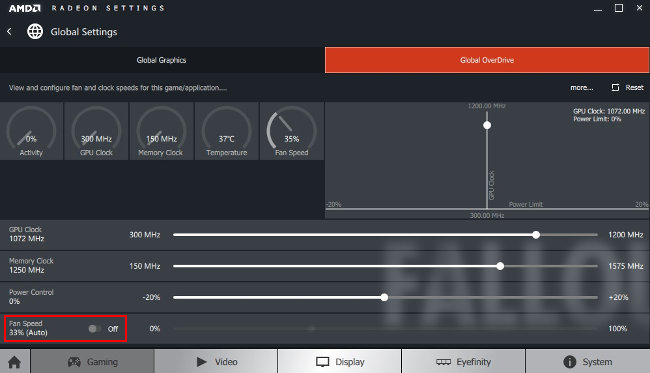
it's not what I use myself, being more of an i3/terminal guy, but it's absolutely what the clients want

Re:PyQt5 Tutorial: Create a Python GUI in 2018 by int_19h on Tuesday September 25, 2018 @04:27PM (#18070212)
For me, "non-ugly" means that it uses the standard UI controls and UI theme for the platform in a reasonable way. That's exactly what the screenshot shows. I would describe it as "neat". All your links are the exact opposite of that.

I'm sure someone (and, in particular, their designers) think they look nice. But the thing about looks is that they're very subjective. However, if I'm using some OS/desktop combo, that means I find its UI, at the very least, acceptable. And thus any app that uses native UI look & feel on that platform is also acceptable. I can't say that for many custom-themed apps.

For example, out of your links, I would say that 2 are downright ugly, and the third is tolerable. And I'm not sure what "in 2018" has to do with that.

Re:PyQt5 Tutorial: Create a Python GUI in 2018 by yorwba on Tuesday September 25, 2018 @02:00PM (#18068796)
What's wrong with it?
Re:PyQt5 Tutorial: Create a Python GUI in 2018 by talltimtom on Tuesday September 25, 2018 @12:49PM (#18068027)
Why not use python? It’s fast enough for most uses, and with PyQT it looks good enough on top of that it solves most cases rather fast. Sure I can make a solution that runs faster with a smaller memory footprint in Cpp, but my client doesn’t gain any value from me deciding to delay delivery to hit functional requirements they didn’t ask for and don’t need.
Re:PyQt5 Tutorial: Create a Python GUI in 2018 by radix07 on Tuesday September 25, 2018 @12:50PM (#18068046)
I suppose if you are familiar with Tkinter and are happy with how it looks have at it! But there are a ton of things that can be leveraged from Python and Qt separately going this route.

PyQt uses compiled Qt C++ code so isn't really that slow, comparable to how NumPy does it's number crunching. Even if you do find it is slow, you can always come back and branch down to the C++ level when needed, although there are ton of steps you could take to optimize in Python first. There are also all the Qt tools from UI editor and Designer to QML and way more if you really wanna go down the rabbit hole...

What are you suggesting as a really good looking and fast cross platform alternative??

Re:PyQt5 Tutorial: Create a Python GUI in 2018 by cpburns2009 on Tuesday September 25, 2018 @12:55PM (#18068084)
I think the better appearance of Qt cross-platform is the main drawing point (at least it would be for me). If I were to make a cross-platform application, or even just a Linux one, I'd likely use Qt (with Python bindings because that's what I know). I tried using Tkinter on Linux for a simple utility, but I could not figure out the theming or find any matching themes for Ubuntu.
Re:PyQt5 Tutorial: Create a Python GUI in 2018 by quotemstr on Tuesday September 25, 2018 @01:02PM (#18068151)
The combination of an interpreted shell with a statically-typed, AOT-compiled core is a time-tested architecture that leads to quick development times and lots of power. Python is a good choice for the former component of this mix, and if you use it, you want to be able to interact with the GUI.
Re:PyQt5 Tutorial: Create a Python GUI in 2018 by mherrmann on Tuesday September 25, 2018 @12:53PM (#18068065)
In my research [1] [2] [3], Tkinter was said to be better for basic applications, PyQt better for more advanced projects.

1: https://stackoverflow.com/a/1094530/1839209

2: https://www.reddit.com/r/learnpython/comments/108zfq/tk_or_q...

3: https://www.quora.com/Should-I-use-PyQt-GTK3-or-tkinter-for-...

Re:PyQt5 Tutorial: Create a Python GUI in 2018 by wiz21c on Tuesday September 25, 2018 @03:34PM (#18069730)
if you make use of editable tables, then Qt's is really powerful (the delegate thing is super cool)
Re:PyQt5 Tutorial: Create a Python GUI in 2018 by HoppyHaus on Tuesday September 25, 2018 @12:47PM (#18067994)
I've only been a Python dev, and have ended up becoming entrenched in Tkinter. I want to be able to just use another GUI framework for when I finally switch to something else. So, I can see the use.
Re:PyQt5 Tutorial: Create a Python GUI in 2018 by ajuc on Tuesday September 25, 2018 @03:28PM (#18069663)
For me pyqt is just the most convenient to use. It's hard to beat on the "time to code vs quality of the result" metric.
Re:PyQt5 Tutorial: Create a Python GUI in 2018 by liveoneggs on Tuesday September 25, 2018 @01:21PM (#18068358)
apparently a lot of the normal and terrible problems are worked around using this: https://build-system.fman.io/
Re:PyQt5 Tutorial: Create a Python GUI in 2018 by tudelo on Tuesday September 25, 2018 @12:48PM (#18068021)
What would you use for an app that needs to look really good and be fast?
Re:PyQt5 Tutorial: Create a Python GUI in 2018 by Longhanks on Tuesday September 25, 2018 @12:53PM (#18068071)
Really good? Platform-native APIs.
Re:PyQt5 Tutorial: Create a Python GUI in 2018 by cpburns2009 on Tuesday September 25, 2018 @12:59PM (#18068124)
On Linux, Qt and GTK are the platform native APIs.
Re:PyQt5 Tutorial: Create a Python GUI in 2018 by clear_dg on Tuesday September 25, 2018 @12:59PM (#18068119)
Qt qualifies then, at least on Linux.
Re:PyQt5 Tutorial: Create a Python GUI in 2018 by solarkraft on Tuesday September 25, 2018 @01:28PM (#18068429)
Qt qualifies on any platform, imo.
Re:PyQt5 Tutorial: Create a Python GUI in 2018 by clear_dg on Tuesday September 25, 2018 @01:51PM (#18068705)
Unless you use Qt quick which seems to be the way forward, and what many devs with html/css/js background seem to prefer.

Qt widgets look close to native UIs but the feel isn't always the same, especially when you have to juggle with different platforms (all native widgets differ in subtle ways even when their function is the same).

Re:PyQt5 Tutorial: Create a Python GUI in 2018 by solarkraft on Tuesday September 25, 2018 @04:07PM (#18070031)
Qt quick has Qt Quick Controls. Confusing naming, basically the same as Qt widgets, but built in Qt Quick (meaning they're themeable).
Re:PyQt5 Tutorial: Create a Python GUI in 2018 by ptx on Tuesday September 25, 2018 @05:29PM (#18070642)
Agreed, but you can use those from Python, through pywin32 and (for a few rare things that are missing in the former) ctypes.

(If you're on Windows. On Linux, Qt could be considered native. On Mac there is PyObjC. )

Re:PyQt5 Tutorial: Create a Python GUI in 2018 by toyg on Tuesday September 25, 2018 @05:47PM (#18070787)
Pywin32 to call native apis for GUIs sounds very, very painful. I had a few run-ins with pywin32 and COM automation, I don’t think I could bear the thought of developing a full UI with that sort of hacks. At that point, might as well go C# (or IronPython, if it’s still around) and enjoy the VS goodies.
Re:PyQt5 Tutorial: Create a Python GUI in 2018 by ptx on Tuesday September 25, 2018 @06:12PM (#18070986)
COM might have its issues, but I meant using the win32gui, win32api etc. modules to call the native win32 C API for UI. That's hardly a hack, and perhaps even slightly less painful than doing it from C. (I'm only using it for some fairly small things, though.)
Re:PyQt5 Tutorial: Create a Python GUI in 2018 by jimnotgym on Tuesday September 25, 2018 @01:57PM (#18068766)
The original post said

> why are you using Python?

I'm not sure

> Platform-native APIs.

are a replacement for Python?