News for hackers. Stuff that matters.
Re:What’s New in Bash/WSL and Windows Console by nailer on Wednesday April 12, 2017 @06:32AM (#14096347)
Windows Console folk: any chance of tabs in the official terminal?

Current Windows terminal options:

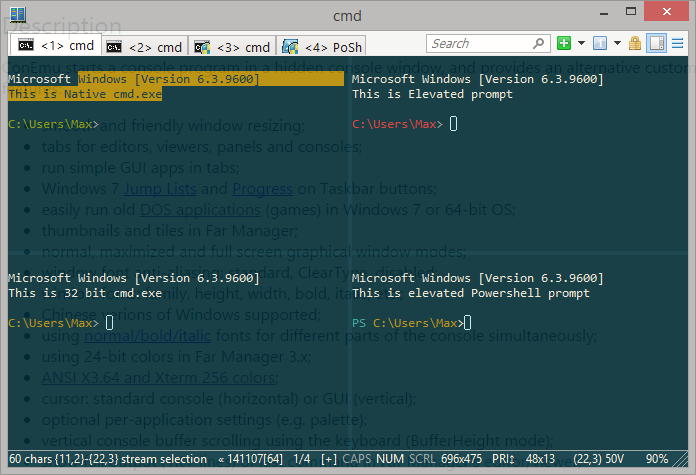
- ConEmu: mainly excellent but a little dated - eg, the active tab color is hard to distinguish but it can't be changed, apparently due to maintainer's insistence it works on Windows XP.

- Hyper: excellent but Ctrl C, Ctrl R etc broken in powershell.

Adding tabs to the Windows console makes more sense than have a third party create an entire console just to support tabs.

Re:What’s New in Bash/WSL and Windows Console by nailer on Wednesday April 12, 2017 @08:58AM (#14097162)
Edit for folks having trouble understanding: the post you're replying to literally mentions two of the best tabbed terminals for Windows. That's not the problem.

A fast, inbuilt, 2017-era terminal is.

- ConEmu has a UI that's a shotgun blast of shit.

- Hyper still fails at basic shortcuts.

- ConEmu plus other software still has a UI that's a shotgun blast of shit.

- Some person's half maintained fork of putty is some person's half maintained fork of putty and we already have Windows openssh for SSH purposes.

- A proprietary app you need to pay for is a proprietary app you need to pay for.

- tmux is not a tabbed terminal.

- Something that uses cygwin is something using cygwin.

The post is requesting a clean tabbed terminal, included in Windows, and maintained full time by Microsoft employees (whether Open Source or proprietary).

Edit: removed 'fully featured' as someone below thinks that means I want all the bullshit the other terminals add, rather than tabs, working escape sequences, and other terminal features.

Re:What’s New in Bash/WSL and Windows Console by ygra on Wednesday April 12, 2017 @09:53AM (#14097655)
> a clean, fully featured tabbed terminal, included in Windows

You'd either get a Microsoft Word equivalent of a console window in that case, since everyone has a different set of features they consider essential, or the Notepad equivalent (more likely). A tool's value doesn't necessarily increase with more features and features are never cheap (in Windows, at least, where there are documentation, translation, configuration, group policy, and other concerns).

Tabbed console windows exist as 3rd-party applications already, seemingly with minor problems for one user or another, but I'd argue those problems are easier to rectify than for MS to develop yet another alternative that people grumble about even more because it doesn't contain their own personal pet feature.

Re:What’s New in Bash/WSL and Windows Console by nailer on Wednesday April 12, 2017 @10:14AM (#14097864)
> A tool's value doesn't necessarily increase with more features and features are never cheap

What I mean when I write 'clean and fully featured' is: a console, tabs, a nice scroll buffer, working escape sequences, suppressing the bell. That's about it.

This is 1000x less features than ConEmu - I don't care about a new exciting way to set terminal variables, or integration with a file manager nobody uses, or support for a bitmap font format, or per-app antialiasing settings. Or various silly extras the other terminals add - I don't want a new way to do Unix on Windows, I don't want a new SSH client this isn't as good as openssh, I don't want a new windowing system.

I'm suggesting EXACTLY something like notepad.

Do 1000x less things, and do the remainder well.

> I'd argue those problems are easier to rectify than for MS to develop yet another alternative

Just add tabs to the console app as suggested. Or use whatever Edge uses for window chrome and shove the console app in there rather than html.

Re:What’s New in Bash/WSL and Windows Console by tolger on Wednesday April 12, 2017 @02:15PM (#14100261)
I'm with nailer on this. All I need is a decent built-in console with tabs and good support for bash, powershell and cmd.
Re:What’s New in Bash/WSL and Windows Console by amyjess on Wednesday April 12, 2017 @09:21AM (#14097363)
It would be nice if someone ported Konsole to Windows. A number of other KDE apps have already been ported, so hopefully it won't be too painful.
Re:What’s New in Bash/WSL and Windows Console by e12e on Wednesday April 12, 2017 @04:30PM (#14101451)
> Some person's half maintained fork of putty is some person's half maintained fork of putty and we already have Windows openssh for SSH purposes.

I wonder if an MS port/fork/patch-set contribution to putty might not be the best way to a great windows console host. At least until there's a native port of libvt.

Putty gets a lot of the console handling right - while win64/32 openssh is pretty outdated and lagging as a ssh client - I find it's preferable to run a recent full openssh under wsl to using openssh on Windows over putty.

As for console for Windows - I'm currently using conemu - considering moving to putty, but haven't quite figured out if it makes sense as a local powershell (and ipython) host...

Re:What’s New in Bash/WSL and Windows Console by nailer on Wednesday April 12, 2017 @08:27PM (#14102996)
Windows OpenSSH is excellent - use the one Microsoft maintain.
Re:What’s New in Bash/WSL and Windows Console by e12e on Friday April 14, 2017 @03:45AM (#14113179)
Re:What’s New in Bash/WSL and Windows Console by Notre1 on Wednesday April 12, 2017 @09:22AM (#14097374)
Out of curiosity, what tabbed terminals on other platforms would you consider to be significantly better than ConEmu/Hyper? (I've never actually used any GUI platform other than Windows for any length of time, so I would be interested in seeing what other people do use.)
Re:What’s New in Bash/WSL and Windows Console by llimllib on Wednesday April 12, 2017 @09:46AM (#14097584)
iterm2 is far and away the best I've ever used. https://iterm2.com/
Re:What’s New in Bash/WSL and Windows Console by mikewhy on Wednesday April 12, 2017 @04:54PM (#14101652)
Apple Terminal, iTerm, gnome-terminal, konsole. I can't really name one worse than ConEmu.

ConEmu likes to do this cute thing where it stops accepting key presses. And with the all the options it has, "starting a new terminal in the directory of the previous" is nowhere to be found.

But still, it's probably the best on Windows if you want tabs.

Re:What’s New in Bash/WSL and Windows Console by bitcrazed on Thursday April 13, 2017 @04:36PM (#14110716)
To be fair to ConEmu, Cmder, Hyper, and all the other Windows terminals/consoles, we don't currently provide a way for them to truly become genuine consoles.

We're working to fix that, but we have to clean things up a little first. Bear with us.
Re:What’s New in Bash/WSL and Windows Console by felipelemos on Thursday April 13, 2017 @08:51AM (#14106360)
And besides the iTerm2 on OSX that everyone here agrees it one of the best, Terminator on Linux does a good job too.
Re:What’s New in Bash/WSL and Windows Console by jcurbo on Wednesday April 12, 2017 @10:20AM (#14097927)
iterm2 on OS X is really good, maybe the gold standard as far as I'm concerned.
Re:What’s New in Bash/WSL and Windows Console by nailer on Wednesday April 12, 2017 @10:11AM (#14097841)
iTerm2, GNOME terminal.
Re:What’s New in Bash/WSL and Windows Console by tjoff on Wednesday April 12, 2017 @09:14AM (#14097297)
ConEmu has the best UI I've ever seen in a terminal. Way better than anything I've seen in *nix.
Re:What’s New in Bash/WSL and Windows Console by nailer on Wednesday April 12, 2017 @09:27AM (#14097413)
I use ConEmu for 5 hours a day. it's the best terminal on Windows, but its UI is absolutely awful https://conemu.github.io/img/ConEmu-Maximus5.png https://conemu.github.io/img/Settings-Main.png

- Minimal contrast in active tabs - can't be fixed due to Windows XP support.

- Flashes it's hidden console proxy on screen continually

- Settings menu with around 5000 options and no sense of heirarchy - something that's rare is just as prominent as something that's common

- Giant colorful icons and wasted space in the title bar. I can't throw my mouse to the top and pick a tab when it's maximised.

- Freaks out when your console is too large

- Does a bunch of things better done elsewhere: my profile bash/powershell profile sets environment variables, I don't need my terminal to do this.

Re:What’s New in Bash/WSL and Windows Console by tjoff on Wednesday April 12, 2017 @09:41AM (#14097533)
1. I understand the developer, I don't see the issue (wouldn't mind it being configurable but if it is the only thing that breaks XP support I can understand it).

2. I've seen it, happens probably once a month for < 50 ms when resizing or something. I can deal with it.

3. This is awesome, you go through it once and have every detail exactly they way you want it just because everything was shown (contrast to being forced to read the entire manual just to know what you can do). Great for discoverability. Take 15 minutes, quickly test out different settings and looks, reap the benefits for years to come.

4. I've removed the titlebar altogether. No borders at all either - Just a tiny (half row) discrete status bar at the bottom.

5. No idea what you mean here, can't recall to have seen it freak out ever.

Re:What’s New in Bash/WSL and Windows Console by nailer on Wednesday April 12, 2017 @10:11AM (#14097835)
1. Color contrast and it's ability to help users distinguish items from each other is a very well researched objective thing. Your personal experience doesn't overturn it as a concept, or make it easier for anyone else to find to find the active terminal.

2. That's great for you. My experience differs.

3. See 1, but for heirarchy.

4. Are sure you sure you can get the tabs all the way to the top?

5. See 2. I suspect I maximise the terminal more often or use a larger screen than you do.

Re:What’s New in Bash/WSL and Windows Console by tjoff on Wednesday April 12, 2017 @10:42AM (#14098101)
1. I'm not arguing that it is. There are more cues than color contrast before taking into account your mental state. As said, I wouldn't mind it being configurable but I understand the reluctance to do it if it breaks XP support.

3. Yes, a perfect hierarchy of the settings would be nice, in theory. Because never mind that what is important depends on the user and context - making the whole concept extremely tricky to get right. It is a tradeoff. And I haven't seen any terminal and few other applications that I've enjoyed setting up as much as ConEmu, most settings are logically where they should be. There are, understandably considering the amount of options, a few places where it can be difficult - but to help with that there is a great search function.

4. I don't even have a tab bar anymore, takes up way too much space and I always switch between tabs using the keyboard (since I only interact with the terminal from the keyboard anyway). But I tested it now, there is about 2px of space above the tab bar but if you try to press that area you still hit the tab you intended. So if you have maximized the window there is no possible way to click above the tab bar.

ConEmu is one of the most well polished applications I use on a daily basis, it doesn't get in the way. I miss it to death every time I'm using a non-windows machine.

Re:What’s New in Bash/WSL and Windows Console by nailer on Wednesday April 12, 2017 @10:51AM (#14098196)
1. You mentioned that you personally didn't have a problem with low contrast. If it's not an argument I'm not sure why you'd mention it. I can't find the active tab easily, but that's irrelevant too: we have long established research on contrast helping people find stuff, and measurably low contrast in ConEmu.

> I wouldn't mind it being configurable but I understand the reluctance to do it if it breaks XP support.

Users running a current OS needing to find their current terminal should take precedence over a small number of people running an unpatched 15 year old OS.

3. Re heirarchy:

> never mind that what is important depends on the user and context

Ultimately more users want to change the font than integrate with 'FAR', or change the method of anti-aliasing used.

4. Interesting (this really should be a default). How do I do it?

> There are, understandably considering the amount of options

The Settings app has more options than ConEmu. It controls an entire OS and it's still easier.

> to help with that there is a great search function.

I've only just found that now, because it's in a different place to every other search box on Windows.

I'm not arguing the non-UX bits of ConEmu aren't great. I'm stating that ConEmu doesn't care about UX and it's really obvious.

Re:What’s New in Bash/WSL and Windows Console by tjoff on Wednesday April 12, 2017 @11:12AM (#14098429)
I didn't have a problem with it as a whole. I never understood the tight coupling with FAR either, but it hasn't distracted me either. It takes me literally no time at all to change the font so why optimize for that further? It's literally the first option in the main section. And arguably changing the anti-aliasing is about as important as the font and should most definitely be right beside it as they are related.

It is not uncommon at all to have a search-bar directly associated with a tree-view. I get the feeling that you primarily use other operating systems.

The settings app is an absolute nightmare. And that's understandable, because the target group are people with no interest or knowledge about computers or windows at all. So it is beginner friendly, but not user friendly by any stretch. Do not confuse the two. Contrast to ConEmu, not beginner friendly at all but quite user friendly.

I do not know how you've set it up but I'm guessing you need to: Main -> Appearance -> Title bar section, Check "Hide caption always". It is non-standard so that's why I think it is sensible that it isn't enabled by default.

I'm arguing that the UX is top notch for it's intended audience. If all you want is cmd.exe with tabs, then yes, I fully understand why ConEmu isn't for you.

But this is derailing, I probably won't be continuing this thread.

Re:What’s New in Bash/WSL and Windows Console by nailer on Wednesday April 12, 2017 @11:48AM (#14098841)
Ack re: not continuing. Short and final response:

- There shouldn't be a 'main' section. 'Main' isn't a category. 'Appearance' would be more logical. Neither should we show that many controls on screen: use a 1/2 heirarchy rather than frames.

- "not uncommon at all to have a search-bar directly associated with a tree-view" Yep, I'd ditch the tree view, and move search to top right to be consistent with other apps.

- "The settings app is an absolute nightmare." How? Settings is aimed at people who want to configure an entire OS - it's doing a more complicated job than conemu is. You could measure the time taken by users of different skill levels and they'd all have a faster time finding something in Settings. Again, let's get or look at data rather than caring about our personal experiences.

> changing the anti-aliasing is about as important as the font

It's not important at all. If you measured it, how many users want custom anti-aliasing options for a single app? Does iterm do it? Does gnome? are their forums filled with people who really need different anti-aliasing settings for a single app?

- Re tabs in title bar: I've never heard window chrome be referred to as "caption".

> It is non-standard so that's why I think it is sensible that it isn't enabled by default.

Word, Edge and Explorer all put useful stuff in the title bar. Seems pretty standard to me.

> I'm arguing that the UX is top notch for it's intended audience.

I understand. I'm arguing it makes decisions that UX research either already has or would prove to be objectively poor for all users.

Thanks re: putting tabs in the title bar!

Re:What’s New in Bash/WSL and Windows Console by zadjii on Wednesday April 12, 2017 @12:11PM (#14099051)
Basically every release we look at if it's possible to get us to tabs in that release window. If it's not, then usually we'll do some architectural work to get us closer to that goal. Part of the problem is that most of the codebase is from 1993, so there's a LOT of architectural work between where we were when Windows 10 first launched, and proper tab support.

We're working hard on that architecture stuff now, because we want tabs just as bad as the community.

Re:What’s New in Bash/WSL and Windows Console by Analemma_ on Wednesday April 12, 2017 @12:21PM (#14099163)
I'm curious: could you explain briefly why tabs are so difficult? I would think that every tab could have its own process space for its own shell, but obviously there's something big I'm missing here.

If this is more than could be enumerated in an HN comment, I'd love to have a blog post about it. This stuff is fascinating.

Re:What’s New in Bash/WSL and Windows Console by nailer on Thursday April 13, 2017 @06:53AM (#14105751)
Hi Zadjii I really appreciate you answering. If it's a 25 year old code base, wouldn't a rewrite be easier? What's the process of taking something like that and trying to modernize it?
Re:What’s New in Bash/WSL and Windows Console by bitcrazed on Thursday April 13, 2017 @04:41PM (#14110744)
This XKCD is equally applicable to this problem - just replace "standard" with "Console" (or any other app for that matter) ;)

https://xkcd.com/927/

And, no, simply rewriting the Console is not an option: Entire businesses' core systems depend on the Console, its specific behaviors, and even its bugs.

If we break existing behaviors we get to hear about who we've broken very, VERY quickly ;)

Re:What’s New in Bash/WSL and Windows Console by nailer on Friday April 21, 2017 @11:08AM (#14166236)
I get that, but there's the Paint/Paint3D option: keep existing codebase and app, for people who need exact behaviour, and rewrite a new cleaner app.
Re:What’s New in Bash/WSL and Windows Console by teh_klev on Wednesday April 12, 2017 @07:32AM (#14096648)
What I do is start sshd in WSL then ssh to <username>@localhost from mobaxterm which is quite a nice (tabbed) terminal app. Works a treat, even with the free edition.

http://mobaxterm.mobatek.net/

Re:What’s New in Bash/WSL and Windows Console by MichaelGG on Wednesday April 12, 2017 @12:45PM (#14099382)
MobaXterm is awesome. Except the performance is just crap. It's noticeably laggy doing basic things like opening tabs and stuff. Anytime it has to redraw/relayout it's just slow. And if you use RDP, the CPU just burns even when idle.

It's so promising though, I paid for it.

Re:What’s New in Bash/WSL and Windows Console by teh_klev on Wednesday April 12, 2017 @06:41PM (#14102403)
I paid for it as well :)

I pretty much use it mostly for ssh and have never noticed any lag. There are one or two oddities, but I can live with them. It's miles better than plain old PuTTY.

If I'm doing RDP I use RoyalTS, another thing I paid for because it does RDP management so well:

https://www.royalapplications.com/ts/win/features

Re:What’s New in Bash/WSL and Windows Console by tejinderss on Wednesday April 12, 2017 @08:59AM (#14097171)
ssh has its own typing latency, doesn't feel like native to me
Re:What’s New in Bash/WSL and Windows Console by teh_klev on Wednesday April 12, 2017 @09:32AM (#14097472)
Can't say I've ever noticed any difference, even over the VPN to our stuff in the DC. Even serious vim editing sessions on a remote box with tmux feel just as instant as when I'm working on my local Fedora/KDE h/w PC in Konsole.
Re:What’s New in Bash/WSL and Windows Console by internet2000 on Wednesday April 12, 2017 @09:52AM (#14097646)
This is the biggest blocker, in my opinion. WSL is nice and all, but as long as cmd.exe/conhost.exe is the only official terminal, it'll never feel just right. If only they had an API so you could run Mintty without the wslbridge kludge.
Re:What’s New in Bash/WSL and Windows Console by bitcrazed on Thursday April 13, 2017 @04:32PM (#14110681)
Hi - PM for Windows Console & Bash on Windows here.

YES ... one day ;)

We're keen to figure out a decent tab story for the console, and the feature ask is on our backlog, but we're currently fully booked completing some important internal re-factoring, after which we'll be able to return to working on important asks like this.

FWIW, we're currently giving the Windows Console its biggest overhaul in > 30 years!! We're re-factoring and modernizing many of the Console's core internals.

We'll be writing-up the why's and wherefores of what we're up to in a couple of months.

Stay tuned on our blog (https://blogs.msdn.microsoft.com/commandline) and follow me on Twitter (https://twitter.com/richturn_ms) for news, udpates, and info.

Re:What’s New in Bash/WSL and Windows Console by uaaa on Wednesday April 12, 2017 @06:51AM (#14096448)
This is a more modern wrapper around ConEmu: http://cmder.net
Re:What’s New in Bash/WSL and Windows Console by nailer on Wednesday April 12, 2017 @07:40AM (#14096686)
Cmder is ConEmu, just with a bunch of other stuff added to the download, including:

- Something called 'git-for-windows' which isn't actually git for Windows https://git-scm.com/download/win but unremarkable things like shell additions which give you git status in the prompt, and a not-particularly-good GUI.

- Clink (which is for cmd.exe).

I.e., this doesn't in any way address the limitations mentioned in the post you're replying to.

Re:What’s New in Bash/WSL and Windows Console by neilsimp1 on Wednesday April 12, 2017 @07:53AM (#14096747)
Doesn't it, though? It lets you create tabs, Ctrl+c - Ctrl+v, and works for Cmd, PowerShell, and Bash on Windows.
Re:What’s New in Bash/WSL and Windows Console by nailer on Wednesday April 12, 2017 @08:42AM (#14097054)
> > - ConEmu: mainly excellent but a little dated - eg, the active tab color is hard to distinguish but it can't be changed, apparently due to maintainer's insistence it works on Windows XP.

> It lets you create tabs, Ctrl+c - Ctrl+v, and works for Cmd, PowerShell, and Bash

Not sure why you think that's addressing this.

Re:What’s New in Bash/WSL and Windows Console by zouhair on Wednesday April 12, 2017 @08:36AM (#14096998)
ConEmu does that
Re:What’s New in Bash/WSL and Windows Console by ivanbakel on Wednesday April 12, 2017 @09:44AM (#14097562)
I really support ConsoleZ. The UI is sadly still a little bulky, but you can do a good bit of configuration for hotkeys. The tabbing is nice, and it also to my memory has panes, without ConEmu's weird hidden tab system for them.

It has the added benefit of you being able to pick the terminal to spin up, and whether you want Administrator mode or not, on every new tab, so you can be working in a bash tab and pop a new Admin cmd tab to update packages using your Windows manager.

Re:What’s New in Bash/WSL and Windows Console by e12e on Wednesday April 12, 2017 @04:33PM (#14101469)
Re:What’s New in Bash/WSL and Windows Console by ivanbakel on Wednesday April 12, 2017 @06:55PM (#14102512)
It is, yeah. Chocolatey has a package for it, which is how I found it.
Re:What’s New in Bash/WSL and Windows Console by hotsauceror on Wednesday April 12, 2017 @02:28PM (#14100408)
I second this. I use ConsoleZ daily as my main shell for cmd and for powershell. It does everything I need it to do, I can dial down the UI to the absolute bare minimum, it's fast and responsive, and it's highly customizable.
Re:What’s New in Bash/WSL and Windows Console by Analemma_ on Wednesday April 12, 2017 @09:43AM (#14097556)
It's on their backlog: https://wpdev.uservoice.com/forums/266908-command-prompt-con... You can upvote it to signal this is important for you, they use UserVoice as one signal to prioritize feature work.
Re:What’s New in Bash/WSL and Windows Console by snarfy on Wednesday April 12, 2017 @07:50AM (#14096737)
But a third party must create an entire console just for tabs, due to /subsystem:console

https://msdn.microsoft.com/en-us/library/fcc1zstk.aspx

Re:What’s New in Bash/WSL and Windows Console by Svenskunganka on Wednesday April 12, 2017 @08:13AM (#14096844)
Mintty is what I'm using for it. You don't have to install the entirety of Cygwin and its unix-like tools to use it, there's smaller bundles specifically made for WSL like this one: https://github.com/mintty/wsltty

I personally don't want a terminal with built-in tabs or windows since I use tmux for that. On my Mac I use iTerm2 where tabs/windowing is integrated with tmux. Try it and see if you like it! :)

Re:What’s New in Bash/WSL and Windows Console by wildmusings on Wednesday April 12, 2017 @09:07AM (#14097240)
You can run gnome-terminal with WSL and VcXSrv. You might need to run unity-settings-daemon once per session to get font smoothing working correctly.
Re:What’s New in Bash/WSL and Windows Console by pcwalton on Wednesday April 12, 2017 @02:07PM (#14100169)
I just use the XFCE terminal connected to VcXsrv in WSL. :)
Re:What’s New in Bash/WSL and Windows Console by nostoc on Wednesday April 12, 2017 @08:24AM (#14096919)
Tmux solves your tab needs!