News for hackers. Stuff that matters.
Re:Firefox 52 released by danielsamuels on Tuesday March 07, 2017 @10:45AM (#13811215)
It's also been in Chrome for years.
Re:Firefox 52 released by jamesgeck0 on Tuesday March 07, 2017 @10:51AM (#13811287)
In the form of an official Chrome extension that was discontinued just over two years ago.
Re:Firefox 52 released by drusepth on Tuesday March 07, 2017 @07:48PM (#13816797)
How is it different from the native functionality in Chrome that lets you see (and open) any tabs you have open in Chrome across any device?
Re:Firefox 52 released by nfm on Tuesday March 07, 2017 @09:13PM (#13817246)
The difference is that you can push a tab from one device to another. So if you're reading something on your phone, and push it to your laptop, it will automatically open in a new tab there once it syncs. It's good for when you're on the go, and want to remember to read something later on once you get back to your computer.

By the way, Firefox also has the feature you mention (view tabs that are open on devices).

Re:Firefox 52 released by drusepth on Thursday March 09, 2017 @03:24PM (#13833163)
Ah, I guess the benefit of "pushing" a tab shows in stateful applications or something, so it keeps the same "state" on the new device? Or, does it keep the same distance scrolled down the page so you can pick up where you were?

I'm confused because I open desktop session links from my mobile all the time and I'm curious if there's features I'm missing out on by pushing from one device to another, instead of syncing.

For example, if I open Chrome, I see the tabs open across all my other computers[1] and I usually just resume relevant tabs from there. It keeps me logged in, but sometimes reverts things like filters or sorting (on-page JS) unless it is part of the URL. It doesn't scroll me where I was in a page either, which would be nice.

[1] http://i.imgur.com/MgPCMy2.png

Re:Firefox 52 released by joosters on Tuesday March 07, 2017 @10:54AM (#13811314)
But doesn't Chrome send your data through Google?
Re:Firefox 52 released by danielsamuels on Tuesday March 07, 2017 @10:55AM (#13811327)
Yes, though you can encrypt it locally before it does so.
Re:Firefox 52 released by ronjouch on Tuesday March 07, 2017 @11:04AM (#13811422)
But do you do? (Honest question; I mean: is there a reliable and easy way to enforce encryption happens?)
Re:Firefox 52 released by danielsamuels on Tuesday March 07, 2017 @11:15AM (#13811548)
Yes, it's a simple option in the settings: https://i.imgur.com/0np3ItM.png
Re:Firefox 52 released by mintplant on Tuesday March 07, 2017 @12:53PM (#13812759)
It's not on by default though, meaning most users will be passing data their browsing data through Google unencrypted. Not only tabs but cookies, full browser history...

I'm always surprised that no one seems to think this a big deal. People will install and recommend tracking-blocking extensions while allowing Google to hoover up all this data without a second thought.
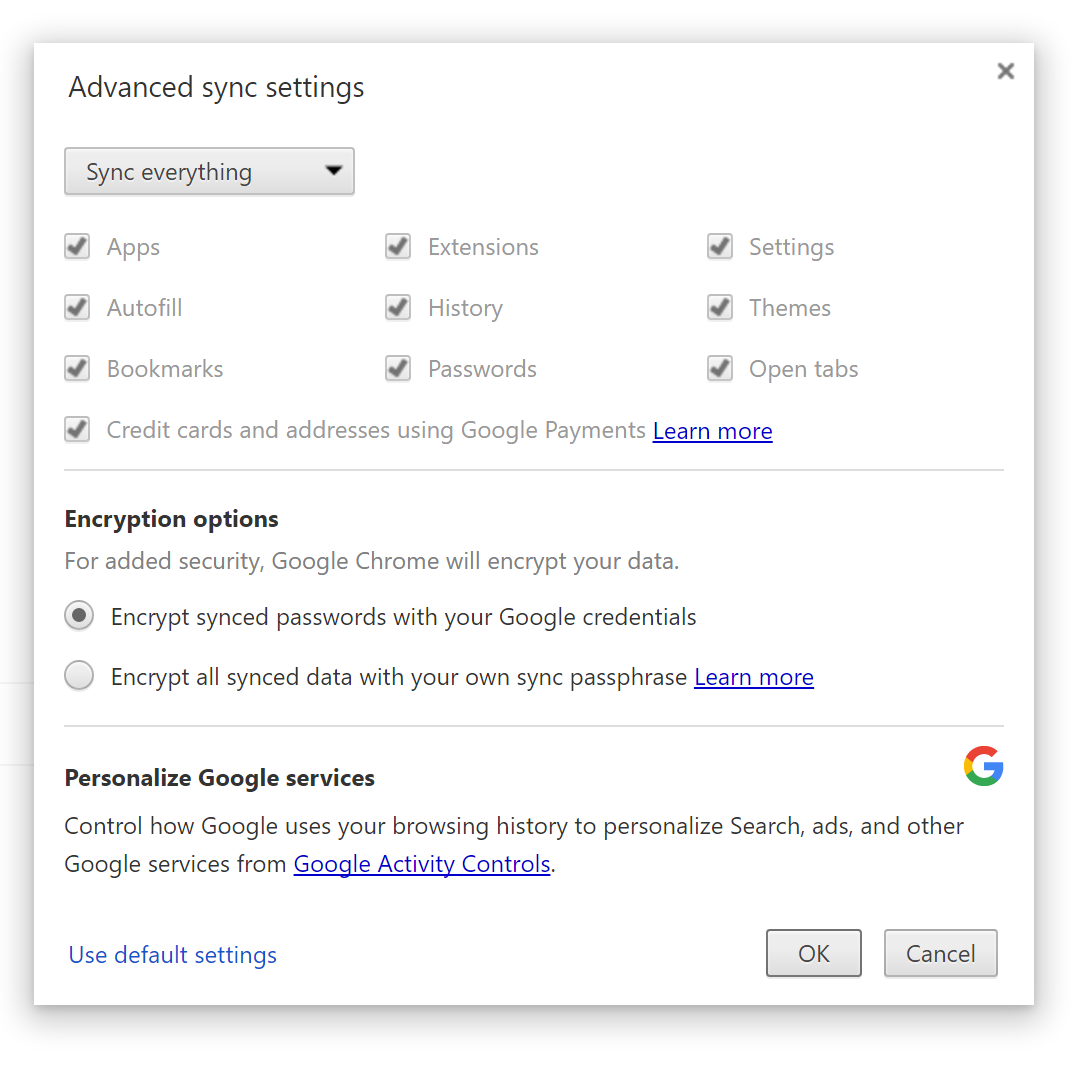
Re:Firefox 52 released by NikolaeVarius on Tuesday March 07, 2017 @01:07PM (#13812900)
By default Google encrypts it. Its clearly in that picture
Re:Firefox 52 released by mintplant on Tuesday March 07, 2017 @01:24PM (#13813080)
No, danielsamuels has manually changed that setting. The default is to only encrypt saved passwords: https://www.spinda.net/files/chromesync.png
Re:Firefox 52 released by ronjouch on Tuesday March 07, 2017 @11:33AM (#13811722)
Oh okay, didn't know Chrome provided this feature natively, I thought you were referring to some kind of crazy DIY encrypt-things-behind-Chrome's-back monitoring script setup.

Thanks, and thanks for the precise screenshot :)