Re:Staffpad: a new class of notation app
by wlesieutre on Wednesday October 07, 2015 @09:44AM
(#10345939)
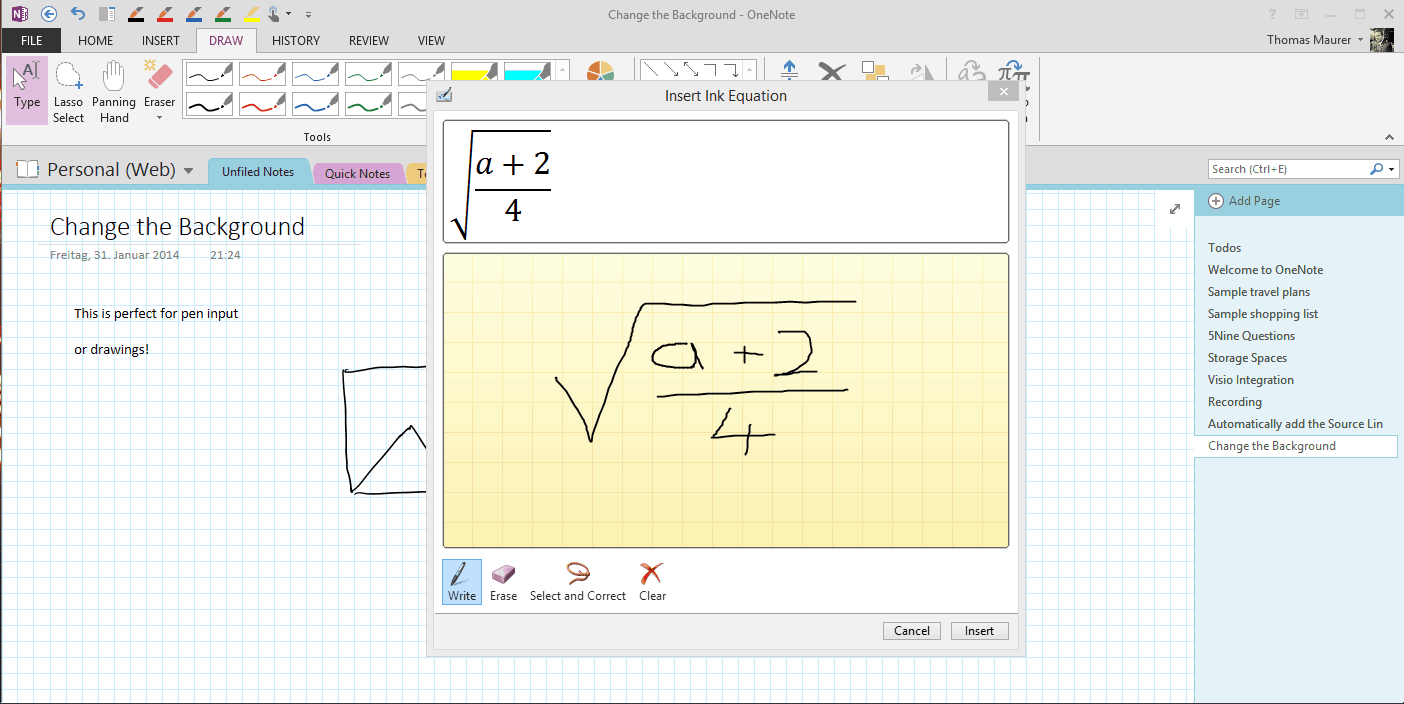
OneNote does this. You can either insert a new equation and get an editor, or select existing strokes to convert (to either writing or math). There's sometimes error correcting involved, but it's pretty impressive.
http://www.thomasmaurer.ch/wp-content/uploads/2014/01/Math-I...
Re:Staffpad: a new class of notation app
by jestinjoy1 on Wednesday October 07, 2015 @08:38AM
(#10345593)
Something like this?
Re:Staffpad: a new class of notation app
by IkmoIkmo on Wednesday October 07, 2015 @08:29AM
(#10345556)
Man absolutely, right now I'm filling up a blocknote really fast working through problem sets, trying to minimise paper by writing small, fitting many problems on one page etc. Would be lovely to use a digital pad and save each problem set on its own page and have an easy eraser tool.
Anyone used the Khan Academy app to brush up on some math? They've got a very nice handwriting to text feature to allow easy entry of answers on a mobile device, a pen would work great in combination.
Re:Staffpad: a new class of notation app
by dnquark on Wednesday October 07, 2015 @03:23PM
(#10348367)
I've been using Xournal for notes, problem sets, etc. for the last 5 years. It doesn't do handwriting recognition, etc., but I find that this is a good thing -- that way I don't ever have to go back and fix recognition errors, and unless you are preparing something for publication, typesetting math is a waste of time.
Re:Staffpad: a new class of notation app
by vortico on Wednesday October 07, 2015 @06:25PM
(#10349569)
It's actually possible to LaTeX as fast as someone is narrating math symbols. Definitely not as fast as writing on a whiteboard, but on the same par as typing English.
Re:Staffpad: a new class of notation app
by hliyan on Wednesday October 07, 2015 @08:23AM
(#10345532)
Flow charts and geometric shapes too.
Re:Staffpad: a new class of notation app
by wlesieutre on Wednesday October 07, 2015 @09:42AM
(#10345916)
Microsoft's iPad Pro demo showed drawing geometric shapes in PowerPoint. Reminded me of drawing in Flash but not quite as free form. I'd be very surprised if PowerPoint on Surfaces never got similar features. Maybe it does already? I don't have Office on mine.
Think Kit for Paper by 53 offers some diagram tools:
http://news.fiftythree.com/post/118777260503/introducing-thi...
Re:Staffpad: a new class of notation app
by debacle on Wednesday October 07, 2015 @08:38AM
(#10345592)
I think math would require more error correction than music. Musical notation is pretty easy to get right, whereas math has a much larger symbol lexicon.
Edit: Why the hell was this downmodded?
Re:Staffpad: a new class of notation app
by pervycreeper on Wednesday October 07, 2015 @09:26AM
(#10345824)
Musical notation can actually get really hairy even when restricting yourself to pre-20th century conventions. Another notation product currently in development has a very interesting blog that delves into some of these issues (http://blog.steinberg.net/ ).
Math, on the other hand, is actually way easier even including things like mapping diagrams.
Re:Staffpad: a new class of notation app
by debacle on Wednesday October 07, 2015 @09:34AM
(#10345870)
K
Re:Staffpad: a new class of notation app
by tantalor on Wednesday October 07, 2015 @08:52AM
(#10345654)
Not if you restrict the input to LaTeX notation.
Re:Staffpad: a new class of notation app
by ececconi on Wednesday October 07, 2015 @09:10AM
(#10345740)
Then I wouldn't see an advantage of typing on a screen vs drawing.
Re:Staffpad: a new class of notation app
by debacle on Wednesday October 07, 2015 @08:53AM
(#10345663)
I have no idea what you mean.
I can understand that music is a good first application of this technology, but entering mathematical and engineering-related content through such an interface could be a huge deal as well.