noseratio
noseratio on Hacker News
I'd be happy if we migrated to Blazor and it lasted for 10 years. Kudos to AngularJS, which is still on LTS until the end of 2021.
It might as well happen with Blazor, if it's kept further maintained as a part of .NET normal release cycles for years to come, and won't be stripped out in some next major release.
Posted by
noseratio on Monday October 25, 2021 @08:49PM
from the ask-hn dept.
I'm a member of a team of C# developers and we're considering Blazor for modernizing a large enterprise ASP.NET MVC app.In the light of the recent overwhelming events in the .NET space, we'd be interested in opinions about what the future of Blazor could be, should Microsoft decide to stop maintaining it.I've created a Twitter poll (upd: the link is in the comments below), you...
> "TypeScript does use JavaScript constructs but has a lot more in common with C# ... It’s fairer to say that TypeScript is a C# superset, with some JavaScript limitations, which compiles to JavaScript."
Lol. As someone who's reasonable good at C#, when I started learning TypeScript, I made that common mistake of approaching it as something similar to C#. Boy was I wrong, it's a totally different language and philosophy, and the prior knowledge of C# actually serves a bad favor here.
Maybe some styling tool similar to CSS exists in modern XAML/WinUI3? I must admit, I haven't followed that space much recently.
Thanks! I'm totally with you on Electron, as I've mentioned earlier in this thread. Ironically, Electron was turned down because the team didn't like the idea of coping with C++ (required for low-level custom add-ons). WebView2 with C# was also on the table, but that'd be a big overkill IMO. Then, WPF:
https://dev.to/noseratio/the-signs-of-wpf-currently-being-on...
Thanks for your thoughts! I've been mostly involved with Electron lately and I'm a believer in all-HTML UI. For this project though, Electron was ruled out.
Posted by
noseratio on Sunday August 15, 2021 @08:08PM
from the ask-hn dept.
Looking for opinions, thank you. It may sound funny in 2021, but I'm inclined to use WinForms.
Posted by
noseratio on Thursday May 27, 2021 @11:49PM
from the show-hn dept.
Posted by
noseratio on Saturday May 22, 2021 @05:04PM
from the gist.github.com dept.
Totally this, and not just for basic shell tasks but also as as scripting tool for CI/CD pipelines.
You'd also need a TURN server if both peers are behind NAT without UPnP, which is very common. STUN alone wouldn't be enough.
Posted by
noseratio on Tuesday March 16, 2021 @07:24AM
from the github.com dept.
Posted by
noseratio on Monday February 08, 2021 @06:42AM
from the show-hn dept.
Win+E, then Alt+D could be an alternative, that will take you to the Windows Explorer address bar.
In my app, Alt+Ins pops up a text editor (a-la Notepad) with the clipboard content already pasted.
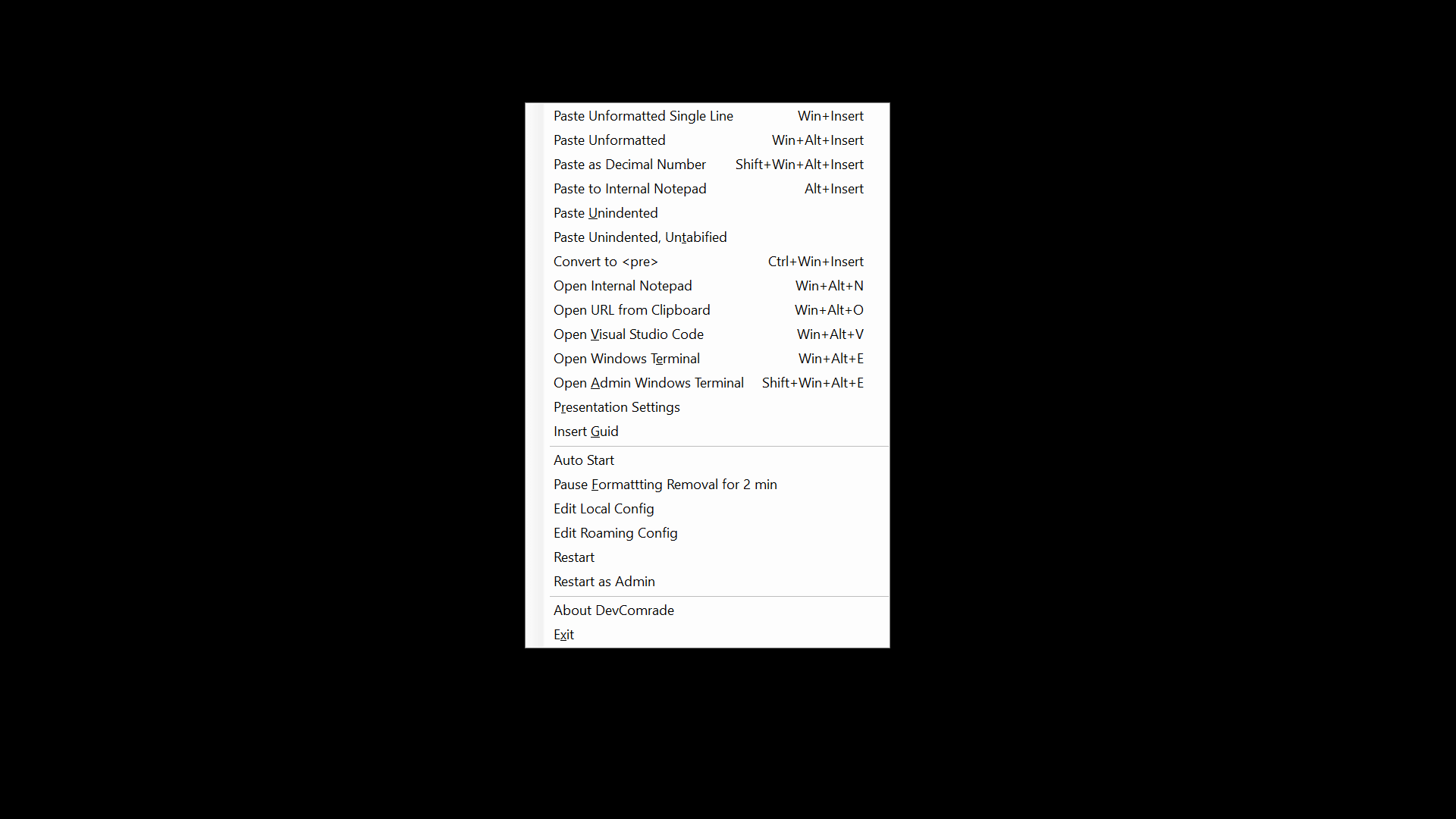
I have an option in the app's tray menu to temporarily disable clipboard formatting stripping (with a timeout), for those rare cases when I actually need to paste rich text.
I was a PureText user for over a decade and I lately (with frequent Win10 updates) I was experiencing problems with some apps, like often I heard the beep but nothing was getting pasted. If it still works great for you, naturally there is no need to switch.
There is one useful feature unique to my app (AFAIK), it's Win+Ins for pasting into a command line. It replaces all line breaks with spaces, so nothing gets automatically executed upon pasting.
Yep this usually works in browsers and Electron-based apps. Not a standard Windows hotkey.
I have an option in the app's tray menu to temporarily disable the format stripping (with a timeout).
I agree with you. I first tried to come up with a universal solution using SendInput API. This shortcut is still there: Win+Shift+Ins, and it works generally well but a tad slow. So eventually I opted to stripping formatting in-place in clipboard. As a compromise, I've added a tray menu item to disable it, when a rich text paste is desired:
https://raw.githubusercontent.com/postprintum/devcomrade/mai...
I was using Notepad too for decades, and now I'm surprised of how quickly I got used to Ctrl+V simply working the way I always wanted it :)
This is an interesting idea (if controlled by a setting). I'm afraid though there is no universal approach to implementing it, which would work across all apps.
Might be one of those legacy poor usability decisions. Still not easy for modern Microsoft to undo, hindered by compatibility concerns and internal bureaucracy.
Same as the infamous "Terminate batch job (Y/N)?" prompt, upon hitting Ctrl+C. Who would every want to continue a .BAT script after trying to stop it? To make it worse, hitting Ctrl+C again cancel that prompt and continues the script. Some lost data because of that.
Me too, plus PureText. The latter didn't always work for me, especially with the frequent Windows 10 updates lately.
I know many people happily use Ditto Clipboard Manager, but I just wanted a simple app which I could quickly tweak as needed.
It only strips the formatting if the Clipboard content is TextDataFormat.Rtf or TextDataFormat.Html, so far that has worked very well for me.
There is an option in my app to disable the formatting stripping by default. Then Ctrl+V is back to do whatever it does by default, and Win+Shift+Ins can be used to paste unformatted text.
How do you deal with multi-line text, Notepad? :)