Only "some" 2-letter commands? Try looking through ':help z' and ':help g'.
Ctrl-key commands become really important in insert and command-line modes.
And not to nitpick, but when you speak of "command-mode functions (e.g. substitution)", I think you really mean command-line mode. Command mode is another name for normal mode. Please try not to confuse the new/prospective users.
This vim cheat sheet should help you do just that:
http://www.viemu.com/vi-vim-cheat-sheet.gif
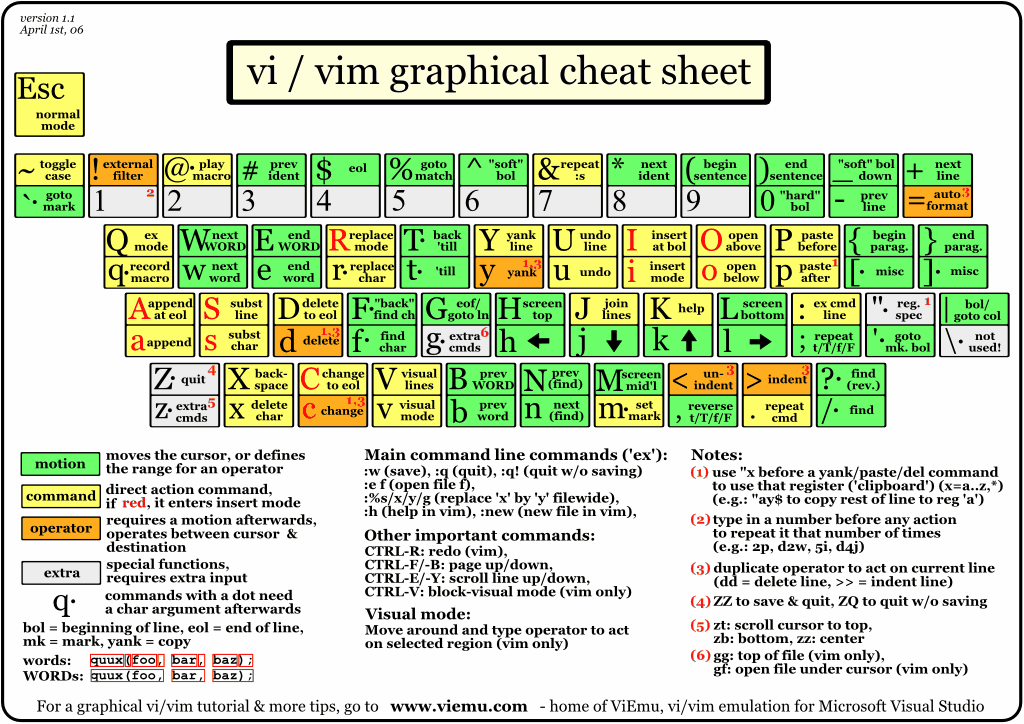
More here:
http://www.viemu.com/a_vi_vim_graphical_cheat_sheet_tutorial...
But I still recommend "vimtutor" as a more structured approach to learning vim.
Then do some actual editing and try to navigate as efficiently as possible - make it a sport. Try to use as many different commands as possible.
There are some two letter commands (e.g. ZZ, gg, zt) but not that much. There are some CTRL-key commands, but few important ones. And there are tons of command-mode functions (e.g. substitution), but there are few that you really need to know.