The first issue with chording keyboards is the tradeoff you make between the amount of keys in a chord required to perform all permutations readily available in a typing keyboard. You can, optimally, pack all permutations only using ~10 keys, but you might require to perform either 6 key chords (3 keys per hand simultaneously), introduce sequences, or introduce trigger delays.
Now, while doable, doing a 6-key chord was quite hard for me. I couldn't remember all the required permutations, and it also required to setup some quantization in order to detect the chords correctly. Quantization in turns imposes an upper-bound on CPM you can attain.
Using more space with smaller chords (a larger set of 2 octaves with ~3-4 keys per chord) was easier for me, but the regularity imposed by the chords (jamming the required keys at the same time) was still unnatural.
I tried to setup some different mechanics, using a sort of tree dictionary where the keys enters the branches. An approach that worked well was to map the frequent character tuples in adjacent keys. Performing CDE, CDF, DEF, EDC combos would result the vowels, which were mapped repeatedly at other locations using the same musical intervals. Typing with this system felt much more "music style": infrequent letters were mapped sparsely on the keyboard, with vowels available in every octave. You could move left-to-right to type. It's also much easier to press keys in _fast_ sequence than trying to perform a perfect chord timing, or at least that was my impression. I didn't need any quantization this way.
Still, for anything but text (ie, programming), a regular keyboard felt so much faster. I remember attaining ~30 wpm or so before giving up entirely.
I wish I had investigated some chord/phonetic based system, but I'm not sure how much that could've helped with regular programming.
The "bigram rollover" is key to reducing the number of key events, and the added bonus is that it should help ramp up the steep learning curve with getting the right sequence.
I am also investigating some sort of phonetic/bigram mapping system (maybe similar to the plover/stenotype system), seems it's the way to go, as shorthand seems to solve the main issue with chording which is high number of key events for a single output.
I am actually looking for help designing the mapping as explained above, it seems we have very similar ideas, perhaps we can collaborate?
In the end, there's nothing in stenotyping that you couldn't do with a regular keyboard. The advantage in stenotyping is not chording per-se (which is used to reduce the number of keys more than anything else), but the input/composition method, which is highly specialized for text (and english text at that).
There's no convenient way to compose arbitrary symbols in a stenotyping machine. In a regular keyboard there are just more keys and thus the requirement for key composition is almost zero (you still "chord" with shift/control/alt if you think about it). More keys = more immediate symbols. On my S90, which is a full-length keyboard, I only have 88 keys with a key travel length of 1.2m! By comparison, I have (more than) 104 keys in 40x20cm right now.
I think of it as a readily available syllable->word database, which any chording mechanism can take advantage of.
You're right, arbitrary symbols is not stenotype's strength, but chording is somewhat, at least when number of key switches is limited and the whole keyboard size is really small.
I suppose the question is whether chording in a confined space is any better than a full size keyboard, because there is zero or less wrist movement and fingers do not need to reach out (no positional issues).
The answer to that question is yes, chording is better in a setting like mobile phones, which by the way is where we do most of our typing these days, so you shouldn't lose interest.
That's a good point on chording mechanics, and useful to compare with Douglas Engelbart's piano-like chording keyboard[1]. Also, if the current design permits minimal movement precision-grip use (vs. crossing into power grip), it may not be too bad.
The tricky design challenge of the Twiddler is that it's intended for portable, handheld use. E.g. I met Steve Mann using an earlier Twiddler rev. some years back as part of his then-current cyborg rig.
Perhaps it's best to look at this device as another design compromise for a portable keyboard, instead of a desktop keyboard replacement. I wouldn't necessarily want to write a novel on my phone, for similar suitability-to-purpose reasons.
[1] http://www.loper-os.org/wp-content/mw/motd_ui.jpg
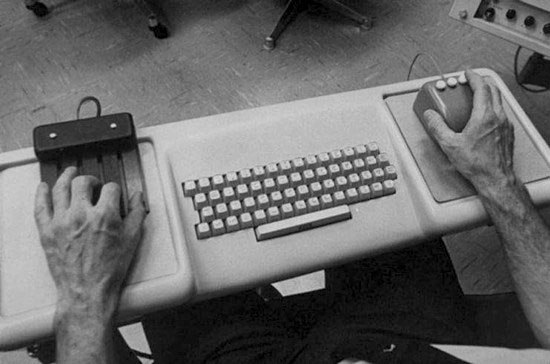
[2] Image in [1] via http://www.loper-os.org/?p=861
Normally the advice to "minimize finger movement" is really intended to protect your wrists, not your fingers. If you need to hit a key, but you avoid moving your hand and instead move your fingers, you will be stretching your wrist. If you consistently bend your wrist to the left or right (radial deviation or ulnar deviation) to reach notes, you may get carpal tunnel syndrome. This is basically an inflammation of the soft tissue surrounding the nerve that passes through the "carpal tunnel," a circle of bone in your wrist. The same thing happens when using a flat computer keyboard, and for the same reasons. This is why the correct keyboard posture is the V-shaped one, and the correct way to reach keys is to move your hand, not stretch your wrist.
There are keyboard designs that can (almost) completely avoid ulnar and radial deviation. For example, the SafeType, a vertical keyboard, is a lot easier on the wrists. It's shaped roughly like an accordion, with the keys on both sides. This eliminates the temptation to bend your wrists to reach a key on the other side of the keyboard. The vertical "handshake" position is also a lot less stressful on the wrist than the flat keyboard one.
There are finger issues that can come up if you strike the keys with too much force. These are especially a problem on the ultra-shallow (low travel) keyboards that Apple and other manufacturers are pushing now. In general, though, I would expect a design that only required finger movement to be much easier on the body than a traditional design, PROVIDED that the keys used were good quality, high travel keys. (This is a very important "provided" since a lot of keyboards nowadays are absolute garbage!)
I'm curious if any research has been done on the ergonomics of chording keyboards. If not, perhaps research on RSI issues with trumpets would be a good proxy? In general, trumpet players don't have to move their hands, but only their fingers while playing. On the other hand, trumpets have a lot of vibration, which tends to exacerbate RSI issues.
The trumpet should be a good model for the perfect chording experience.
I have played the trumpet years before (in high school) and I recall that there wasn't much strain to the waist or finger. Is there any professional trumpet players here whom can share some experience in regard to the strain at high playing speeds? The location of the strain? Where the limitations are?
I see the benefit for those that already have movement limitation, but not really otherwise.