News for hackers. Stuff that matters.
Re:Designing a Personal Knowledgebase by darkxanthos on Thursday September 04, 2014 @05:50PM (#8270860)
God this is hard. I've been trying to get at a solution to this exact problem for a very long time as well. It needs to be there when I'm walking down the street, sitting in a busy meeting, or at home in bed. A hybrid of mind-mapping, notes, and a document database. I'd also like to be able to publish and organize documents for others to view.

I wish I had a solution.

Re:Designing a Personal Knowledgebase by Ixiaus on Thursday September 04, 2014 @08:16PM (#8271543)
Org-mode is incredible. I use it to capture everything from vocabulary (which is automatically put into org-drill for spaced repetition), to my ideas, todos, shopping lists, EVERYTHING. Capture can happen on phone or laptop and syncs seamlessly.

Agenda for captured todos syncs with gcal. Publishing / printing to pdf / web / latex no problem. Index or search? No problem. Inline images and video, figured out. Snippet capture from web browser? Done.

Plus the incredible power to modify all this using emacs lisp. It's not python but it's powerful and every other emacs mode uses it.

There zillions of modes and tweaks to the emacs environment that add to this.

Org-mode and emacs are the single most powerful organizational tools I've ever encountered.

Re:Designing a Personal Knowledgebase by fensterbrett on Thursday September 04, 2014 @11:12PM (#8272125)
The workflow proposed in the first link looks quite interesting: Emacs + org-mode + python in reproducible research; SciPy 2013

http://www.youtube.com/watch?v=1-dUkyn_fZA

And here are some more reviews, opinions, advices and experiences I just stumbled upon:

http://academia.stackexchange.com/questions/1273

http://orgmode.org/talks.html

Re:Designing a Personal Knowledgebase by walterbell on Thursday September 04, 2014 @08:26PM (#8271599)
What transport is used for mobile sync? Is a browser plugin used for snippet capture?
Re:Designing a Personal Knowledgebase by AceJohnny2 on Thursday September 04, 2014 @08:59PM (#8271740)
I'm not sure if you're being sarcastic to make a point or actually ignorant :)

org-mode, while amazing, is emacs-only. There is no browser interface, no cloud (unless you store the files on Dropbox or GDrive or whatever) and no mobile app.

And that's its greatest failing in today's mobile/cloud world. Gee, it's almost like there's an opportunity here... ;)

Re:Designing a Personal Knowledgebase by walterbell on Thursday September 04, 2014 @09:13PM (#8271791)
Semi-ignorant :) I knew of org-mode as emacs only, but the grandparent post mentioned mobile & browser snippets. Just found two apps which edit & sync org-mode files, and templates for bookmarks.

Android app uses ssh, https://play.google.com/store/apps/details?id=com.matburt.mo...

iOS app uses dropbox, https://itunes.apple.com/us/app/mobileorg/id634225528?mt=8

Blog post on replacing other svcs/apps with org-mode, http://www.swaroopch.com/2013/01/16/orgmode/

Web bookmark sync on mobile, http://karl-voit.at/2014/08/10/bookmarks-with-orgmode/

Re:Designing a Personal Knowledgebase by deerpig on Friday September 05, 2014 @12:33AM (#8272326)
A browser interface for reading can easily be done by exporting to html. There is an option to output in a texinfo-like interface,with prev next and up navigation. Latex equations, charts, images and graphs (if you want to learn a little R) can all be integrated easily. Bibliographies can be handled using BibTex.

There is a learning curve to be sure, but the payoff is incredible since you can then directly build research papers and books that output to LaTex/PDF....

Re:Designing a Personal Knowledgebase by hsitz on Friday September 05, 2014 @01:01AM (#8272396)
And a browser interface for recording and linking web pages in your Org files can be found here (although there are other ways to do it): http://orgmode.org/worg/org-contrib/org-annotation-helper.ht...

Also, because Org files are at heart just some pretty simply formatted plain text, it would be easy enough to write Org entries in any simple text editor and add the file to your main Org repository of Org files at a later time, possibly by using the 'refile' functionality to have each entry in the "scratch" file routed to correct spot in permanent files.

I think Org-mode is probably one of the best knowledgebase solutions, but only for a limited range of users, who must be pretty savvy power users and also willing to devote a bit of time to get setup to their liking so they can then leverage it to their benefit. It's pretty hard to wrap your head around all the different things that Org-mode can do, and then a bit harder to create a workflow that's easy and fast to use. But many have done it, some for the knowledgebase scenario and some for the wide variety of things the very flexible Org-mode app can do.

Re:Designing a Personal Knowledgebase by sondr3 on Thursday September 04, 2014 @09:04PM (#8271757)
Not entirely true about no mobile app, there is always https://github.com/MobileOrg/mobileorg but it hasn't been updated since Febuary and there doesn't seem to be anyone actively involved with the project anymore.
Re:Designing a Personal Knowledgebase by donw on Thursday September 04, 2014 @07:25PM (#8271295)
I have one, but it's not public -- at least, not yet. One of the hardest things to get right here is search. It's easy to drop in a full-text search solution, quite another thing to design search that works well.

My system is a tiny app that automatically grabs pretty much everything I do on the Internet and indexes it. Github stars, HN posts, Facebook likes, bookmarks, you name it.

I can optionally tag or add my own sticky-notes to anything, and there's some other neat tricks that make fuzzy searching a lot easier. Human memories are very story-based, and so if I only remember that I looked at something important about ducks when I was at a Meetup, I can actually search for that.

I'm considering productizing this -- email's in the profile if you'd like to chat. :)

Re:Designing a Personal Knowledgebase by zrail on Thursday September 04, 2014 @07:58PM (#8271449)
Sounds like a neat project. I started putting something like that together but it was more text focused. I like the idea of automatically gathering data from other sources.

On a side note, I use mizuno for a project[1] and I've never had any problems with it. Thanks!
[1]: https://github.com/docverter/docverter

Re:Designing a Personal Knowledgebase by smcnally on Saturday September 06, 2014 @06:53PM (#8279774)
I designed historian https://github.com/smcnally/historian to extend browser history to include annotation and tags. Browser history is majority of what you do online; chrome search is pretty decent.
Re:Designing a Personal Knowledgebase by ckluis on Thursday September 04, 2014 @07:09PM (#8271207)
FWIW - I’ve always thought these guys were close to something (but not there yet) - https://gingkoapp.com/p/future-of-text - the idea of a quick dive-down/up through knowledge with potentially tagging/linking thrown in would seem pretty stellar from a knowledge management system.
Re:Designing a Personal Knowledgebase by lorddoig on Friday September 05, 2014 @01:14AM (#8272432)
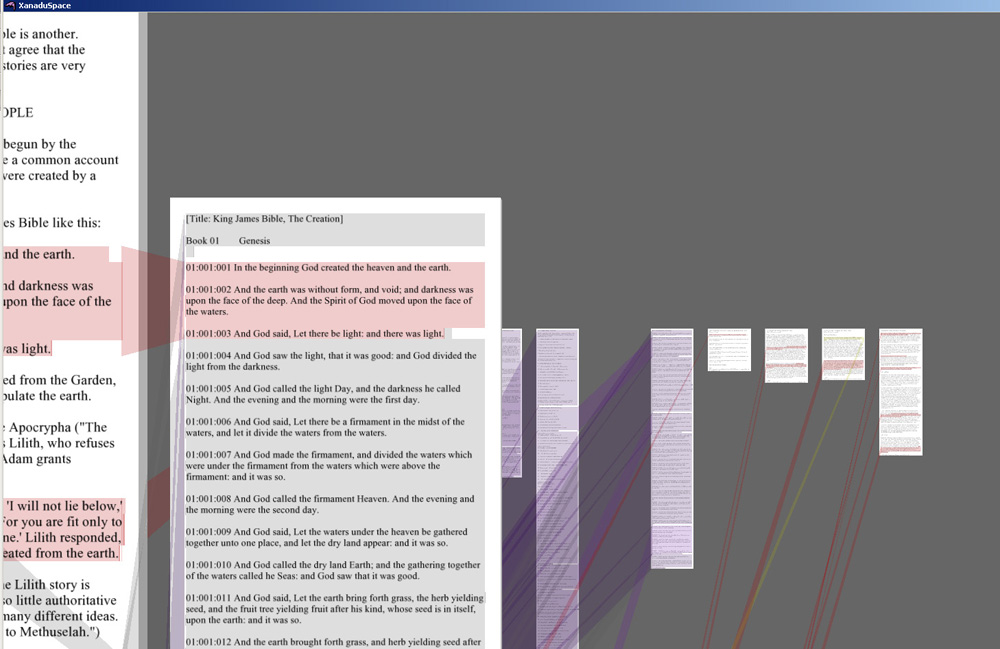
I don't want to say this is a rip-off, but it does share a remarkable resemblance to Ted Nelson's pre-Berners-Lee hypertext Project Xanadu (http://en.wikipedia.org/wiki/Project_Xanadu). Here's a recent screenshot http://www.open-hypervideo.org/img/xanadu.jpg.

That man has been trying to get traction on it since 1960. He's quite remarkable.

Actually, reading their blurb is like reading his work from then. If you know the story of Nelson and Xanadu, the lack of credit to him is a little unforgivable.

Re:Designing a Personal Knowledgebase by walterbell on Thursday September 04, 2014 @07:29PM (#8271311)
A bit like the visions of Nelson & Engelbart, http://thoughtvectors.net/

Inkling is working on related challenges with ebook authoring, https://www.inkling.com/blog/2014/06/problem-of-structured-a... .

InfinitePDF on iOS allows non-linear navigation paths to be overlaid on an existing PDF, http://www.148apps.com/reviews/infinite-pdf-review/

The challenge for all of these solutions is migration/import/rewrite of existing content.

Re:Designing a Personal Knowledgebase by SupremumLimit on Thursday September 04, 2014 @08:46PM (#8271688)
Thanks for pointing out Gingko - it looks like it could have the right mix of features that I miss in Workflowy, i.e. going beyond lists/outlines and having richer content in leaf nodes. Excited to try it out!
Re:Designing a Personal Knowledgebase by Ramonal on Saturday September 06, 2014 @08:54PM (#8280009)
On daily work for outlines, I use Workflowy, which is easy to edit; and on systematize knowledge or stuff, I use Weavi, which is a decent product.
Re:Designing a Personal Knowledgebase by SupremumLimit on Sunday September 07, 2014 @09:22PM (#8283051)
Thanks for the pointer. Tried it out - it's similar to Gingko but seems much less polished, and I couldn't find the keyboard shortcuts! I guess the advantage is that it's free. I really hope this kind of text manipulation will get developed further.
Re:Designing a Personal Knowledgebase by ckluis on Monday September 08, 2014 @09:22AM (#8284543)
Agreed that this form of data capture seems powerful.
Re:Designing a Personal Knowledgebase by porter on Thursday September 04, 2014 @07:40PM (#8271367)
Where does evernote fall short for you?
Re:Designing a Personal Knowledgebase by dmourati on Thursday September 04, 2014 @10:46PM (#8272067)
OP said he wanted an open source solution. Other than that, I can find no faults in using Evernote for this purpose. I use it for my personal stuff.

Where Evernote falls down, and this is by design according to CEO Phil Libin, is in sharing across many people. Libin says Evernote is not social, it's anti-social. As such, it doesn't work when you need to collaborate on notes. But see Evernote Business which seems to contradict this assertion.

OP was talking about a personal solution so the social aspect doesn't apply.

Re:Designing a Personal Knowledgebase by AH4oFVbPT4f8 on Thursday September 04, 2014 @08:57PM (#8271732)
Working within the editor. As a save and reference Evernote is great but for working within the document its awful. Just try to add/remove columns in a table or rearrange photos within a note.
Re:Designing a Personal Knowledgebase by karanbhangui on Thursday September 04, 2014 @09:40PM (#8271881)
How about the new OneNote for OSX?
Re:Designing a Personal Knowledgebase by walterbell on Thursday September 04, 2014 @07:45PM (#8271389)
Doesn't work for confidential data.
Re:Designing a Personal Knowledgebase by walterbell on Thursday September 04, 2014 @06:12PM (#8270966)
What do you use today?
Re:Designing a Personal Knowledgebase by darkxanthos on Thursday September 04, 2014 @07:16PM (#8271244)
I use a hybrid of Omnifocus, mediawiki, and pen and paper.