News for hackers. Stuff that matters.
Re:Making Remote Work Work by sneak on Thursday February 13, 2014 @01:42PM (#7233215)
Create another local user account on your computer for being at work. Change the desktop background to big work logos. Don't configure your personal instant messenger accounts and whatnot. Set up the email client to only check the "work" account so you don't fall down personal email item rabbit holes. Configure the WasteNoTime Safari extension appropriately (more strictly than your personal account's config, with sites like reddit, facebook, HN, etc on unconditional block).

Added benefits:

* easy default correct ssh key use (~/.ssh/id_rsa in work account is not my personal key)

* different browser cookie jar

* different dropbox/gdrive login

* different bookmarks

* different shell history

* faster homedir backups (my personal account has ~300GB of aperture in its homedir, my work account is <10GB)

* privilege separation (both my personal and work accounts are unprivileged, so unless there's local priv escalation being used, rogue user-priv software in one can't steal keys/data from the other)

Then, finally, disable fast user switching. (You should do this anyway, as having it turned on enables a Firewire/Thunderbolt DMA memory-dumping attack that can steal your FileVault2 keys while your screen is locked.) This means that you have to consciously choose to "leave work" by logging out and then logging in to your personal account you use to browse reddit/HN/etc.

This is the single biggest productivity gain I found for enforcing the "I am at work now" discipline. (Being able to use a non-personal dropbox account for work stuff is almost worth the price of admission itself.)

Re:Making Remote Work Work by d0 on Thursday February 13, 2014 @02:32PM (#7233667)
You dont need to do any of this. Walking away from a problem and doing something else ends up in faster more elegant solutions every time than avoiding distractions on the machine. I'll tap out a tune on my piano, play with the kids or sit in the garden for a bit whilst working from home. Then I'll do an hour or two of work and repeat.

I deliver more finished higher quality code and solutions than anyone else chained to the keyboard all day.

Re:Making Remote Work Work by JTon on Thursday February 13, 2014 @02:38PM (#7233705)
I'm glad you found a routine that works for you. If doing particularly grueling work (hey, who doesn't here and there?) or I'm in a mental slump, your methods don't work for me. I don't think productivity has a turn-key solution
Re:Making Remote Work Work by d0 on Thursday February 13, 2014 @02:43PM (#7233737)
Holidays are a turn key solution from experience. Even if its a weekend sleeping in a tent somewhere. I go like a machine after them for days.
Re:Making Remote Work Work by Cthulhu_ on Friday February 14, 2014 @10:44AM (#7239094)
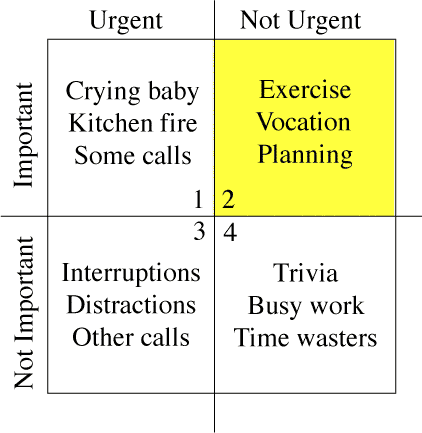
Productivity isn't something that can be forced; there's some good books out there on the subject. The 'grueling work' you described (and likewise) remind me of Stephen Covey's quadrants [1] (and similar); being in one quadrant (grueling work being 'urgent but not important') too much will cause someone to go to another for escape (not important, non-urgent tasks; distractions). It's important to find a balance there, for both personal planning and if you're a resource planner / project manager / scrum master / whatever

http://sidsavara.com/wp-content/uploads/2009/01/merrillcovey...
Re:Making Remote Work Work by sneak on Friday February 14, 2014 @11:56AM (#7239479)
> You dont need to do any of this. Walking away from a problem and doing something else ends up in faster more elegant solutions every time than avoiding distractions on the machine.

I am not talking about what I do when I take breaks, I'm talking about keeping those breaks from turning from "a short 5 minute break" to "oh shit I just spent four hours in a wikipedia rabbit hole about nuclear energy and now the day is over and I'm tired and my work isn't done".

Re:Making Remote Work Work by Cthulhu_ on Friday February 14, 2014 @10:39AM (#7239071)
<snark mode on> You mean taking breaks from work like every profession ever does / requires of its employees? </snark>

I don't know where this 'being chained to the keyboard all day' mentality came from, even if I experience and have seen it a lot in the industry. Take breaks; in a lot of countries, the law or health & safety regulations even make it obligatory. And don't feel guilty over it.

Re:Making Remote Work Work by mscman on Thursday February 13, 2014 @02:35PM (#7233686)
I feel some of this is based on personality. It's great that you're able to step away from work periodically and then focus again (I do the same thing working from home). A lot of people have trouble getting back into the work mode again after taking that break. That's what the "work account" idea is designed to help.
Re:Making Remote Work Work by d0 on Thursday February 13, 2014 @02:39PM (#7233711)
To be fair, I've had that trouble but I found out that I just wasn't happy doing what I was doing so changed it. You have to want to do it before focus comes naturally.
Re:Making Remote Work Work by sneak on Thursday February 20, 2014 @04:51PM (#7273891)
Telling someone with attention/focus issues "you just have to WANT IT" is like telling someone with depression "first you have to WANT to be not depressed!"

It doesn't work that way.

Re:Making Remote Work Work by jcater on Thursday February 13, 2014 @03:16PM (#7233972)
It's funny, I've been a full-time remote worker for over a year, and it never dawned on me until last week to do exactly what you described. I'm on week two of having separate user accounts, and it really does make a huge difference in defining your current "role".
Re:Making Remote Work Work by cookiecaper on Thursday February 13, 2014 @05:28PM (#7234968)
An associate of mine takes this to a different extreme; he creates a different virtual machine for each client, and works only in that.
Re:Making Remote Work Work by subway on Thursday February 13, 2014 @05:40PM (#7235097)
I tend to keep completely separate physical machines. I have Thinkpad provided by work, and a personal Thinkpad. When the workday starts, the work machine goes in the dock, then at the end of the workday, I swap it out for the personal machine.

I'm a strong believer in using company hardware only for work, and never using personal hardware for work related tasks, if only because it makes things slightly less complicated with regard to who owns what IP.

EDIT: Correcting typos.

Re:Making Remote Work Work by sneak on Friday February 14, 2014 @12:11PM (#7239575)
It doesn't need to be different physical machines, separate user accounts on the same machine (as long as both are unprivileged and can't access the other) are fine.
Re:Making Remote Work Work by fixedd on Friday February 14, 2014 @01:22AM (#7237232)
Wait till you go to a "Bring Your Own Device" employer.... ugh.
Re:Making Remote Work Work by jimmcslim on Friday February 14, 2014 @07:33AM (#7238153)
Use a virtual machine on Your Own Device as the Work Computer?
Re:Making Remote Work Work by felipeerias on Thursday February 13, 2014 @08:48PM (#7236305)
I just got an iPad. Now work-related computing happens on my laptop, at my desk. Leisure computing happens on my lap, on the couch. It makes it much easier to establish a clear divide between “working” and “not working”. Being able to disconnect properly is very important for quality of life and productivity.
Re:Making Remote Work Work by technomancy on Thursday February 13, 2014 @04:05PM (#7234333)
I did this for compliance reasons (needed disk encryption and my CPU is too slow for full-disk), but it turned out to be really handy regardless. You can't turn off fast user switching using X on Linux systems, but it hasn't been a problem for me; I just close my personal mail client.