News for hackers. Stuff that matters.
Re:Quick tip for developers who use OS X by mikeroher on Monday January 13, 2014 @10:47AM (#7051192)
Two more tips:

* Ctrl-a to go to beginning of line

* Ctrl-e to go to end of line

Re:Quick tip for developers who use OS X by actf on Monday January 13, 2014 @12:01PM (#7051774)
I love how osx supports emacs key-bindings by default for any text field.

I miss this feature a lot when I switch back to windows. I find myself pressing ctrl-n in my browser's address bar, expecting to view my URL history, and instead I get a new windows.

If anyone knows of a way to get similar functionality in windows, I would love to hear about it!

Re:Quick tip for developers who use OS X by mariusmg on Monday January 13, 2014 @02:37PM (#7052769)
Cltr + D to focus on address bar. Alt + down arrow to view history.
Re:Quick tip for developers who use OS X by zampano on Monday January 13, 2014 @11:02AM (#7051289)
A couple more:

* ⌘ + ` (tilde key) to switch between different windows of your current application

* ⌘ + l (lowercase L) in most web browsers to highlight the address bar

Re:Quick tip for developers who use OS X by netghost on Monday January 13, 2014 @11:38AM (#7051591)
I'm always telling people about ⌘ + `, it makes navigating windows on OSX so easy.
Re:Quick tip for developers who use OS X by virtualwhys on Monday January 13, 2014 @12:24PM (#7051940)
The former is the one thing I missed the most from my OSX days...until I got a tiling WW setup (i3).

Woohoo, love me some Linux, let choice reign ;-)

Re:Quick tip for developers who use OS X by sandipc on Monday January 13, 2014 @09:24PM (#7054982)
to piggyback off of this... (not sure if this is in the thread already)

⌘ + ` to switch between different windows of current application

⌘ + SHIFT + ` to switch between different windows of current application (reverse order)

same for the general application switcher:

⌘ + TAB to switch between different windows of current application

⌘ + SHIFT + TAB to switch between different windows of current application (reverse order)

Re:Quick tip for developers who use OS X by koenigdavidmj on Monday January 13, 2014 @10:53AM (#7051238)
A lot of the Emacs shortcuts work in OS X (most of the system) as well as on Linux (bash and other users of readline).
Re:Quick tip for developers who use OS X by lr on Monday January 13, 2014 @11:08AM (#7051333)
The basic Emacs key-bindings should work in all Cocoa apps. For instance, the URL bar of your web browser, while text editing in just about any editor (maybe even in Office, but I have not tired in a while), etc. Basically, anywhere you have a cursor, the basic line-editing key bindings should work.

So, in practical terms, this means you have 1 + n clipboards[1]. The main global GUI clipboard (using the command key), and then an app-specific clipboard (using the control key with Emacs bindings). As a developer, it is extremely helpful to have two clipboards in TextMate, for instance.

[1] Technically, the clipboard in OS X maintains a history (not sure what the limit is), but the OS X GUI only exposes the last cut/copied item.

Re:Quick tip for developers who use OS X by eddieh on Monday January 13, 2014 @11:55AM (#7051722)
defaults write -g NSTextKillRingSize -string 4
Re:Quick tip for developers who use OS X by lr on Monday January 13, 2014 @02:11PM (#7052632)
Can you shed some light on how to access those other three from the GUI (whether using the command key or some other means)?
Re:Quick tip for developers who use OS X by eddieh on Monday January 13, 2014 @10:31PM (#7055200)
Sorry forgot some steps...You also have to rebind C-y to 'yankAndSelect:' (https://developer.apple.com/library/mac/documentation/Cocoa/...)

For the most in depth info on the Cocoa Text System: http://www.hcs.harvard.edu/~jrus/site/cocoa-text.html

Re:Quick tip for developers who use OS X by mikeroher on Monday January 13, 2014 @10:56AM (#7051255)
I use Vim and was unaware that this shortcut existed. Are there any other Emacs shortcuts which are useful in OSX?
Re:Quick tip for developers who use OS X by coliveira on Monday January 13, 2014 @11:02AM (#7051290)
If you do "set -o vi" you can also use vi shortcuts, such as ESC-j,k to go up/down the history, 0 to go to the beginning of the line, etc.
Re:Quick tip for developers who use OS X by pyre on Monday January 13, 2014 @11:14AM (#7051377)
You cannot use 'set -o vi' to turn Cocoa text fields into vi-mode.
Re:Quick tip for developers who use OS X by 65a on Monday January 13, 2014 @11:00AM (#7051283)
Ctrl-K kill to end of line,

so Ctrl-A Ctrl-K will clear a given field

Re:Quick tip for developers who use OS X by Fishkins on Monday January 13, 2014 @11:38AM (#7051595)
And you can Ctrl-Y to paste the line you killed. This is a separate copy/paste buffer from the normal Cmd-C one, which can be nice.
Re:Quick tip for developers who use OS X by panzi on Monday January 13, 2014 @11:38AM (#7051589)
Because crappy Macs have no Home/End keys (or they don't work as such).
Re:Quick tip for developers who use OS X by webjprgm on Monday January 13, 2014 @12:59PM (#7052160)
ctrl-arrow (which breaks with Lion's Spaces default keys), or shift Home/End in Terminal.

It's not that Macs are crappy, they just have different key bindings. I regularly work with Macs, Windows, and Linux for development and I've just learned to use the different key mappings.

I don't think I'm quite as proficient in any one system because of that, though. For example, I have avoided learning the Emacs key bindings for use in Mac/Terminal. (I don't want to try to remember TWO bindings for Mac, plus I learned vim first so usually avoid Emacs.)

Re:Quick tip for developers who use OS X by panzi on Monday January 13, 2014 @05:47PM (#7054112)
ctrl-arrow jumps to the next word boundary under Linux.

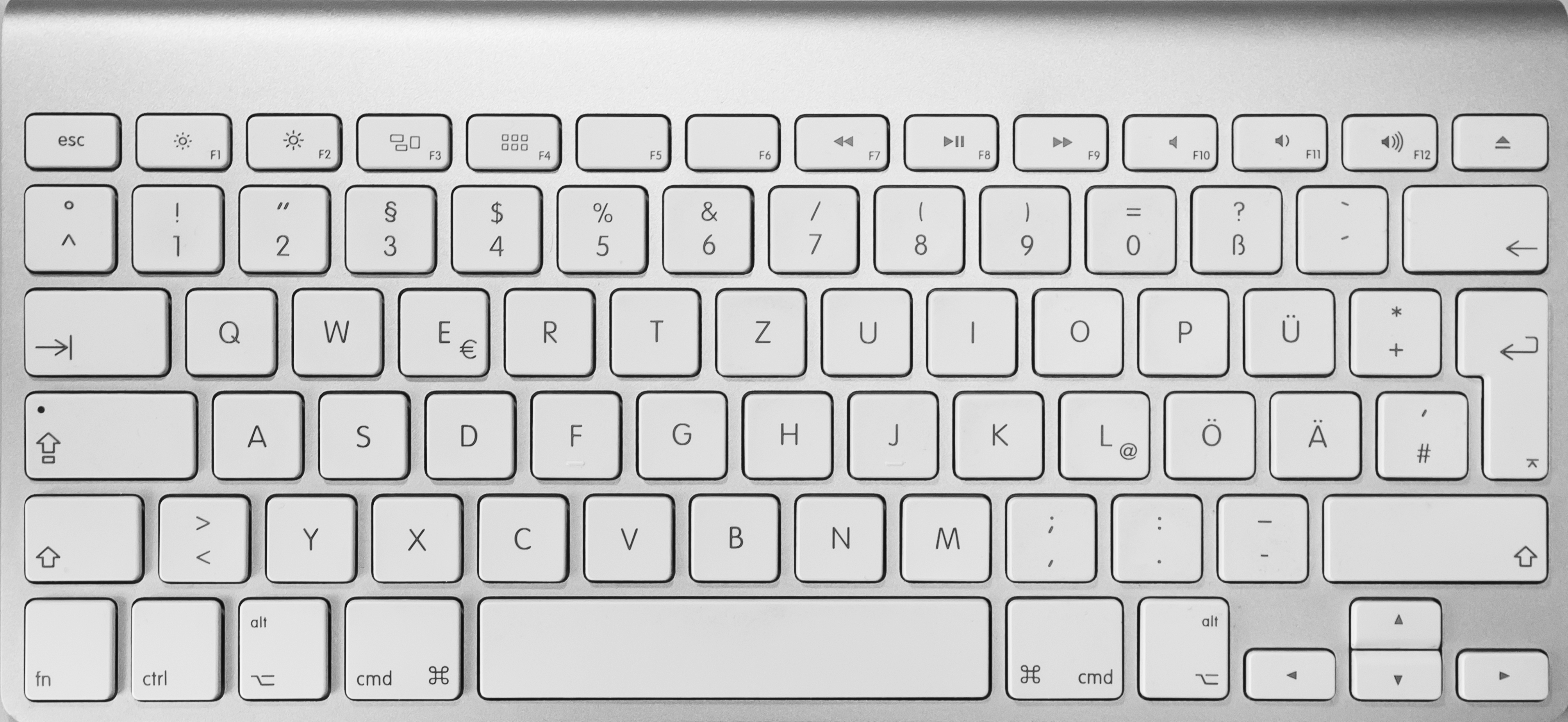
Yes, other systems have other key bindings, but why do common things like jumping to the begin/end of a line need a key combination? And why aren't the characters written onto the keys? Every time I have to type some code on a Mac I have to press all the keys in order to find { } [ ] etc. At leas I learned not to quit the terminal when I want to enter a @ by now. Whose brilliant idea was that?
Re:Quick tip for developers who use OS X by sandipc on Monday January 13, 2014 @09:27PM (#7054994)
{ } [ ] are just above the return key...?
Re:Quick tip for developers who use OS X by panzi on Tuesday January 14, 2014 @07:08AM (#7056561)
Not on a German keyboard (forgot to mention that, sorry). Where are all the keys a programmer needs here?: http://upload.wikimedia.org/wikipedia/commons/1/11/Apple-Wir...

In contrast a German PC keyboard: http://www.buypcsupplies.com/images/cat/38568_xlargenss_ndo4...

However, I prefer a Microsoft Comfort Curve keyboard, but I can't find an image of the German version right now.

Re:Quick tip for developers who use OS X by ggreer on Monday January 13, 2014 @01:20PM (#7052312)
On most macs, Fn + left/right arrow are home/end. Fn + up/down are pageup/pagedown.
Re:Quick tip for developers who use OS X by 72deluxe on Tuesday January 14, 2014 @09:02AM (#7057042)
Not sure if I have it set up differently but mine is Cmd-Left or Cmd-Right to move to the beginning of a line...? Easier to reach than fn (I'm using a real wired BIG Apple keyboard, the RSI inducing one...)
Re:Quick tip for developers who use OS X by panzi on Monday January 13, 2014 @05:42PM (#7054080)
Fn... urgh. I hate these crippled laptop keyboards (and tiny neck pain inducing laptop monitors).
Re:Quick tip for developers who use OS X by dchichkov on Tuesday January 14, 2014 @03:06AM (#7055952)
Well, you don't have to follow that glossy mainstream. Just get yourself a new linux desktop with lots of RAM, couple of nice matte monitors, mouse and a good full size keyboard.
Re:Quick tip for developers who use OS X by panzi on Tuesday January 14, 2014 @07:00AM (#7056527)
That's what I always do. My new PC should be delivered any minute, actually (16 GB RAM; at one intensive work session my current 8 GB where almost a bit scantly - is that the right English word?).
Re:Quick tip for developers who use OS X by gatehouse on Monday January 13, 2014 @10:56AM (#7051254)
Re:Quick tip for developers who use OS X by EnSabanNur on Monday January 13, 2014 @11:10AM (#7051343)
This was life changing when a co-worker showed me this last year.