News for hackers. Stuff that matters.
Re:Laying Out a Print Book with CSS by DeinFreund on Tuesday March 21, 2023 @04:25AM (#35243715)
This article completely misses the point. Proper typesetting is about achieving a consistent appearance starting from ligatures and kerning, then word spacing and hyphenation, up to entire paragraphs and pages. Each character has to be typeset considering what character came before, how many words are in the same line and other lines in the same paragraph. The choice of font is also questionable, but not the main issue except for capitalized sections.

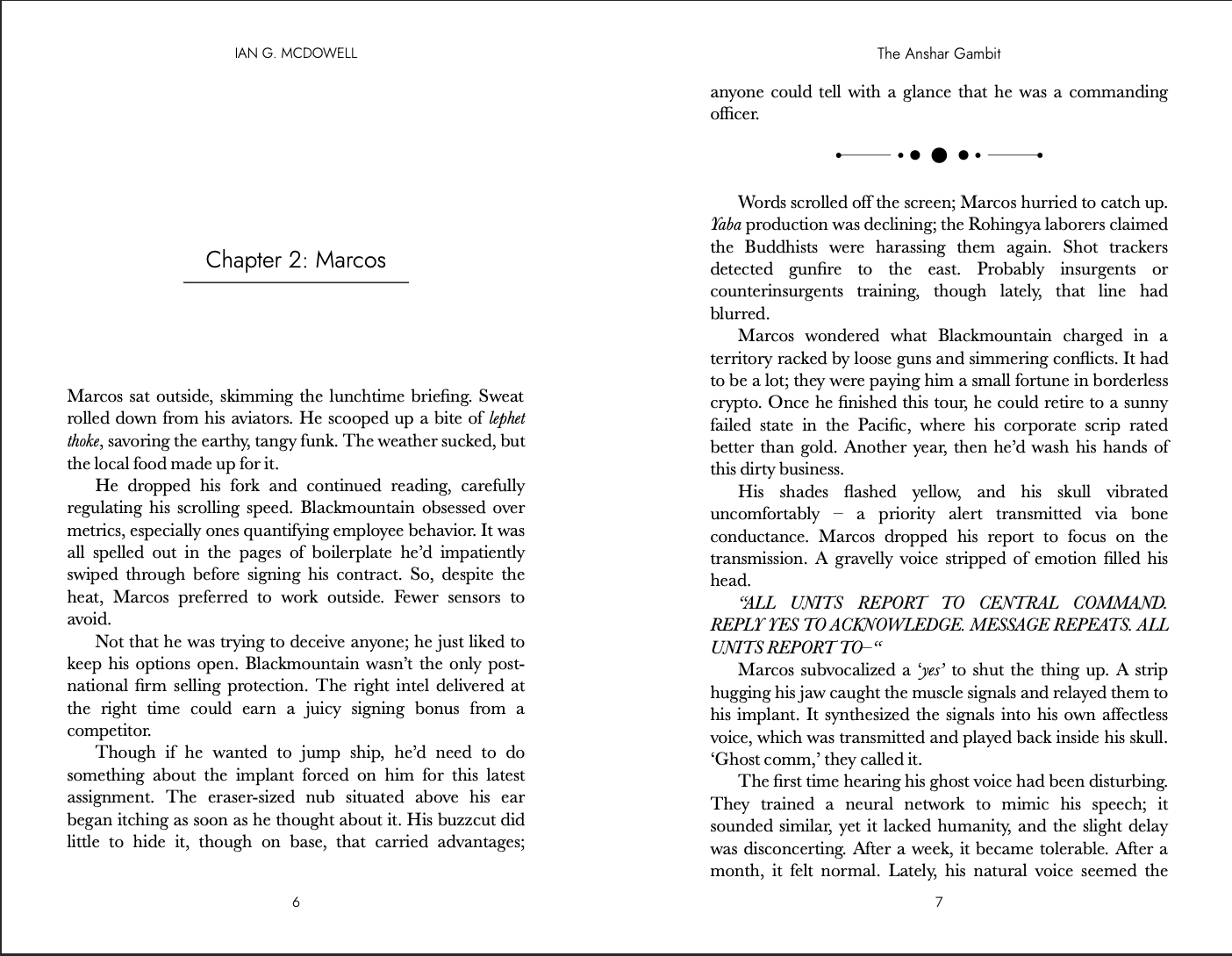
This example from the article says it all: https://iangmcdowell.com/blog/book_breaks.png

I understand that LaTeX is convoluted and other software is expensive, but when offering an alternative, there should at least be a comparison based on the quality of typesetting.

Re:Laying Out a Print Book with CSS by rhn_mk1 on Tuesday March 21, 2023 @04:48AM (#35243872)
I think the article stated the point clearly: the author wanted to hold some paper carrying the HTML contents. From what I can see, they hit the point completely.

Perfect is the enemy of the good, they say.

Re:Laying Out a Print Book with CSS by thaumasiotes on Tuesday March 21, 2023 @05:29AM (#35244125)
> Proper typesetting is about achieving a consistent appearance starting from ligatures and kerning, then word spacing and hyphenation, up to entire paragraphs and pages.

I looked into CSS hyphenation because I was curious about controlling hyphenation in ebooks. CSS hyphenation appears to be based around the principle that you manually insert HTML entities representing potential hyphen locations into every word, which is obviously insane.

    hy­phen­ation
    hy­phen­ation
    hy­phen­ation
    hy­phen­ation
The TeX way is to provide a set of hyphenation points once, such that, if a word needs to be hyphenated, that list can be consulted and the word can be hyphenated appropriately without each instance of it needing to be entered with several invisible HTML entities.

    \hyphenation{hy-phen-ation}
    hyphenation
    hyphenation
    hyphenation
    hyphenation
I can't think of any use case where I'd prefer what is apparently the only way to do it in CSS. Do epubs have a bespoke non-CSS way to handle this?

(I looked into this in the first place because the Kindle mobile app is godawful at hyphenating words, and I wanted to know what it would take to write an ebook that didn't have obvious howlers. The errors occur in foreign words, but they violate the rules of hyphenating English -- I've seen the app place a hyphen before the first vowel in a word, and I've seen it render "Qis-han", which is exactly equivalent to a hypothetical English "fis-hing" -- so it seems like they must be using a lookup table for all English words and falling back on something completely ridiculous for words that aren't in the table.)

Re:Laying Out a Print Book with CSS by winety on Tuesday March 21, 2023 @06:24AM (#35244432)
It’s crazy, and that’s why hyphenation doesn’t really work that way. Both TeX and web browsers use Liang’s algorithm to split words. [1] It uses so-called patterns, which are short substrings of words in which numbers indicate how to divide the word. For example, the pattern “s1h” indicates that in the word “fishing”, a divider can be inserted between “s” and “h”. Patterns compete and can override each other, and the whole thing is quite complicated. As for your example with Qishan — the “s-h” probably overrides the “i-s” pattern. (There have been a number of articles in TeX journals that explain the algorithm, such as [2].)

In CSS, automatic hyphenation must be explicitly turned on, see [3].

In TeX and in CSS, hyphenation points can be marked explicitly: in TeX with the \- macro and in CSS with the ­ or U+00AD character. In TeX you can also override the automatic division with \hyphenation{}.

The splitting algorithm in CSS is worse than the one in TeX, because it has to work in real time and because (good) splitting patterns are often missing.

[1]: https://www.tug.org/docs/liang/

[2]: https://www.fi.muni.cz/usr/sojka/papers/euro01.pdf

[3]: https://developer.mozilla.org/en-US/docs/Web/CSS/hyphens

Re:Laying Out a Print Book with CSS by Karellen on Tuesday March 21, 2023 @08:26AM (#35245243)
> The splitting algorithm in CSS is worse than the one in TeX, because it has to work in real time and because (good) splitting patterns are often missing.

Surely that's only the case for real-time renderers like web browsers.

If you're creating a layout engine for printed media that uses CSS as the way for authors/setters to specify style, couldn't it implement a better, slower splitting algorithm? Using an internal (or pluggable?) dictionary of hyphenations?

Re:Laying Out a Print Book with CSS by eat_veggies on Tuesday March 21, 2023 @09:15AM (#35245653)
You could probably write some JS to reimplement the better algorithm and insert the ­ hyphenation hints
Re:Laying Out a Print Book with CSS by winety on Tuesday March 21, 2023 @11:11AM (#35247342)
You could and that's basically what TeX does, just without the CSS. There are even typesetting systems similar to (La)TeX, that can take XML as input, see Context [1] or Sile [2]. They’re just a step away from using HTML + CSS. Why isn’t there such system? I do not know.

[1]: https://wiki.contextgarden.net/XML

[2]: https://sile-typesetter.org/

Re:Laying Out a Print Book with CSS by thaumasiotes on Tuesday March 21, 2023 @10:18PM (#35255928)
It seems very clear that Amazon's default approach is to insert hyphens based on a whitelist of correct hyphenation points.

And that is what the algorithm you refer to does! Your links [1] and [2] speak specifically in terms of the patterns being a form of data compression that is applied to lighten the storage requirements of a big list of correct hyphenation points. The hyphenation algorithm is just that you check the word you want to hyphenate against the Master List Of All Words and learn where hyphenation is allowed. The patterns are a form of data preprocessing that makes that algorithm more efficient (here, in terms of space requirements) without changing the output.

So what we need is a way to extend the set of precomputed rules whenever we want to use a word that wasn't in the original dictionary. As noted, TeX provides this with the \hyphenation{} command. Why is this not available in CSS?

Suppose I want to write an ebook that doesn't make mistakes on the level of "fis-hing" and "f-orest". [Another example I'm not making up; the Kindle app is convinced that "Ts-inghua" is correct hyphenation.] How do I include the hyphenation information in my document?
Re:Laying Out a Print Book with CSS by mprovost on Tuesday March 21, 2023 @06:46AM (#35244538)
I chose to use InDesign to typeset my self-published book, and I have to say the quality it produces from just placing some imported text with no other changes looks 1000 times better than this. It's easy to go down a rabbit hole and start really tweaking the layout but if all you're doing is applying some CSS anyway then you can produce better output with InDesign's defaults in about 5 minutes. I've been writing the book in Google Docs and printing chapters for review as I go, and it's nice to see a physical copy of your work. But I was blown away when I made my first PDF copy with InDesign how much better the typesetting is. It really does feel like a proper book and not an essay that I printed out for a school assignment.
Re:Laying Out a Print Book with CSS by edent on Tuesday March 21, 2023 @09:03AM (#35245550)
> This example from the article says it all: https://iangmcdowell.com/blog/book_breaks.png

What does it say? I read lots of book and... it looks like every other book. What am I missing?

Re:Laying Out a Print Book with CSS by mikeryan on Tuesday March 21, 2023 @09:48AM (#35246032)
So properly justifying text for a print layout is hard. For example on the right page, the sentence that starts with “Marcos wondered”.

You start to see how in the first line it’s fairly widely spaced but the second line starts to look like the line was crammed in to fit the line.

It’s subtle but those are the kinds of things that proper print layout tools help with. It’s weird looking at one page in a vacuum you won’t notice as much but after a few pages it starts getting “harder” to read. I’ve noticed this with some E-books and started to pick up on it.

Re:Laying Out a Print Book with CSS by Izkata on Tuesday March 21, 2023 @11:02AM (#35247205)
Those are just like (almost) all books. "Proper" typesetting like LaTeX does seems to only be a thing in a very small subset.
Re:Laying Out a Print Book with CSS by lelanthran on Tuesday March 21, 2023 @10:58AM (#35247146)
See the RHS of the page, see the column of space after "detected gunfire" and "counterinsurgents".

In fact, the spaces are all over the place.