News for hackers. Stuff that matters.
Re:My Mac Mini by ssharp on Monday April 28, 2008 @11:16PM (#176259)
Pretty common complaints about the actual OS for people who are used to windows. You just have to get used to the idea that windows float and that it's not really designed to have windows maximized. I was pretty used to the interface after a month or so, I started in late 2003, so Panther was out by then and Expose helped out a lot.

I have to disagree with running 2 monitors, I've done it for a couple years now and have never had any usability issues.

However, the Apple store comments are pretty much dead-on. I'd rather just order online or go to a reseller then deal with the Apple Store.

Re:My Mac Mini by abstractbill on Tuesday April 29, 2008 @12:18AM (#176297)
it's not really designed to have windows maximized

I've heard this line before - people say it as if something disastrous would happen if Apple gave in and made the green '+' a maximize button... so far nothing's coming to mind.

(btw, I haven't used windows for anything other than testing IE for about 9 years, and I still hate Apple's choice regarding the 'zoom' button).

Re:My Mac Mini by TheWama on Tuesday April 29, 2008 @12:44AM (#176314)
The disastrous thing is that it would be less useful to have a maximized window be 10x the size of its contents. For example, IMO the behavior of safari on maximize is just beautiful, because it's tailored to the specific website you're viewing.

If the application is a window into your data, why make that window bigger than necessary, thus obscuring your desktop, or some other window behind it? That may not be disastrous, but I think its intent makes sense.

Without further explanation, I end up suspecting that when he writes: "it almost never does what you’d want or expect it to," the emphasis is on his expectations as a Windows user, not on what he would prefer, all things being equal.

[and for the record, I'm speaking as an Ubuntu user, who has never owned a mac]

Re:My Mac Mini by abstractbill on Tuesday April 29, 2008 @12:47AM (#176315)
I want to obscure my desktop, and all the other windows. Why would I want that stuff in my peripheral vision when I'm busy working?
Re:My Mac Mini by demallien on Tuesday April 29, 2008 @01:19AM (#176337)
In which case you simply hit Cmd-Shift-H (or select 'Hide Others' in the app menu), which hides all but the active application...

Personally though, I generally just use Spaces to have different screens containing only applications that I want to use together. So I'll have a programming doc open in Preview, next to my XCode project window. Or I'll have a web browser open with Textmate if I'm doing something with Rails. That way you only have the apps that you are interested in on screen in any given 'space'.

Next quibble?

Re:My Mac Mini by abstractbill on Tuesday April 29, 2008 @01:46AM (#176354)
This is what my desktop looks like for more than 90% of the time:

http://abstractnonsense.com/desktop.png
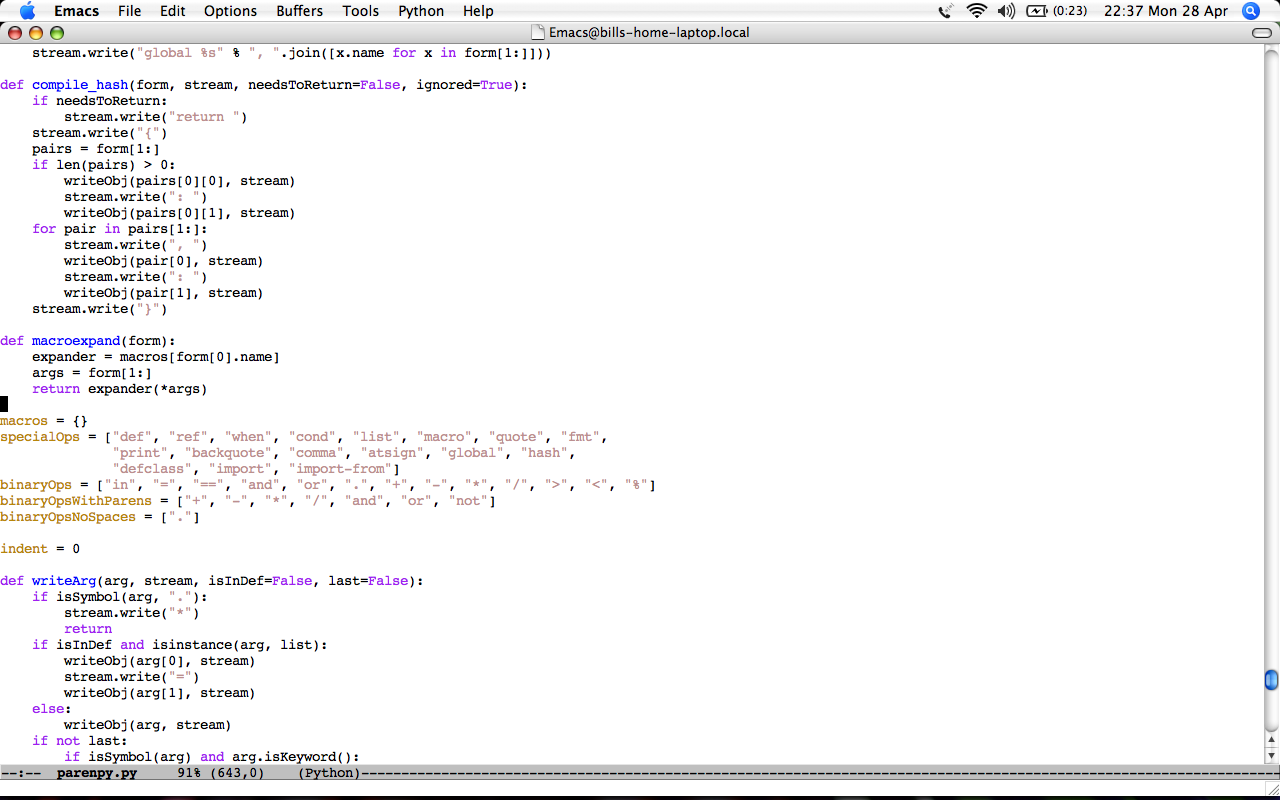
If emacs wasn't taking up the whole screen, I'd have a scrollbar running down the middle of the screen, which would be really visually distracting.

I used virtual desktops a lot back when I used Linux for my desktop os. They're great, and I'm sure I'll use them again when I upgrade from Tiger. But, for me at least, they're no substitute for maximization.

Re:My Mac Mini by jrockway on Tuesday April 29, 2008 @02:35AM (#176380)
Do us a favor and hit C-x 3 sometime :)

http://jrock.us/emacs-20080420.png

Re:My Mac Mini by abstractbill on Tuesday April 29, 2008 @09:49AM (#176527)
Heh, I'd never get anything done with all that clutter ;-)
Re:My Mac Mini by jrockway on Tuesday April 29, 2008 @12:23PM (#176676)
Yeah, that is more of a "this is possible" thing :) In "real life" i use the same size screen, but with the right third consisting of an irc window, REPL, and terminal; and the other two-thirds 2 or 4 files of code.

Still cluttery, I guess... but I love it ;)

Re:My Mac Mini by boucher on Tuesday April 29, 2008 @04:56AM (#176422)
I pity someone who spends more than 90% of their time in emacs. In fact, I pity anyone who spends 90% of their time in any text editor. Googling for things alone probably takes up 10% of my time, plus the time spent in my app, plus the time spent doing none of those things.
Re:My Mac Mini by paulsilver on Tuesday April 29, 2008 @08:10AM (#176478)
If you'd like to try them before upgrading, you can use VirtueDesktops from www.virtuedesktops.info - it's free and a pretty good virtual desktop app.
Re:My Mac Mini by menloparkbum on Tuesday April 29, 2008 @01:27AM (#176342)
Cmd-Shift-H actually sends you "home" if that option is available. Opt-Shift-H hides others. The lame thing about hide others is there isn't a built in key command to show all.
Re:My Mac Mini by demallien on Tuesday April 29, 2008 @02:31AM (#176378)
Lol, actually we're both wrong. It's Opt-Cmd-H... At least it is when using French keyboards...
Re:My Mac Mini by menloparkbum on Tuesday April 29, 2008 @02:57AM (#176386)
whoops... yeah, that's it.