Autobackup can be done by rsync, file access by Samba, printing through CUPS. Oh yeah, you can run all of the above on an $50 wifi router with custom firmware. It will also barely use any power and not make any noise.
EDIT: I am not attacking MS, and I don't hate people who don't use Linux. Just pointing out there is a way to achieve this functionality with mostly off-the-shelf software and hardware. Startup idea? Nah, more downvotes :)
RE: concept, understood it may be used for other OS's. Was pointing out that WHS uses a different file system than normal windows, one built to scale in terms of drives.
in terms of drive failure, in my experience it's less about the drive and more about the data you have. so, for instance, if you value your Photos directory like I do, you can select that to be duplicated across multiple drives. This will make sure there are multiple copies of that folder in case of any single drive failure.
I've also got an external RAID that I've connected to my WHS. WHS sees this as one drive, while in reality it's two drives in RAID config.
I've trusted my WHS build with 10TB of very valuable data. So far so good.
Do you know if it verifies data integrity? I have heard about WHS from a few people now and it seems like the best solution. I don't even have a Windows machine so that may sound odd, but afaik there's no Unix-based equivalent available today.
Pros and cons abound in that setup, of course, but setting aside the lack of integrity checking ala ZFS for a moment, I have personally taken advantage of the file-level software RAID 1 portion when my first WHS server encountered an internal hardware issue and I had to pull its drives (normal NTFS drives full of the files) and bring them online in a replacement WHS server. Each drive was brought online out of the storage pool, its files copied into the pool volumes, and finally the drive was added to the storage pool. It requires an extra drive already in the pool to pull this off, but given that it worked very well, far better than some of the horror stories I've heard about people trying to transplant RAID 5 and 6 setups when other NAS solutions have failed at the server level. A part of me of course wishes for a ZFS-style WHS, and perhaps MSFT will get there some day, but in the meantime I can certainly see how WHS's design decisions were reached.
I haven't experienced much data corruption but it has bitten me here and there. With terabytes on each disk these days I really wish more systems verified our data, even if they can't repair it I want to know when my disks are no longer reliable. Ah well, can't have it all. We'll get there eventually.
edit: at least we have SMART
What about web access and/or being able to copy a public URL to any file like you can with dropbox?
I guess you'd have to set up your own web server with some software to do that, right?
Is it easy to use with a remote control? Browse movies and play them, etc?

You will automatically get your desired, password-protected https://[whatever].homeserver.com, pointed to your server. (It's autoconfig too with your router). When you access that remotely, you get access to your WHS server, plus all your connected devices. (it looks something like this: http://www.roughlydrafted.com/RD/RDM.Tech.Q1.07/5B259B0F-B5B...)
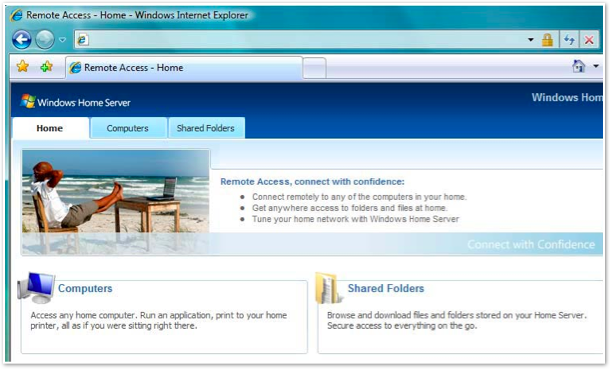
For public URL, you can install dropbox on the WHS box or one of the connected PCs, if you'd like.
For movie playback, that's separate from the WHS. You need to think of the WHS as the Server and the playback devices as the Client. In this way, the WHS is very extensible and your playback options are limitless. You can use windows media center on a different PC, or just use VLC or windows media player.
Effectively, WHS is a very "insanely great" home server that stores your files and serves it, allowing you to decide how you want to consume it.
For what it's worth, I use windows media center on a machine connected to the TV, and a logitech dinovo mini for remote (see: http://www.logitech.com/en-us/keyboards/keyboard/devices/384...).
Because I'm a home theater junkie, I did start a side project called http://www.intellimote.com that uses the iPad as a remote to browse and play movies.
And the remote access does look nice.
My blog post was originally about a device that just worked like I described out of the box with no other requirements.
Preferably it would be a small box like my media playing storage device that I have or like the tonidoplug, which costs $100 and is already set up.
Your WHM solution is super awesome, but it's not something I can buy from the store, plug in, maybe configure a little bit and start using. It's a project. It's something you work on to get it working the way you want it to.
What I'd like to see is somebody create a pre built solution, similar to the tonidoplug, with more media capabilities etc, video outputs etc.
If some startup or company would build that, people would buy that.
Your solution is awesome, I must go ahead and try WHS, I didn't even know that it existed.
Size wise, it's small (photo: http://www.ehomeupgrade.com/wp-content/uploads/hp_mediasmart...). Cost wise they're relatively cheap (considering it comes with enclosure, cpu, motherboard, hard drives, etc), I've seen them for ~$300-350.

It uses Windows Home Server plus their own custom add-ins. They're nice. You get everything I mentioned before, except this is pre built. They have things like integration with Tivo. I decided to build my own since I had spare parts lying around, otherwise I would have bought one of the MediaSmart machines.
Also, when you say something with "more media capabilities", it is doubtful you will be able to surpass a WHS-based system. This is because a system like MediaSmart, out of the box, will stream everything to any PC, any mobile device, any windows media center, etc. They've built it for streaming media, and all kinds of ways to access the content are already in the ecosystem. They have even included a silverlight/flash based streamer if you decide to only use a browser (they transcode on the fly then stream it to your browser). Devices (eg. xbox 360) and even entire OS's are designed to work with WHS (Windows XP, Vista, Windows 7).
One more thing: the WHS and MediaSmart communities are great. Many websites/forums discussing ways to use it, how to optimally set up your home, issues you'll encounter (and resolutions), etc. (http://www.wegotserved.com, http://www.mswhs.com, http://homeservershow.com, http://www.whsaddins.com, http://www.homeserverhacks.com, http://www.mediasmartserver.net, to name a few)
If you're looking to start out with your first home server/theater, the community welcomes you.
Setup was a breeze, plug it in, let it do the windows update thing, while still running pop in additional hard drives (4 bays total), configure them, done.
For video clients I have both the Asus O!Play and the WD HD Live, they both work great but lack search and content download features.
The Acer Aspire Revo running XBMC seems to be a very popular and affordable option for that. The UI is beautiful, downloads movie info and covers from IMDB, very slick.
EDIT: Forgot to mention one of the biggest pluses. Microsoft pioneered a special file system for WHS called Drive Extender. There are no drive letters, just folders, and it spans across all your hard drives and future hard drives. No more "oh that video is in H:, oops I mean K:", it's just "It's in the video folder." See: http://en.wikipedia.org/wiki/Windows_Home_Server#Drive_Exten...
The best thing is that WHS is tightly integrated with Windows, so it has things like autobackup (selective and not), health monitoring (if any of the PC's hooked up at your home springs an alert, like virus found, or low disk space, etc, it notifies the other computers through dismissable systray popup), central user/password management across all your machines, and other cool things. Many companies have also developed plugins for WHS as well (useful things like PerfectDisk for defragmentation). It also works/integrates with Mac environment.
For playback of media content, I have two HTPCs connect from two different rooms as well as some Xbox 360's (yea, the xboxes just found the folders and was able to play the content. it just works). Also, I installed Air Video to stream videos to ipad/iphone.
And since it needs to be always-on, I hooked up a UPS battery to it. It's headless -- just the machine is needed, which is great for a server in the closet. You'll manage the WHS through remote desktop/web ui. You'll also want to get the Rosewill RSV-S8 -- you will need more and more space! (Some people have gone the "octopus" -- lots and lots of external hard drives hooked up through USB. I initially went this route but the throughput became a bottleneck so I got the Rosewill - See: http://www.newegg.com/product/product.aspx?Item=N82E16816132...).
Some use-cases: I've got private directories for myself, then I've got public directories such as Photos and Videos, with Photos being writable by certain members of the family. This means I can create a folder, say "07.04.10 July 4th in Boston", and each of us can upload our iphone/camera images to that folder. Now we have a global picture folder for the event we shared together. With Videos, since WHS supports Windows Media Center as well as just normal file streaming, I outfitted my WHS box with 1GBit ethernet card and the machine can stream out files to each of the HTPCs and other consuming devices.
Oh yea, the new Windows Home Server release coming out later this year is going to be even better. If you've got an MSDN subscription, download it and mess with it. You won't be disappointed. It's one of the best products Microsoft has put out.