Re:How can I avoid my MacBook Pro giving me minor shocks?
by phee on Monday November 14, 2016 @04:54AM
(#12948668)
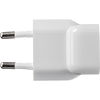
About reversed hot/neutral. We have these[1] symmetrical adapters in Europe. How are you supposed to know the proper orientation? You are not. Because you either have an earthed metal case or you have a double insulated device.
My magsafe adapters have a "double insulation" symbol, a tiny tiny one near "UL Japan", but still need a earthed prong to not feel any shock from the laptop metal case.
1. http://images.apple.com/support/assets/images/products/ac-wa...
As someone else pointed out, get an outlet tester.[1] They're about $7. You may have an open ground, or reversed hot/neutral. Once you've eliminated that, suspect the power supply.
Make sure you have a UL-listed power supply. If you're getting stray AC voltage on the output side of a UL-listed supply, report it to UL. Here's the form.[2] There's no excuse for that.
[1] https://www.amazon.com/Amprobe-ST-101B-Socket-Tester/dp/B008... [2] http://www.ul.com/customer-resources/market-surveillance-dep...