I've wondered if support for a feature like this could finally resolve the "debate" between merging and rebase. The people who like having the full history (whatever that means) would have it, and the people who care about logical changes would see it by default. The cost would be that the repo history would indeed have the full level of detail, but you could imagine supporting a cleanup operation that erases this "origin" information for commits that are sufficiently old, or else simply doesn't pull the info by default and fetches it only when necessary.
(You can kind of simulate this using merge commits, by only looking at one parent, but it doesn't really work out well in practice.)
FWIW, the OpenOffice.org guys had this insane workflow where they squashed all commits into one commit and then out a summary of all the changes into the commit message. Then they scrubbed the private branches.
That methodology is an extreme example of where squashing does NOT make sense.
This is otherwise known as a merge. A single atomic change to master, referencing only the final files, with the first parent referencing the previous master that was also "not" broken.
It has only one change: A second parent, referencing the more accurate history.
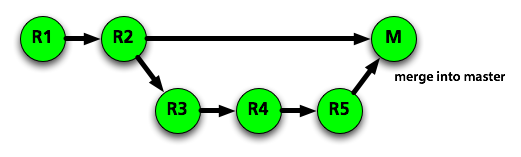
If we start without M, and start with master=R2, temporary-feature-branch=R5, I expect the following outcomes:
"squash" will leave us with master=M, and the graph R1 -> R2 -> M. Once temporary-feature-branch is deleted, R3-R5 are forever lost.
"merge" will leave us with master=M, and the graph R1 -> R2 -> M, + R2 -> R3 -> R4 -> R5 -> M
"rebase" will leave us with master=R5, and the graph R1 -> R2 -> R3 -> R4 -> R5. Once temporary-feature-branch is deleted,
The first case loses the history of the code, and thus can't be what we're talking about.
If you call the second case "squash" I find that very confusing. It's also not what github is referring to when talking about "squash your commits" in the parent article, they're talking about the first case. Now, git confuses the issue a bit too - perhaps I should be labeling the second case a "non-fast-forward merge", but I'd still find that clearer than "squash without losing the history."
You can squash into master without losing the history of the code review with git. This gives you the best of both worlds, a more accurate history than the one you propose, and a master that isn't broken.